A few months back, I reviewed the TerraMaster D1 SSD Plus and liked it for what it offered. A sturdy box that gives a second life to an NVMe SSD lying around (rarity these days).
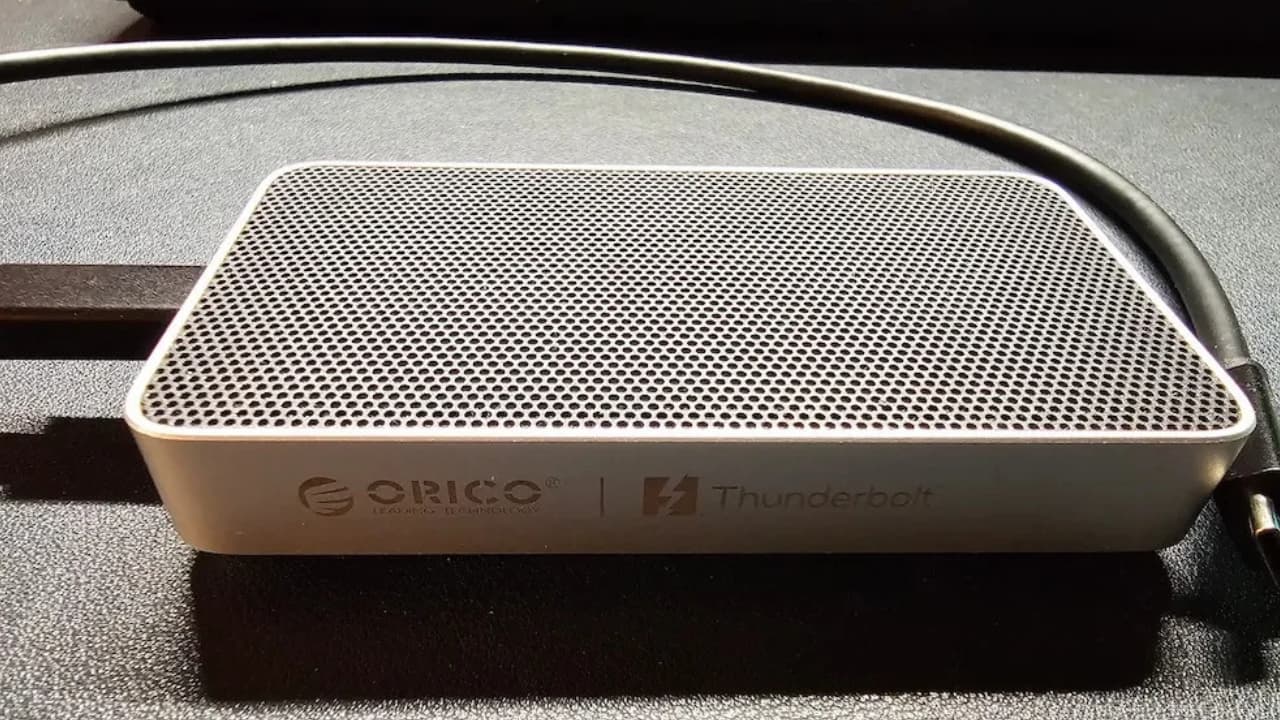
Now I have the ORICO X50 on my desk, which does the same job but promises twice the bandwidth with Thunderbolt 5.
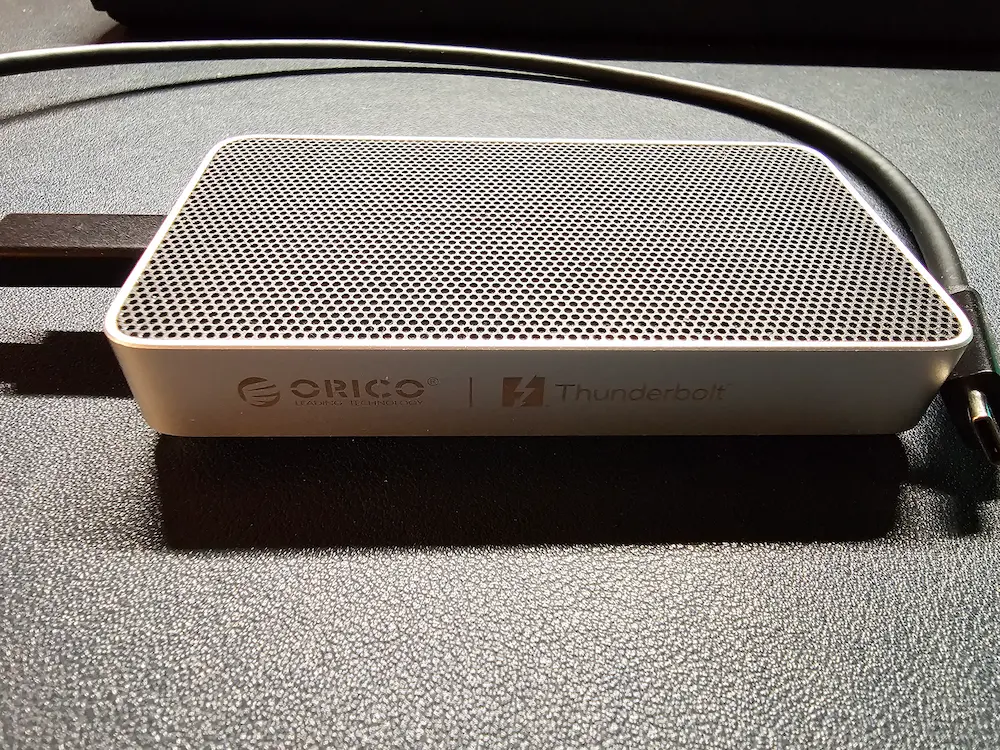
I ran the similar set of benchmarks on it on Ubuntu, and I have the numbers to share.
Here's a quick summary of my experience with the device.
✅ Comes with an 80Gbps cable in the box
✅ Works out of the box on Linux, with full NVMe SMART data
✅ Stayed in the 60s °C during a 13-minute sustained write
❎ Only 2280 NVMe SSDs; heatsink SSDs won't fit
❎ Priced well above USB4 enclosures
ORICO X50 Thunderbolt 5 SSD enclosure specifications
Here are the hardware specifications for ORICO X50.
| Specification | ORICO X50 |
|---|---|
| Interface | Thunderbolt 5 (80Gbps), backward compatible with Thunderbolt 4, Thunderbolt 3 and USB4 |
| Rated speed | Up to 6000 MB/s read, 5800 MB/s write |
| Supported SSD | M.2 NVMe, 2280 size only (2230 not supported), M Key and B+M Key |
| Recommended SSD | PCIe Gen4 or Gen5 |
| Max capacity | 4TB |
| Cooling | Fanless, aluminum unibody with micro fins, thermal film and thermal paste |
| Material | Aluminum alloy |
| Dimensions | 110 × 60 × 18.7 mm |
| Cable | 0.5m USB-C to USB-C, 80Gbps |
| OS support | Windows, macOS, Linux |
| Price | $269.99 for the diskless version |
ORICO also sells the X50 with a 512GB or 1TB SSD already installed. I got the empty enclosure, which is what most of you would want if you have an SSD to reuse.
Pay attention to the supported SSD list. Like most enclosures of this kind, the X50 doesn't take everything. It's NVMe only, so your old SATA M.2 drive cannot be used, and it's 2280 only, so the tiny 2230 SSD in your stock won't be of much use either.
Also note that on Thunderbolt 4 hosts, the speed is limited to 40Gbps, and on Thunderbolt 3, it will drop even further.
Design and build
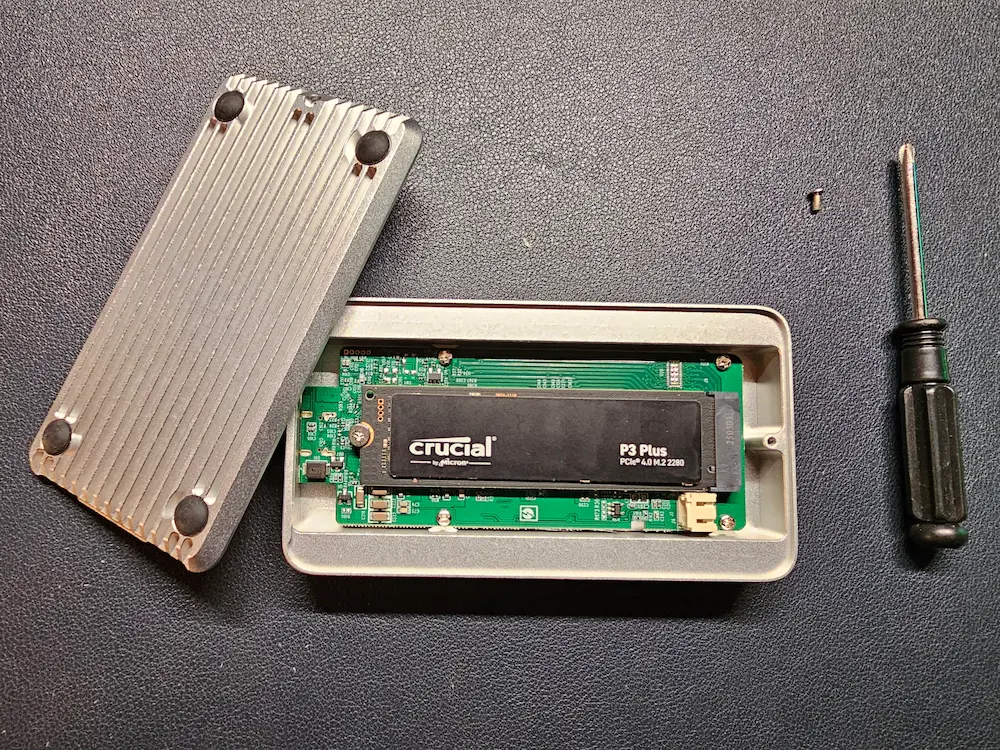
The X50 is noticeably less bulky than the TerraMaster D1 SSD Plus. It's slim enough to slide into a laptop bag pocket. Although it is not as slim as my Sandisk Extreme portable SSD.
The silver aluminum finish looks good, and I think it would fit right into the Apple ecosystem as it matches the aesthetic.
Flip it over and you'll see fins running along the bottom. These increase the surface area for heat dissipation, and judging by my thermal numbers (more on that later), they seem to do their job. There's no fan, so it's completely silent.
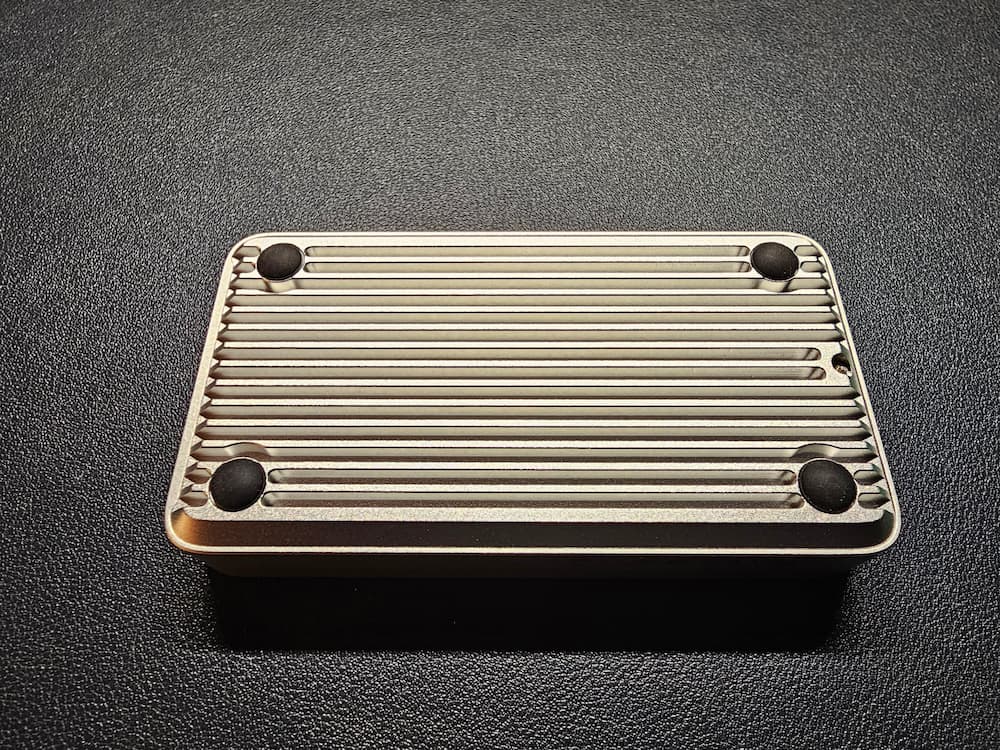
In the box, you get the enclosure, a fast 80Gbps USB-C cable and thermal paste. No SSD, of course, since I got the diskless version. A good cable matters with devices like these. Good of ORICO to include it in the box.
You can apply the thermal paste directly on the SSD. I did not. I wanted to take the raw numbers in the testing.
SSDs with an attached heatsink, like the Samsung 9100 Pro Heatsink version, won't fit inside the X50. Get the bare version of the SSD if you plan to use it with this enclosure.
The first plug-in experience
For my testing, I used a Crucial P3 Plus 500GB. It's a PCIe Gen4 drive rated at 4700 MB/s read and 1900 MB/s write, and it uses QLC NAND. Keep the QLC part in mind; it matters for the sustained write results.
I tested the X50 on Ubuntu 26.04 with Linux kernel 7.0. It worked out of the box. Plugged it in, and the SSD shows up like any other drive. I formatted it as ext4 and it was mounted automatically. So, no surprises here.
Since it's a Thunderbolt device, it's worth checking with boltctl. It got authorized automatically and showed a 40 Gb/s link (2 lanes × 20 Gb/s). Interestingly, it identifies itself as "DM9002QN" from Shenzhen Dongman Technology rather than ORICO.
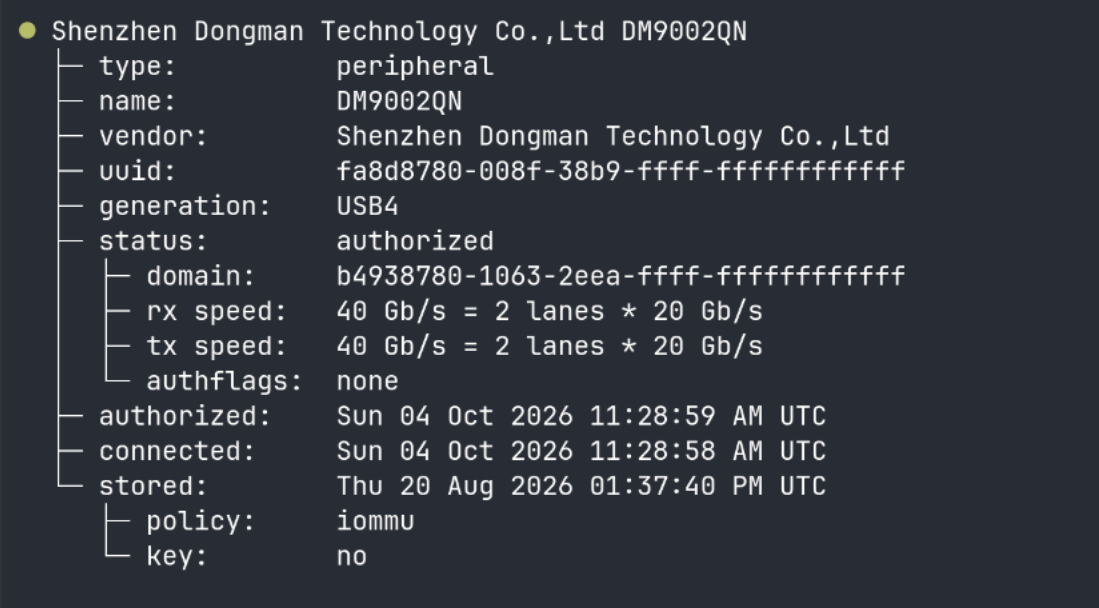
Because the X50 tunnels PCIe over Thunderbolt, the drive shows up as a native NVMe device (nvme1n1), not a USB disk. That means nvme smart-log works directly and you get full SMART data, including temperature. No need to fiddle with USB bridge flags in smartctl.
This is definitely a plus for Linux users. With many USB enclosures, getting health data out of the SSD is often hit or miss.
Performance: the numbers and the big caveat
Here's the thing. The X50 is a Thunderbolt 5 device, but I don't have a Thunderbolt 5 machine. My laptop is the ASUS Zenbook S14, which has Thunderbolt 4. So the link was capped at 40Gbps, half of what the X50 is designed for.
This is often the case with storage benchmarks. The weakest link in the chain, be it the port, the cable or the SSD, decides the speed you see. The ORICO's rated 6000 MB/s needs both a Thunderbolt 5 host and a fast Gen4 or Gen5 SSD.
I used fio for simulated tests, plus a couple of real file copy tests. Here are the results from the first run.
| Test | ORICO X50 |
|---|---|
| Sequential read | 3878 MB/s |
| Sequential write | 2810 MB/s |
| Random read (QD32) | 1512 MB/s (369K IOPS) |
| Random write (QD32) | 1175 MB/s (287K IOPS) |
| Random read (QD1) | 59 MB/s (14.4K IOPS, 34 µs latency) |
| Mixed 70% read / 30% write | 1483 MB/s |
| 10GB single file copy | 11.8 seconds |
| 5000 small files (4KB) copy | 17.5 seconds |
The sequential read of 3878 MB/s is pretty much the ceiling of a 40Gbps connection. Pay attention to bits and bytes. The enclosure maxed out what my laptop could offer. The sequential write of 2810 MB/s was well above the Crucial's rated 1900 MB/s, thanks to SLC cache handling the burst.
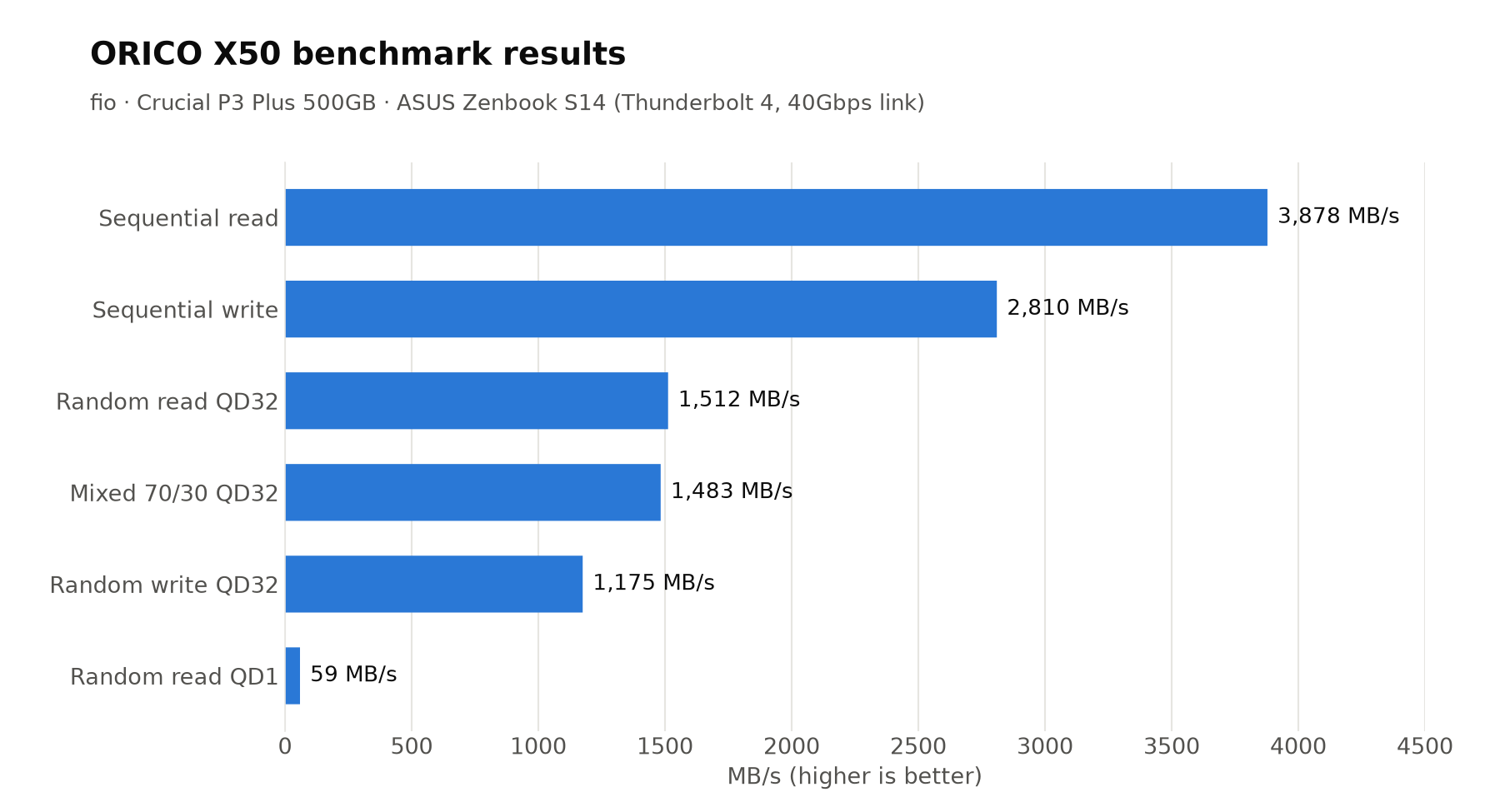
I ran the tests a second time to check consistency. The read numbers were pretty much identical. Random write dropped to 978 MB/s and the 10GB copy took 17.8 seconds instead of 11.8. That's because the SSD's cache probably had not fully recovered from the earlier runs.
Thermal performance during sustained writing
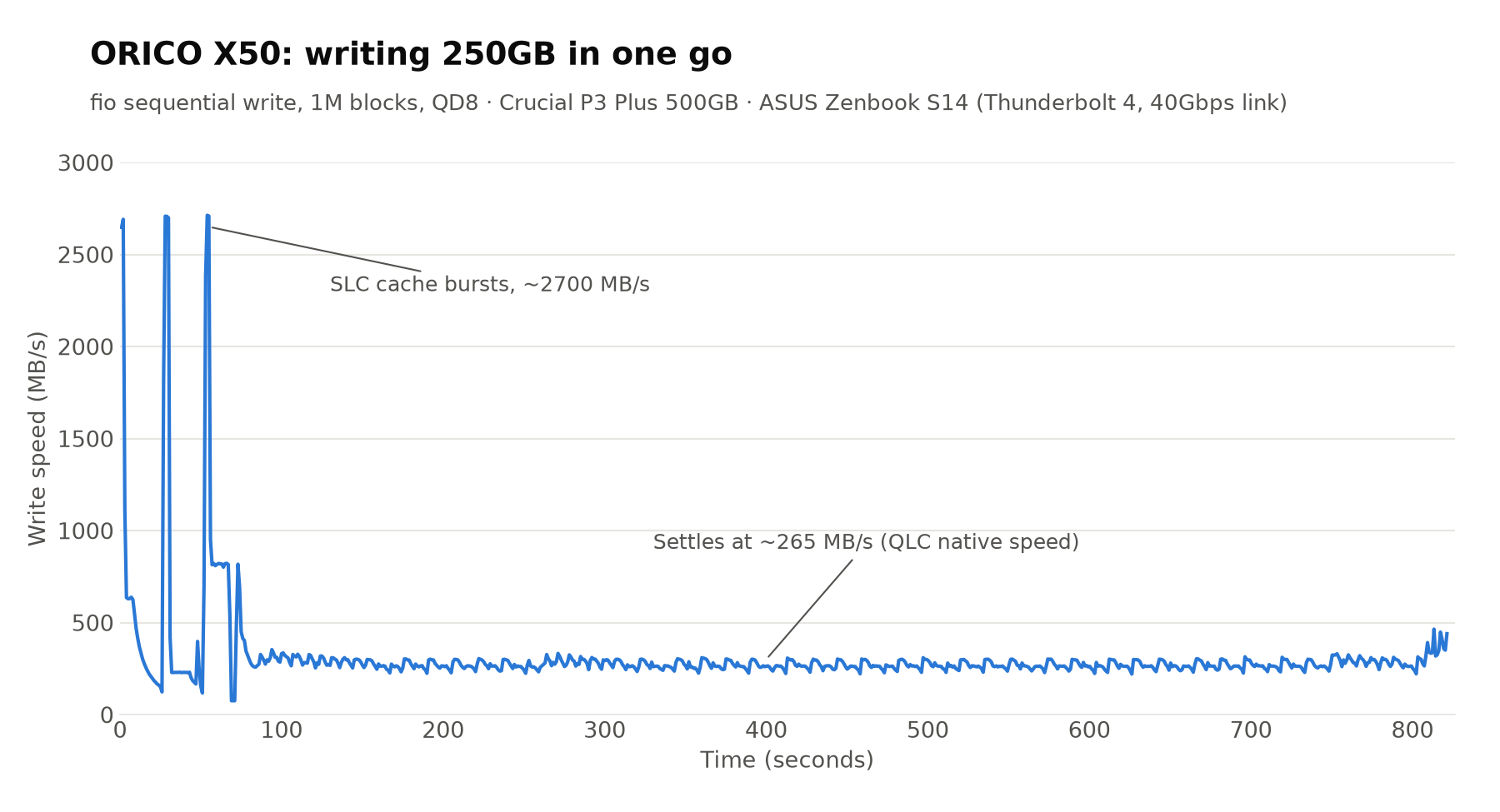
To see how the X50 handles heat, I wrote 250GB in one go. It took a little over 13 minutes.
The speed fell from around 2700 MB/s to about 265 MB/s within the first few seconds and stayed there till the end. Before you blame the ORICO enclosure, this is classic QLC behavior.
Once the SLC cache is full, the Crucial P3 Plus writes at its native QLC speed. In the earlier shorter run with a fresh cache, it held about 2700 MB/s for nearly 19 seconds before falling off.
Let's focus on the temperature. Throughout the 13-minute write, the SSD stayed between 58°C and 68°C, and mostly stayed around 62 to 65°C.
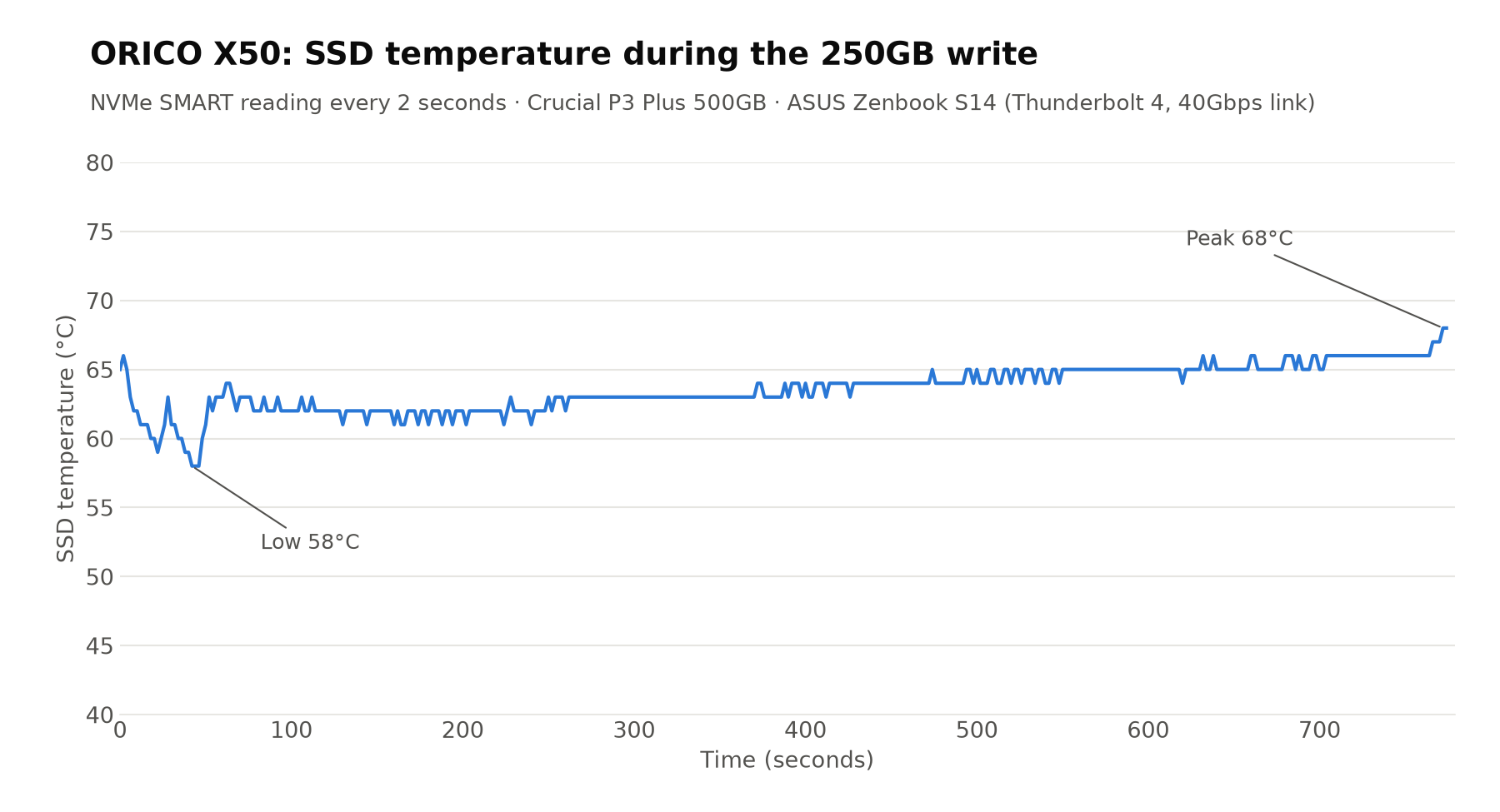
There were no sudden dips in the speed graph that would indicate thermal throttling, at least that's what I would like to think. The fins and the paste seem to be doing their work. The room temperature was around 32°C, I think.
ORICO X50 vs TerraMaster D1 SSD Plus
Since I had reviewed the TerraMaster D1 SSD Plus earlier, a comparison was only natural. I ran the same benchmark script on it, on the same Zenbook S14.
The tests are not indentical though because I used a different SSD in each. Crucial P3 Plus 500GB in the ORICO and the WD Blue SN5000 1TB in the TerraMaster. So this is not a pure enclosure vs enclosure comparison. Take the write numbers especially with a pinch of salt.
| ORICO X50 | TerraMaster D1 SSD Plus | |
|---|---|---|
| Interface | Thunderbolt 5 (80Gbps) | USB4 (40Gbps) |
| Price | $269.99 (sale) | ~$110 |
| Max capacity | 4TB | 8TB |
| Size | Slim (110 × 60 × 18.7 mm) | Bulkier |
| SSD in my test | Crucial P3 Plus 500GB | WD Blue SN5000 1TB |
| Sequential read | 3878 MB/s | 3323 MB/s |
| Sequential write | 2810 MB/s | 3202 MB/s |
| Random read (QD32) | 1512 MB/s | 1588 MB/s |
| Random write (QD32) | 1175 MB/s | 1470 MB/s |
| Random read (QD1) | 59 MB/s | 64 MB/s |
| 10GB file copy | 11.8 s | 6.2 s |
| 5000 small files | 17.5 s | 17.1 s |
| Sustained write (250GB) | ~265 MB/s after cache | ~950 MB/s after cache |
| Peak SSD temperature | 68°C (13+ minutes of writing) | 59°C (about 3 minutes of writing) |
On a 40Gbps connection, both enclosures are in the same league. The ORICO had the better sequential read, which is the best indicator of what the enclosure itself can push. The TerraMaster won on writes, but that's largely down to the WD SSD having a bigger cache and faster post-cache speed than my QLC Crucial.
Basically, on a Thunderbolt 4 or USB4 laptop, you won't see much practical difference between the two. The ORICO's extra money buys you a slimmer design and headroom for Thunderbolt 5. That also keeps you future proof for the next few years.
Is ORICO X50 worth it?
If you have NVMe SSDs lying around and want to use them as fast external storage, the X50 is a good device. It's slim, looks good, stays cool, and works on Linux without any tinkering. The native NVMe access is a nice touch for those of us who like to check drive health from the terminal.
The 2280 only support is limiting. If you have a 2230 or 2242 SSD from an older laptop or a handheld, you can't use it here. And with no SATA support, older M.2 drives are out of the picture as well.
If you have a Thunderbolt 5 machine, or you are planning to buy one in the next year or two, the X50 is a future-proof pick. Pair it with a fast Gen4 or Gen5 TLC SSD to actually get near the advertised 6000 MB/s.
I could not test it at full Thunderbolt 5 speed. If you have a Thunderbolt 5 machine and use the X50, I'd love to hear your numbers in the comments.

from It's FOSS https://ift.tt/XE4kivO
via IFTTT

Tidak ada komentar:
Posting Komentar