Minggu, 17 Desember 2023

11 Fish Shell Features That Make it More Awesome Than Bash

11 Fish Shell Features That Make it More Awesome Than Bash

Bash the most common shell. Zsh is the most popular one among developers. But Fish is the most underrated one.

I am not exaggerating. Fish indeed is an overlooked shell that could be a great fit for beginners and advanced FOSSers alike.

Fish provides a range of features that makes it an attractive choice. From syntax highlight to abbreviation (my favorite), there are numerous novelties here.

Let me share some of my favorite Fish shell features with you.

1. Syntax highlighting

It is better to spot errors before they get executed. This saves a lot of time, energy and frustration.

Most modern code editors have the syntax highlighting built-in. Fish has this functionality built into the shell itself and it works on Linux commands.

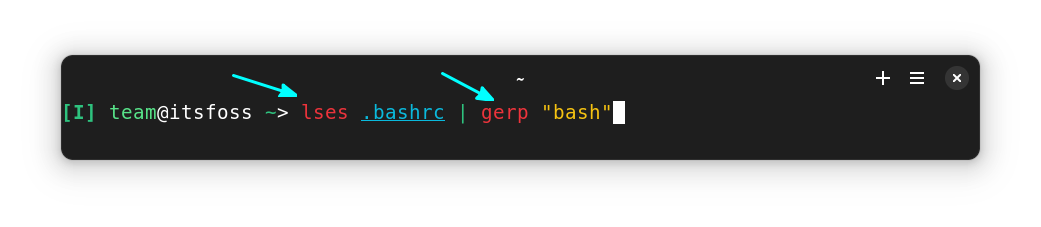
Incorrect commands? You see it highlighted in red. The same goes for arguments and options that do not match with the context.
11 Fish Shell Features That Make it More Awesome Than Bash
Errors highlighted in red

2. Autosuggestions

The Fish shell suggests commands as you type, which you can later complete accordingly using the tab key.

11 Fish Shell Features That Make it More Awesome Than Bash
Fish Autocompletion

The suggestions will be greyed out as you type, to make it more accessible. If the whole line of suggestion is acceptable to you, you can press the right arrow key to complete it in full.

3. Interactive man page for command options

This is a cool feature, where you will be able to complete a command's options, by taking help from the man page interactively.

First, you need to parse the man page, which can be done by running:

fish_update_completions

This will parse the man pages.

11 Fish Shell Features That Make it More Awesome Than Bash
Parsing Man Pages

Now, if you type a command, put a hyphen for the options and then press the tab button to see the man page suggestions for the possible options with their short descriptions:
11 Fish Shell Features That Make it More Awesome Than Bash
Fish Man Page Help

You can scroll through the options, and select after reading about its work, from the pager that appears.

This makes things a bit more easier than typing command -h.

4. Abbreviations instead of aliases

Abbreviations in Fish are like text-expanders. Here, you will set some frequently used code to an easily accessible abbreviation.

For example, I have used sch as an abbreviation for the command pacman -Ss to search for packages.

abbr -a sch pacman -Ss

Now, whenever I type sch and press the space button, it will be replaced with pacman -Ss.

11 Fish Shell Features That Make it More Awesome Than Bash
Fish Shell Abbreviations

You can make it permanent by writing it to the config file.

๐Ÿ’ก
The difference between alias and abbreviation is that an alias works under the hood. You don't get to see the actual commands it is aliased to. Abbreviation will show the actual commands and they are also recorded into the history correctly.

5. Extensive web-based help

Linux purists rely on the man pages to get help with a command. The newer bunch of Linux users are more reliant on the web for such things.

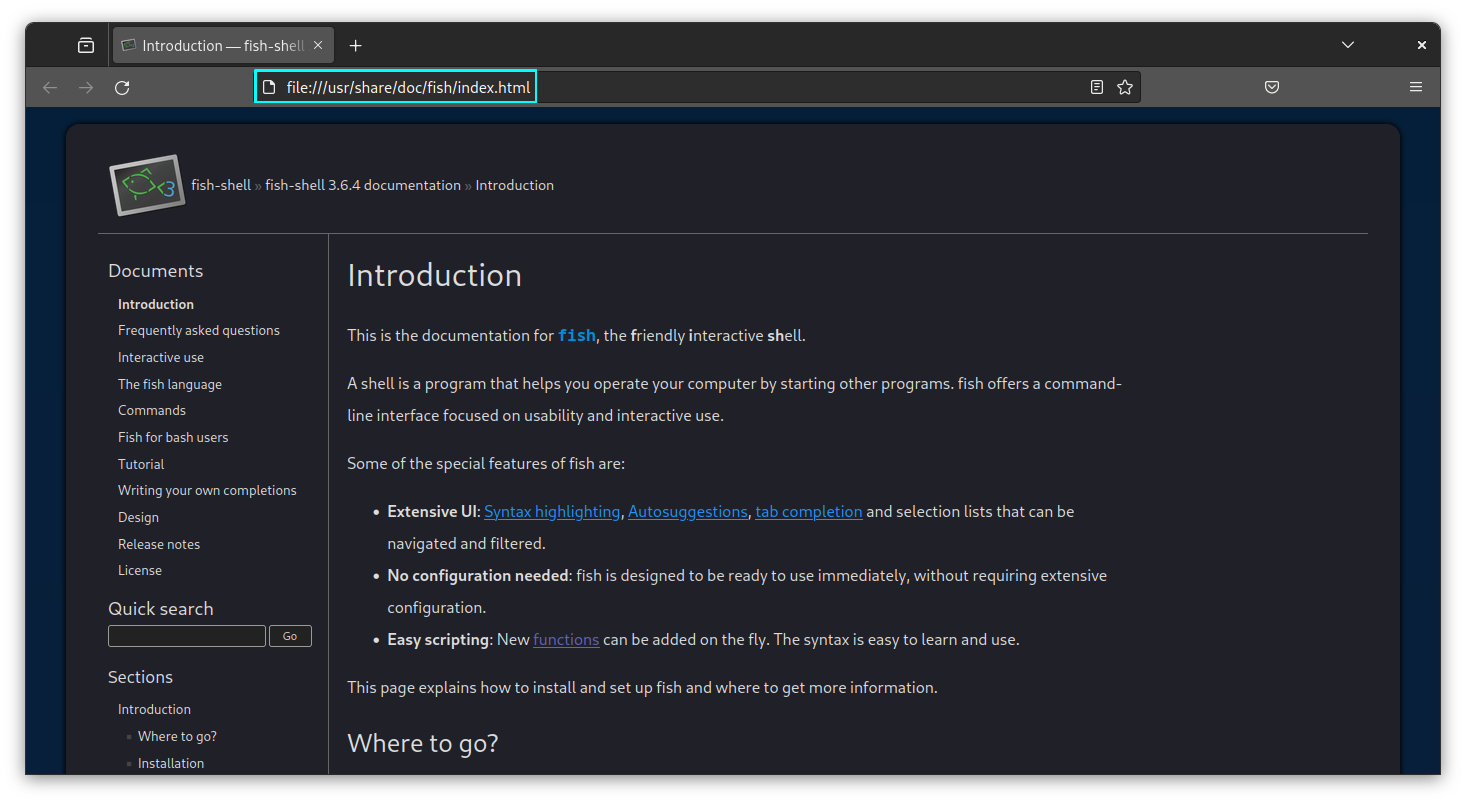
Fish gives a mix of both with its extensive "web-based" help which is easily available on your system, even if there is no internet, since it is stored locally.

To get help, while running Fish shell, just use:

help

This will open the Help page on your web browser.
11 Fish Shell Features That Make it More Awesome Than Bash
Fish Shell Web Help

You can refer to the extensive documentation with ease now.

6. Web-based configuration

Yes, another 'web-based' feature.

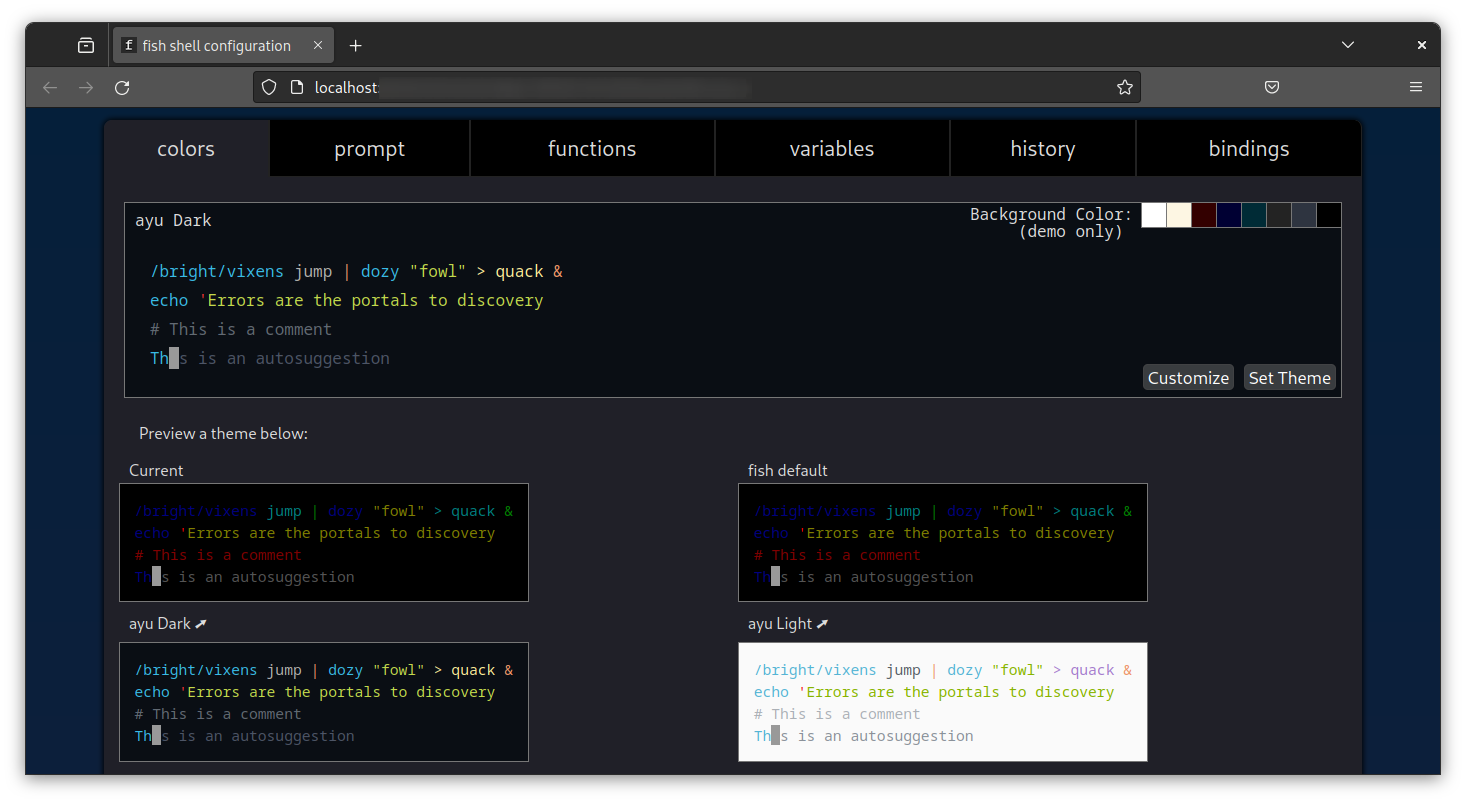
To change the prompt color or other configurations, you don't need to edit configuration files in the terminal. Instead, you can use the web-based configuration.

Type the following command while running Fish shell:

fish_config

This will open the configuration settings on your browser.
11 Fish Shell Features That Make it More Awesome Than Bash
Fish Shell Web-based configuration

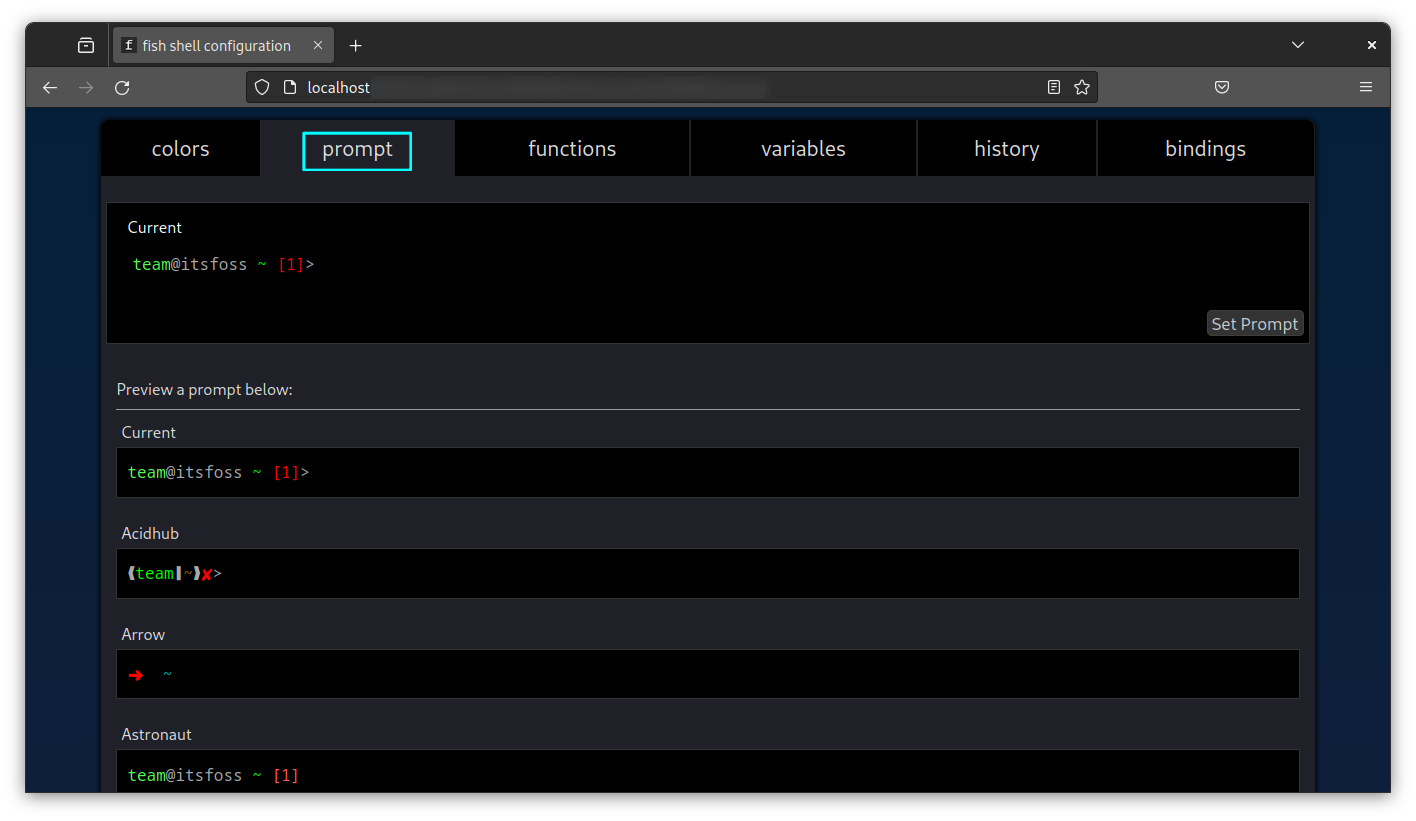
Here, you can change the colors, set a different prompt from the already available list, etc.
11 Fish Shell Features That Make it More Awesome Than Bash
Prompt Selections

Easier to make changes this way, no?

7. Automatic CD

If you want to move to a directory, you don't need to type the cd command. Just type the directory name, that's it.

For example, if you are in your Home directory and want to move to the Downloads directory, just enter Downloads. As you type, it will suggest further completion as well.

11 Fish Shell Features That Make it More Awesome Than Bash
Automatic cd

You need to use the absolute path, if you are in a particular directory and want to go to an entirely different branch.

8. Easier path navigation

If you need to go back and forth between the directories you have visited, no need to type in the path or use cd .. etc. Just press ALT + Right/Left arrow, to move forward and backward, respectively.

11 Fish Shell Features That Make it More Awesome Than Bash
Directory Navigation

Alternatively, you can type cdh and enter, so that a pager interface will come, where you can use the number corresponding to the directory you want to go back to.

11 Fish Shell Features That Make it More Awesome Than Bash
Navigation using Pager

You can search for a specific command in history interactively on Fish. For this, use the good old CTRL+R.

This will open a pager like view, with a search prompt. Enter the command name that you need, and see the result:

11 Fish Shell Features That Make it More Awesome Than Bash
Interactive History Search

10. Universal variables

In Fish shell, if you set a variable as Universal, this will be available even if the shell is restarted or even if the system is rebooted.

To make a universal variable, use:

set -U my_variable 10

The value of my_variable will be saved to 10, even if the system is rebooted.

Yeah, no need to add them to your RC or profile.

11. Private Mode

Fish shell has a private mode where the commands you enter will not be saved to the history or stored on the disk.

To move to a private mode, use the command:

fish -P
11 Fish Shell Features That Make it More Awesome Than Bash
Fish Private Mode

Once you have finished your work, you can exit out of private mode by typing exit.

Install and Setup ZSH on Ubuntu Linux
Want a cool looking Linux terminal? Try Zsh. Learn how to set up Zsh on Ubuntu Linux with Oh My Zsh.
11 Fish Shell Features That Make it More Awesome Than Bash

There is a lot more to explore with Fish

Fish shell provides many other user-friendly features like:

  • Simple Multiline command edit using ALT+Enter
  • Switch between Emacs (default)/Vim keybindings
  • A simple and clean syntax for scripting

Of course, you can achieve most of the Fish shell features discussed here with some efforts in other shells as well, but having them enabled by default is a different thing.

Fish could help you be a bit more productive and effective with your development work, given that you are controlling your development environment. Don't write scripts exclusively for Fish shell that others have to run in Bash. Shell compatibility issues may arise in a shared environment on a multi-user system.

If you liked the features, give Fish shell a try and see how it goes. Maybe you'll change Fish as your default shell.

Even if you don't want 'Fish' in your terminal, you may like (ASCII) aquarium ๐Ÿ˜‰

Using Asciiquarium for Aquarium in Linux Terminal
Here’s a tiny CLI tool to add an aquarium in your Linux terminal.
11 Fish Shell Features That Make it More Awesome Than Bash

๐Ÿ’ฌ Please share your views on Fish shell in the comments ๐Ÿ˜„


from It's FOSS https://ift.tt/mMo9TqF
via IFTTT

Jumat, 15 Desember 2023

Blast from the Past: DG/UX UNIX Operating System

Blast from the Past: DG/UX UNIX Operating System

I tried looking up some information on an old operating system I used to work with: DG/UX. Sadly, there isn't a lot of information about it anymore. I loved that little operating system, and while I am sure that my experiences will not make history at all, I wanted to add some written account of my experiences with it for the historical record.

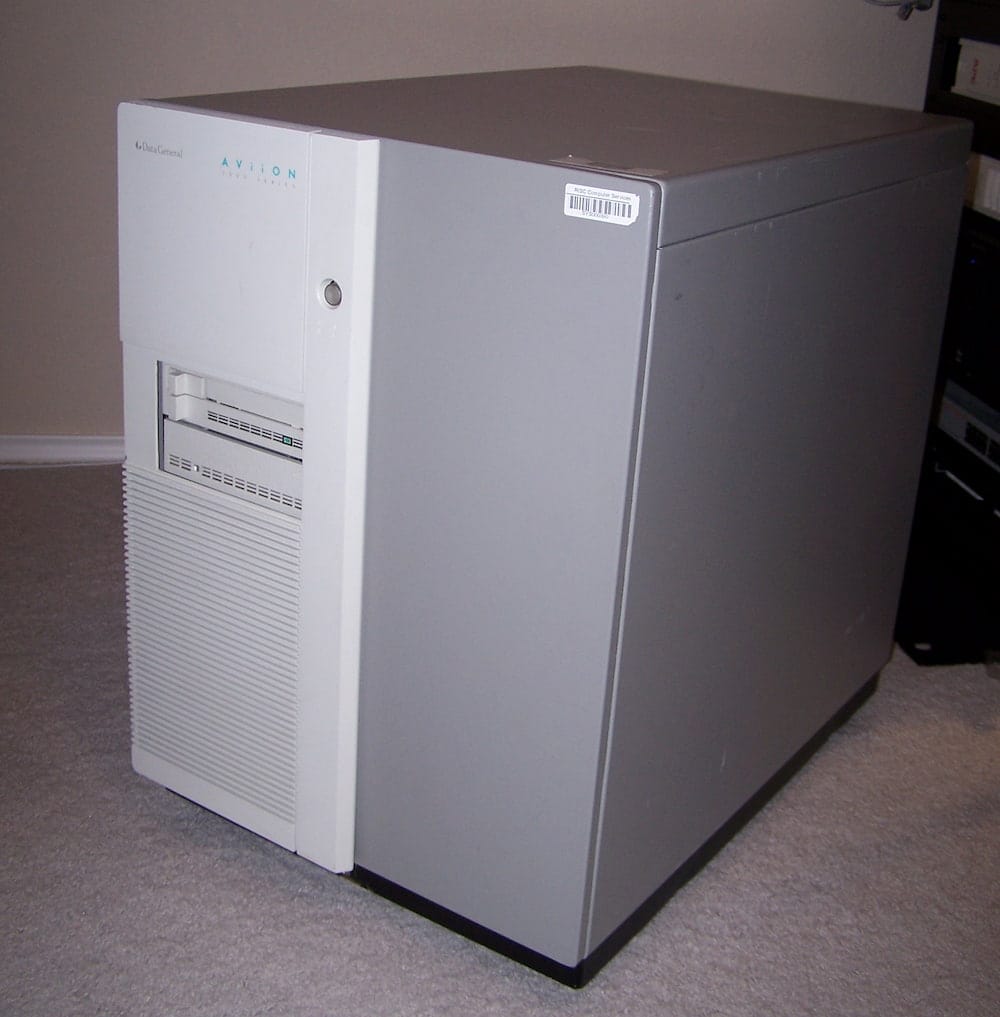
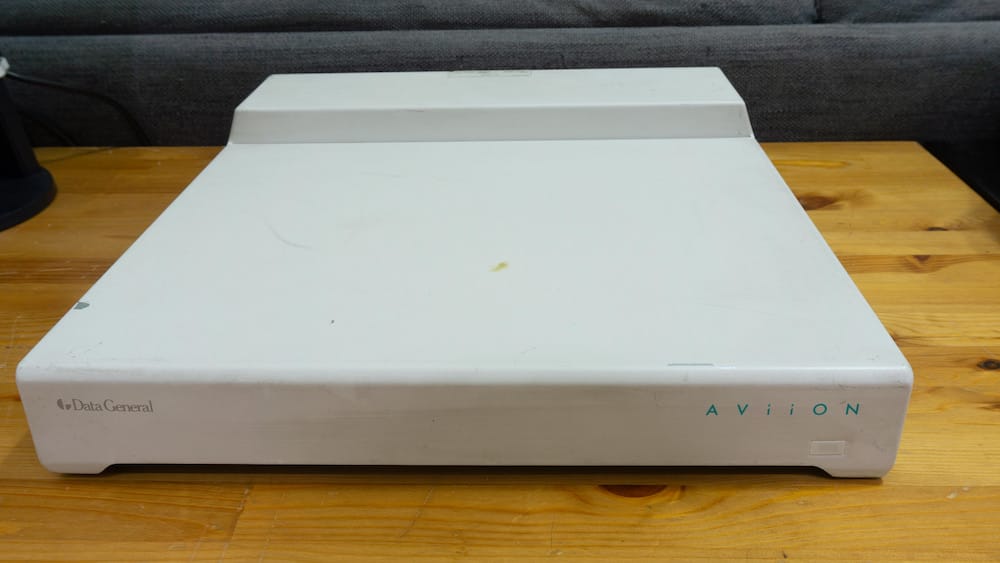
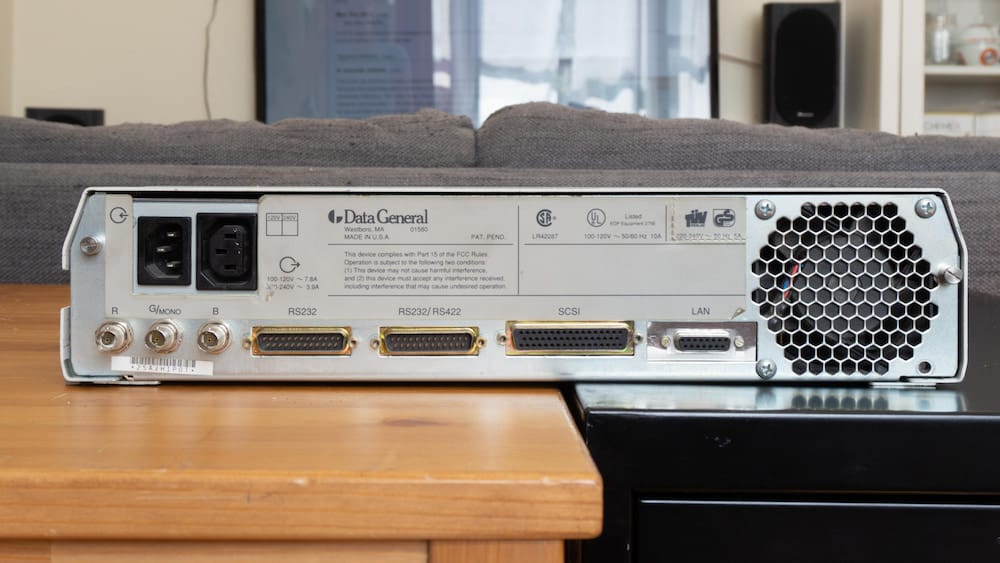
Developed by Data General, DG/UX was a Unix operating system for its Eclipse MV minicomputer line, and later the AViiON workstations and servers. I never worked on the Eclipse systems, but I worked on the AViiON systems. Built like tanks, they were and amazingly simple to use.

Blast from the Past: DG/UX UNIX Operating System
Data General AV/4000 | Picture copyright WolfeDen.org

OS Overview

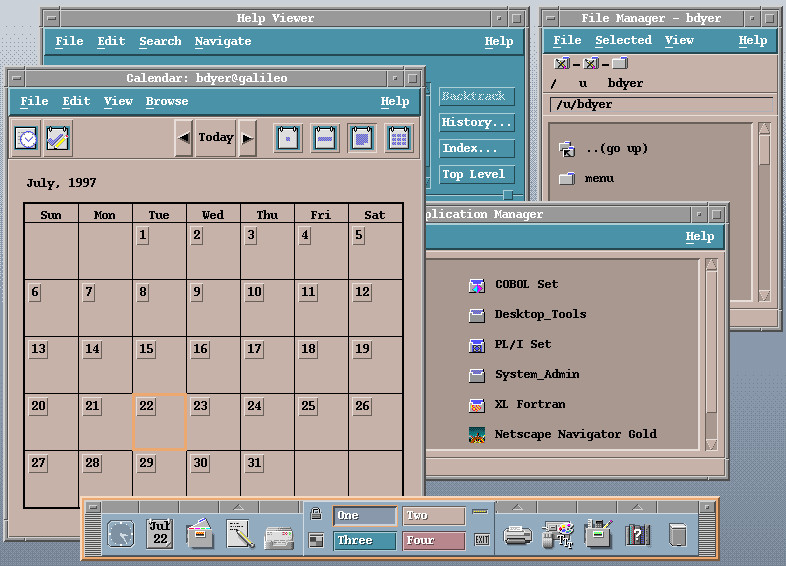
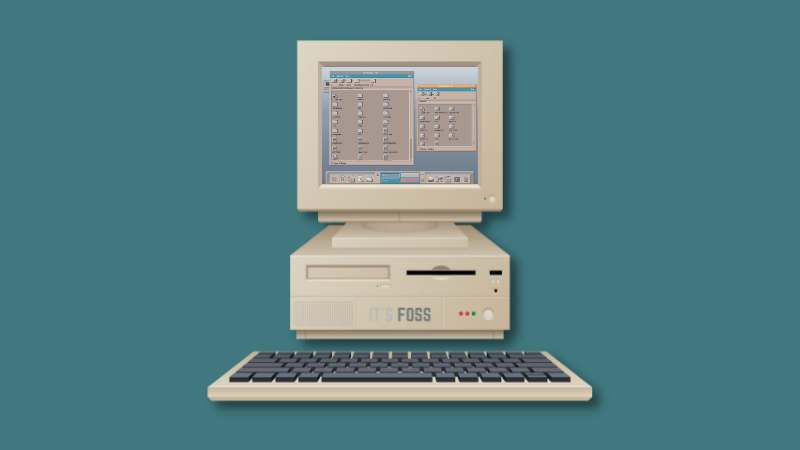
I was introduced to DG/UX in the mid 1990s, but it had been around for a while. DG/UX 1 was released in March, 1985 and, was based on UNIX System V Release 2 with additions from 4.1BSD. DG/UX 3.10 came around a couple of years later with TCP/IP networking, NFS and the X Window System included. Remember CDE?

Blast from the Past: DG/UX UNIX Operating System
CDE (Common Desktop Environment)
Trying Common Desktop Environment on a Modern Linux Distro
Bill shares his re-experience with Common Desktop Environment (CDE), the de-facto standard windowing environment on UNIX systems in the 90s.
Blast from the Past: DG/UX UNIX Operating System

DG/UX 4 (the "4" would later confuse me to no end later on...) was released in 1988, and was a major re-design of the system, based on System V Release 3. The filesystem, using the logical disk facility, could span multiple disks.

DG/UX 5.4 was a biggie. This was the version I started working with. This version replaced the legacy Unix file buffer cache with unified, demand paged virtual memory management.

The operating system was also more complete than some other Unix variants; for example, the operating system included a full C compiler. We also had an army of COBOL programmers, but if I remember correctly, COBOL was an add-on. Today, a C compiler may seem to be a given, but it was a blessing back in the day. While I wrote scripts for many of my admin tasks, I did write several C programs specific to the work required.

The OS was small and compact, but extremely easy to use. The System V and added BSD tools were the right mix - the best of both worlds, you could say. It was simple and easy to install or upgrade and did not need much resources of memory or processing power.

The volume manager built into the OS was simple, but very powerful. Any disk administration could be performed online, without taking any file system offline. Again, in an insurance/risk management shop, this was important. We could extend, relocate, mirror, or shrink - and the same functions could be performed on the swap area, allowing in-place migrations of disk storage without downtime.

The Machines

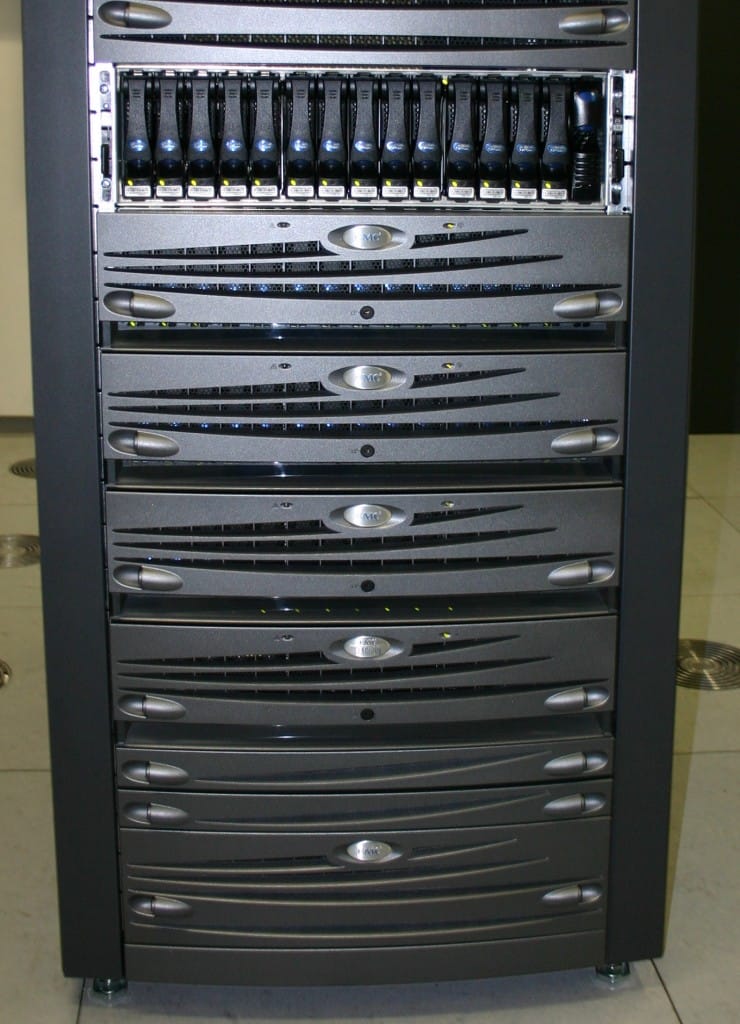
The AViiON machines I worked on, came in two types: One was an AV300 pizza box workstation and the other was the AV9500 server with CLARiiON disk arrays.

On the AViiON, DG/UX supported multiprocessors. Working in an insurance/risk management shop, this was a huge plus. Not every Unix package supported this. DG/UX also worked seamlessly with the CLARiiON arrays.

Having raids, like the CLARiiON, it was easy to allocate space for certain accounts, but a previous administrator would "use first available space" when creating accounts. It didn't take long to run into problems with this approach: a single query could cause the lights on all 125 disks to light up - an account's data was spread across the entire set of arrays.

Blast from the Past: DG/UX UNIX Operating System
By Michael Moll - photo taken by Michael Moll, CC BY 2.5, https://commons.wikimedia.org/w/index.php?curid=512844

Once I took over as senior administrator, I set about correcting the problem by assigning an array to certain large accounts and smaller accounts grouped onto two arrays. It took about a week of night work to do, but DG/UX made the rearranging of files to specifically assigned arrays, easy.

The raids themselves were rock solid too. At one time, we had IBM 1GB disks. The mechanisms in these disks had a habit of sticking and the only way to get them to work again was to remove them and spin them on the floor like a top (I'm serious!). Once in a while, the disk was beyond hope and would never spin again. Now, the raid makes copies of each disk across its array, so the data was still present, although efficiency was lost. Once, I had to "borrow" a disk from another computer to keep an array running until a replacement could be obtained. The CLARiiON handled it superbly for the day. Rather than test our luck further, we replaced every disk. - and the DG/UX backup/restore utility made that work seamless as well.

Support

There is not much to say about support except that it was fantastic. I had never had a problem with support. Every question I had was answered courteously and always accurately. That's something not seen today.

Remember the "4" I mentioned earlier, that would confuse me later? I called support on that. In 1995, I received the operating system upgrade tapes for the OS. Now, we had been running 5.4. I was surprised to see 4.10 tapes. I thought this was an error and that I was sent the wrong set of tapes; I didn't want to be downgraded.

As it turned out, I did have the right tapes. The "4" was a nod to the System V Release 4 update. I sometimes still think that it was odd - upgrading an OS while backing off the version number. Here's a short list of versions to illustrate:

  1. DG/UX 5.4 - 3.00 - Jan '94
  2. DG/UX 5.4 - 3.10 - Jul '94
  3. DG/UX 5.4 - 4.00 - Jan '95
  4. DG/UX - 4.10 - Aug '95
  5. DG/UX - 4.11 - Dec '95

The End of DG/UX and AViiON

I transferred out of the shop at the end of '95 but I heard that EMC bought Data General, around the turn of the century, in order to get their hands on the CLARiiON arrays and software. Considering how solid the CLARiiON was, I cannot say that I blame them. If I remember the reports correctly, EMC did support the DG/UX OS and AViiONs for a couple of years, and then dropped them. A part of me wishes that they had kept the OS, but at that time, bigger companies, such as IBM, Sun Microsystems, and HP, were calling the shots in the Unix world. Also, let's not forget the rise of Linux which would become popular.

Data General and DG/UX certainly had a good run. Excellent support and operating system - a combination not easily matched today. I certainly enjoyed that operating system and it is definitely one to be remembered.


from It's FOSS https://ift.tt/OsiW97M
via IFTTT

Rabu, 13 Desember 2023

FOSS Weekly #23.50: BSOD on Linux, Mint 21.3 Beta, Xonsh Shell and More

FOSS Weekly #23.50: BSOD on Linux, Mint 21.3 Beta, Xonsh Shell and More

Last week, I introduced the new feedback mechanism that lets you easily notify me of any grammatical error or outdated information in an article.

I made an improvement on it. Any suggestion submitted this way, opens an entry on our GitHub repo. This way, it is easier for everyone to track the progress.

๐Ÿ’ฌ Let's see what you get in this edition of FOSS Weekly:

  • Early sneak peek at Cinnamon 6.0 with Mint 21.3 beta
  • New Kali Linux and Armbian releases.
  • Arrival of 'Blue Screen of Death' on Linux.
  • And other Linux news, videos, Puzzles and, of course, memes!

๐Ÿ“ฐ Linux news

You can try Cinnamon 6.0 right now with the Linux Mint 21.3 Beta.

Linux Mint 21.3 Beta Will Let You Try Cinnamon 6.0 Now!
Linux Mint 21.3 beta is here!
FOSS Weekly #23.50: BSOD on Linux, Mint 21.3 Beta, Xonsh Shell and More

Brace yourself, BSODs will be arriving early next year in Linux distros near you!

The Blue Screen of Death Comes to Linux, Thanks to Systemd
Now, Linux folks get to experience the horror of a blue screen.
FOSS Weekly #23.50: BSOD on Linux, Mint 21.3 Beta, Xonsh Shell and More

๐ŸŒ Follow us on Google News

By the way, if you use Google, follow It's FOSS on Google News to get trusted It's FOSS content before other websites in Google search.

It’s FOSS - Google News
Read full articles from It’s FOSS and explore endless topics, magazines and more on your phone or tablet with Google News.
FOSS Weekly #23.50: BSOD on Linux, Mint 21.3 Beta, Xonsh Shell and More

๐Ÿง  What we’re thinking about

A new AI alliance has been formed; includes some big names.

‘ChatGPT vs the World: AI Alliance’ for Open Innovation Formed By IBM and 50 More
An alliance like this should prevent a single company dominating the AI advancements. What do you think?
FOSS Weekly #23.50: BSOD on Linux, Mint 21.3 Beta, Xonsh Shell and More

๐Ÿงฎ Linux Tips, Tutorials and More

For simple, text-based PDFs, LibreOffice has the editing capability.

Edit PDF Files in Linux Easily With LibreOffice
Wondering how to edit PDF files in Linux? At times, you don’t even need PDF editors in Linux because LibreOffice Draw can help you with that.
FOSS Weekly #23.50: BSOD on Linux, Mint 21.3 Beta, Xonsh Shell and More

This is an interesting shell for the people who use Linux and work on Python application development.

Xonsh Shell: Combining the Best of Bash and Python in Linux
If you are primarily into Python development on Linux, Xonsh shell could be an addition to your toolkit.
FOSS Weekly #23.50: BSOD on Linux, Mint 21.3 Beta, Xonsh Shell and More

Learn how to create and work with links in Obsidian, the knowledge base tool everyone is talking about these days.

Creating and Working with Links in Obsidian
The true power of the Obsidian knowledge base tool lies in the links. Learn to use it.
FOSS Weekly #23.50: BSOD on Linux, Mint 21.3 Beta, Xonsh Shell and More

๐Ÿ“น What we are watching

Time for some silliness before this year ends, a different take on monitoring your CPU.


✨ Project highlights

Jami is a really cool communication app if you are looking for something serverless.

Jami: A Versatile Open-Source Distributed Communication App
Installing and using Jami to give you a walkthrough of how it works, and what you can expect from it.
FOSS Weekly #23.50: BSOD on Linux, Mint 21.3 Beta, Xonsh Shell and More

๐Ÿงฉ New quizzes

It's time to look back into the history.

Linux History Trivia Quiz
An enjoyable trivia quiz about Linux history.
FOSS Weekly #23.50: BSOD on Linux, Mint 21.3 Beta, Xonsh Shell and More

It's FOSS Plus users can play this Word Search on Debian release names.

Puzzle of the Week: Word Search #6: Debian Release Names
Exercise those ‘little gray cells’ of yours and solve this puzzle.
FOSS Weekly #23.50: BSOD on Linux, Mint 21.3 Beta, Xonsh Shell and More

๐Ÿ’ก Quick handy tip

A quick VirtualBox tip. You can use: Right CTRL (Host Key) + F1-F6 to access the TTY of a distribution.


๐Ÿคฃ Meme of the week

Seems like I found the perfect Christmas Gift ๐Ÿคฃ

FOSS Weekly #23.50: BSOD on Linux, Mint 21.3 Beta, Xonsh Shell and More

๐Ÿ—“️ Tech Trivia

Google released the first stable public release of its flagship browser Chrome on 11th December 2008. Little did we know that it will completely eclipse over any other web browser out there.


๐Ÿง‘‍๐Ÿค‍๐Ÿง‘ FOSSverse corner

FOSSers are discussing GRUB parameters.

Multiboot: setting grub parameters
I learnt something about grub today. Say we have 2 Linux distros, A and B , with grub configured to multiboot. Let distro A be the controller of grub. So A has grub installed and has a /boot/grub/grub.cfg file produced by running update-grub ( and os-prober). B may have no grub installed at all, and รจven if it has grub, it may have no /boot/grub/grub.cfg file. Now lets say I want to set a linux boot parameter for B… I go to /etc/default/grub in B and add a line GRUB_CMDLINE_LINUX=“init=/…
FOSS Weekly #23.50: BSOD on Linux, Mint 21.3 Beta, Xonsh Shell and More

❤️ Loving FOSS Weekly?

Share it with your Linux-using friends and encourage them to subscribe (hint: it's here).

Share the articles in Linux Subreddits and community forums.

Become a Pro member and support our work ๐Ÿ™

Anything else? Please reply to this email :)


from It's FOSS https://ift.tt/l0TaXwu
via IFTTT