Sabtu, 11 Januari 2025

ArmSoM AIM7: A Promising Upcoming Rockchip Device for AI Development

ArmSoM AIM7: A Promising Upcoming Rockchip Device for AI Development

When ArmSoM kindly offered to send me their upcomingAIM7, along with the AIM-IO carrier board, I was thrilled.

Having worked with AI hardware like Nvidia’s Jetson Nano and Raspberry Pi boards, I’m always curious about devices that promise powerful AI capabilities without requiring a large physical setup or heavy power draw.

The AIM7, powered by the Rockchip RK3588, seemed to hit that sweet spot, a compact module with robust processing power, efficient energy use, and versatile connectivity options for a range of projects.

What intrigued me most was its potential to handle AI tasks like object detection and image processing while also supporting multimedia applications, all while being small enough to integrate into custom enclosures or embedded systems where space is a premium.

Here’s my hands-on experience with this exciting piece of hardware.

๐Ÿ“‹
AIM7 is an upcoming product in the crowdfunding pre-launch phase. My experience is with a product in early stages and the product will improve with the feedback provided by me and other reviewers.

ArmSoM AIM7 specifications

ArmSoM AIM7: A Promising Upcoming Rockchip Device for AI Development

The AIM7 is a compact yet powerful board built around the Rockchip RK3588 SoC, an octa-core processor with a quad-core Cortex-A76 and a quad-core Cortex-A55, clocked up to 2.4 GHz.

Complementing this powerhouse is the ARM Mali-G610 MP4 GPU with a 6 TOPS NPU, making it an excellent choice for AI workloads and multimedia applications.

Its small size and versatile connectivity options make it suitable for embedded applications and development projects.

The unit I received came with 8 GB of LPDDR4x RAM and 32 GB of eMMC storage.

Feature ArmSoM RK3588(Rockchip)
CPU Cores Quad-core ARM Cortex-A76 + Quad-core ARM Cortex-A55
GPU Cores ARM Mali-G610 MP4
Memory 8 GB/32 GB LPDDR4x, 2112 MHz
Storage microSD card, 32GB eMMC 5.1 flash storage
Video Encoding 8K@30 fps H.265 / H.264
Video Decoding 8K@60 fps H.265/VP9/AVS2, 8K@30 H.264 AVC/MVC
USB Ports 1x USB 3.0, 3x USB 2.0
Ethernet 1x 10/100/1000 BASE-T
CSI Interfaces 12 channels (4x2) MIPI CSI-2 D-PHY1.1 (18 Gbps)
I/O 3 UARTs, 2 SPIs, 2 I2S, 4 I2Cs, multiple GPIOs
PCIe 1x 1/2/4 lane PCIe 3.0 & 1x 1 lane PCIe 2.0
HDMI Output 1x HDMI 2.1 / 1x eDP 1.4
DP Interface 1x DP 1.4a
eDP/DP Interface 1x eDP 1.4 / 1x HDMI 2.1 out
DSI Interface 1x DSI (1x2) 2 sync
OS Support Debian, Ubuntu, Armbian

AIM-IO Carrier Board Specifications

ArmSoM AIM7: A Promising Upcoming Rockchip Device for AI Development

The AIM-IO carrier board is designed to complement the AIM7 AI module. It offers a rich set of features, including multiple USB ports, display outputs, and expansion options, making it an ideal platform for development and prototyping.

Feature Specification
USB Ports 4x USB 3.0 Type-A
Display 1x DisplayPort, 1x HDMI-out
Networking Gigabit Ethernet
GPIO 40-pin expansion header
Power Connectors DC Barrel jack for 5V input, PoE support
Expansion M.2 (E-key, PCIe/USB/SDIO/UART), microSD
MIPI DSI 1x 4 lanes MIPI DSI up to 4K@60 fps
MIPI CSI0/1 2x 2 lanes MIPI CSI, Max 2.5Gbps per lane
MIPI CSI2/3 1x 4 lanes MIPI CSI, Max 2.5Gbps per lane
Firmware Flashing and device mode via USB Type-C
Dimensions 100 x 80 x 29 mm

Unboxing and first impressions

The AIM7 arrived in a compact, well-packaged generic box alongside the AIM-IO board, which is essential for getting the module up and running.

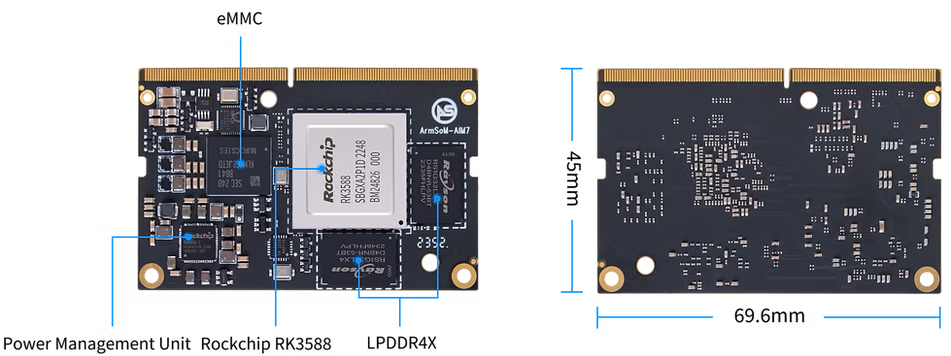
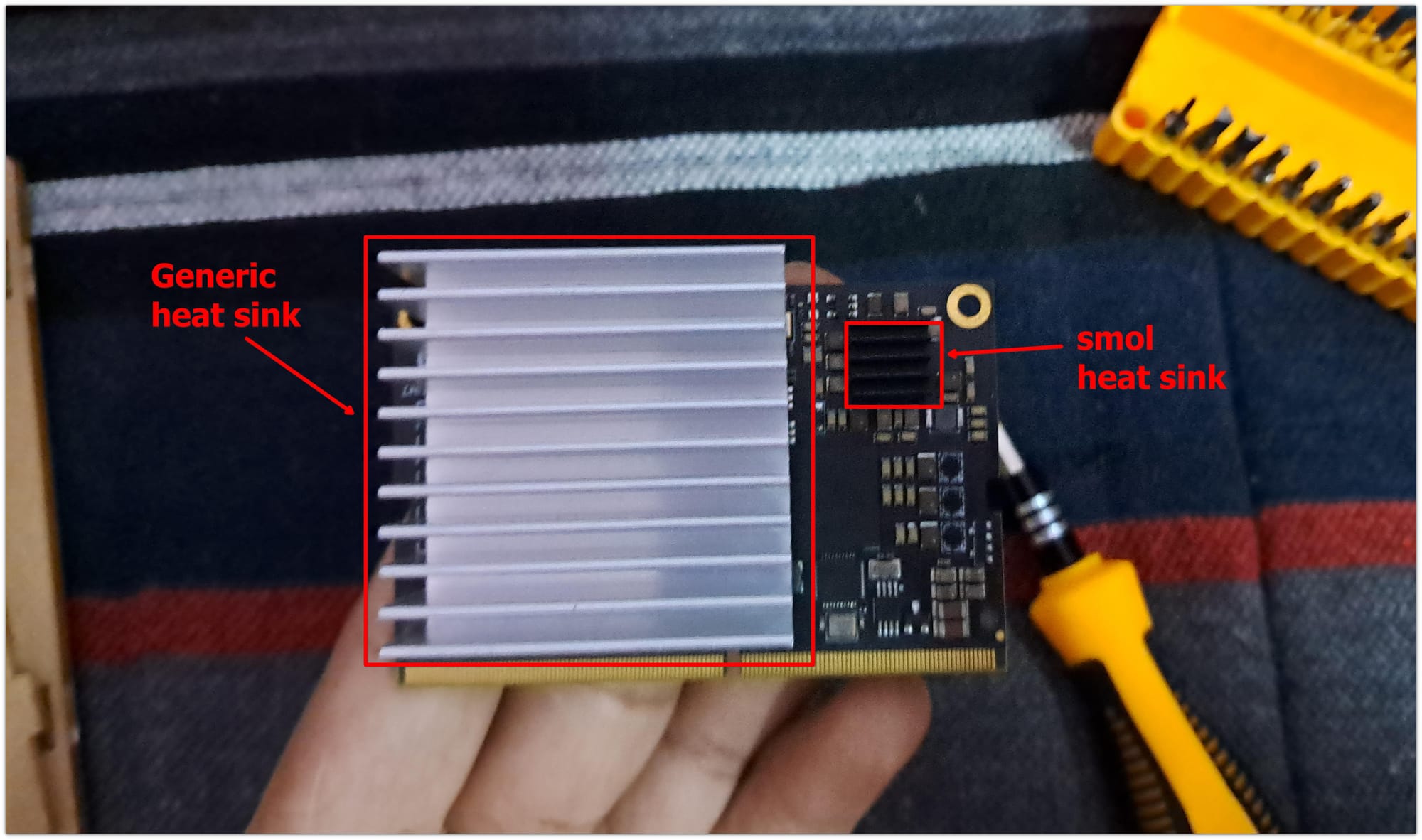
At first glance, the AIM7 itself is tiny, measuring just 69.6 x 45 mm—almost identical in size to the Jetson Nano’s core module.
ArmSoM AIM7: A Promising Upcoming Rockchip Device for AI Development
I added the heatsink on my own

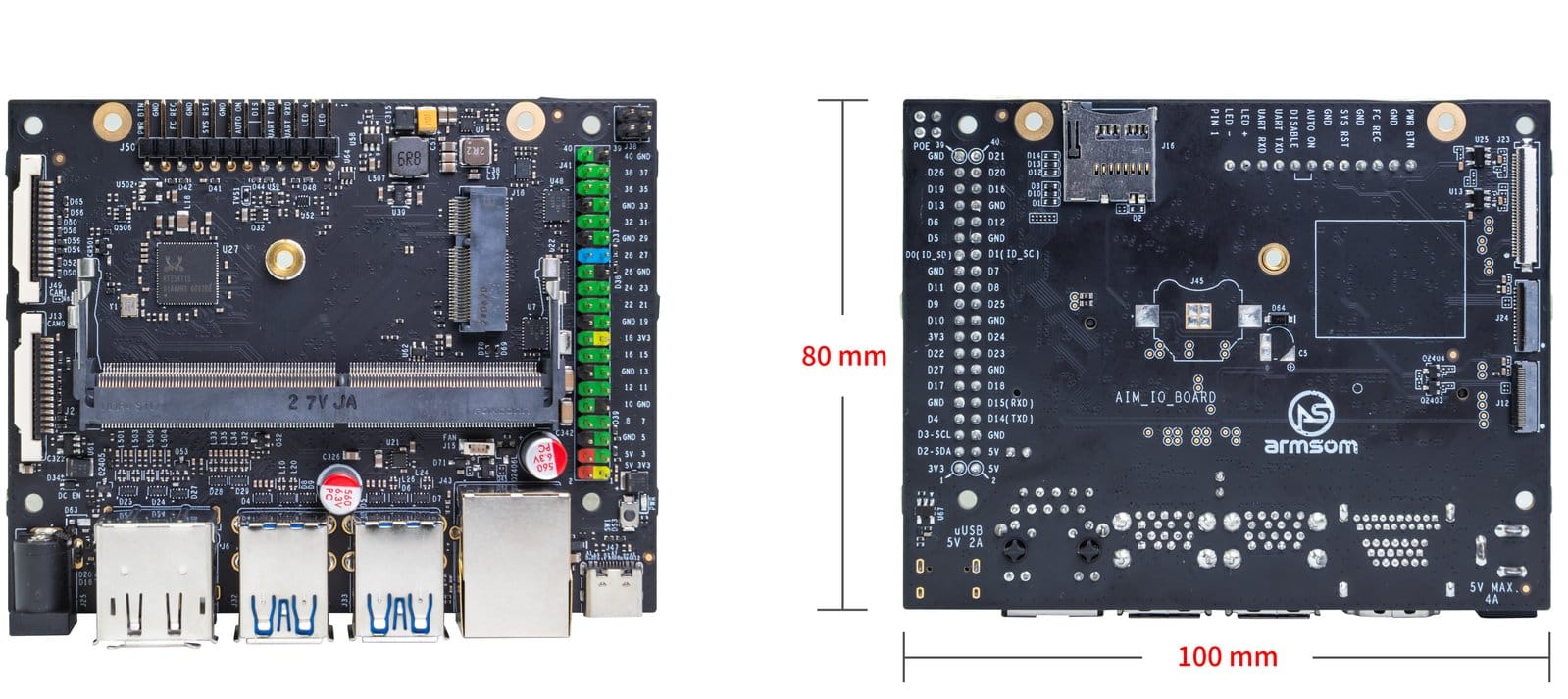
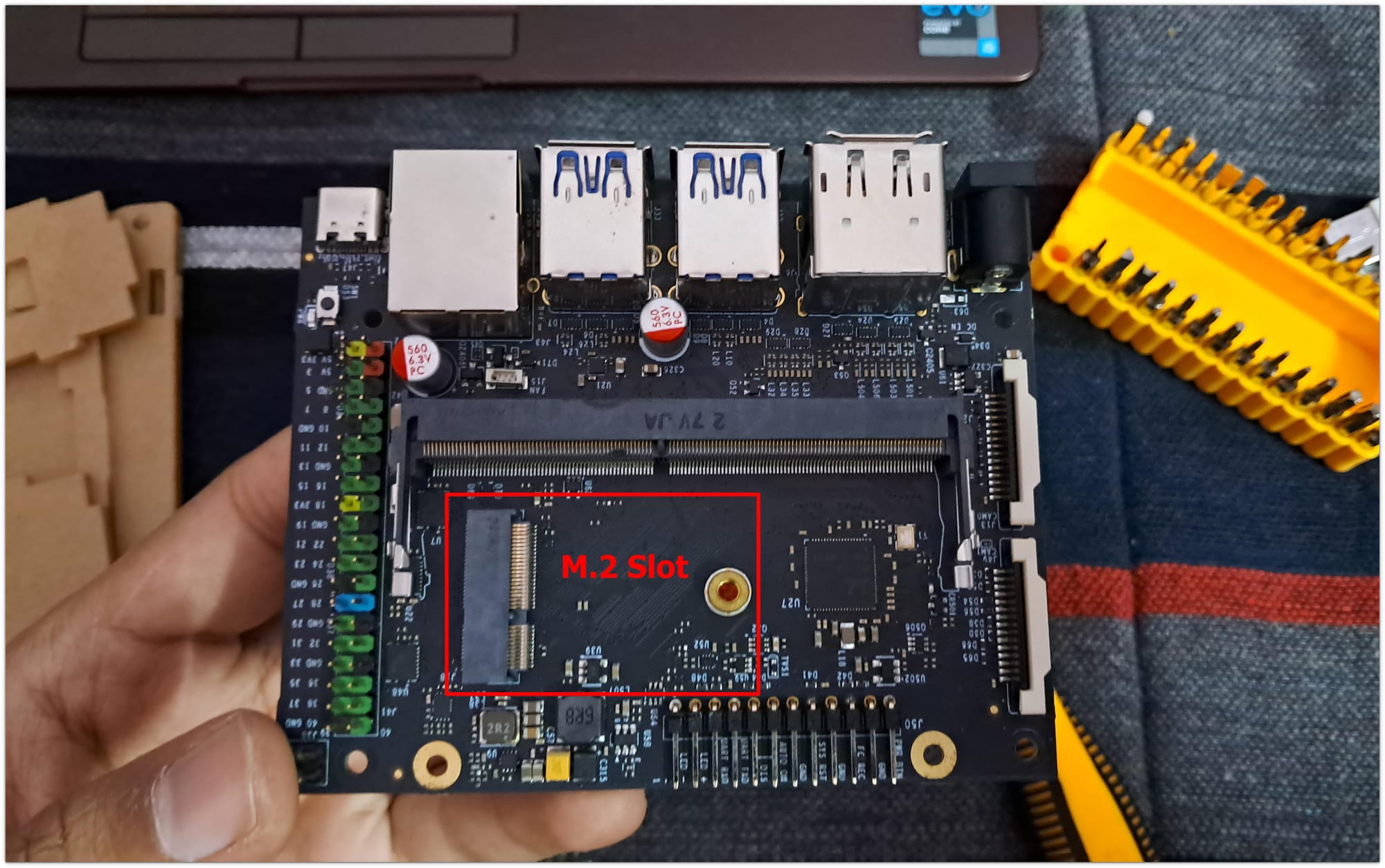
The carrier board, too, shares the same dimensions as the Jetson Nano Developer Kit’s carrier board, making it an easy swap for those already familiar with Nvidia’s ecosystem.
ArmSoM AIM7: A Promising Upcoming Rockchip Device for AI Development

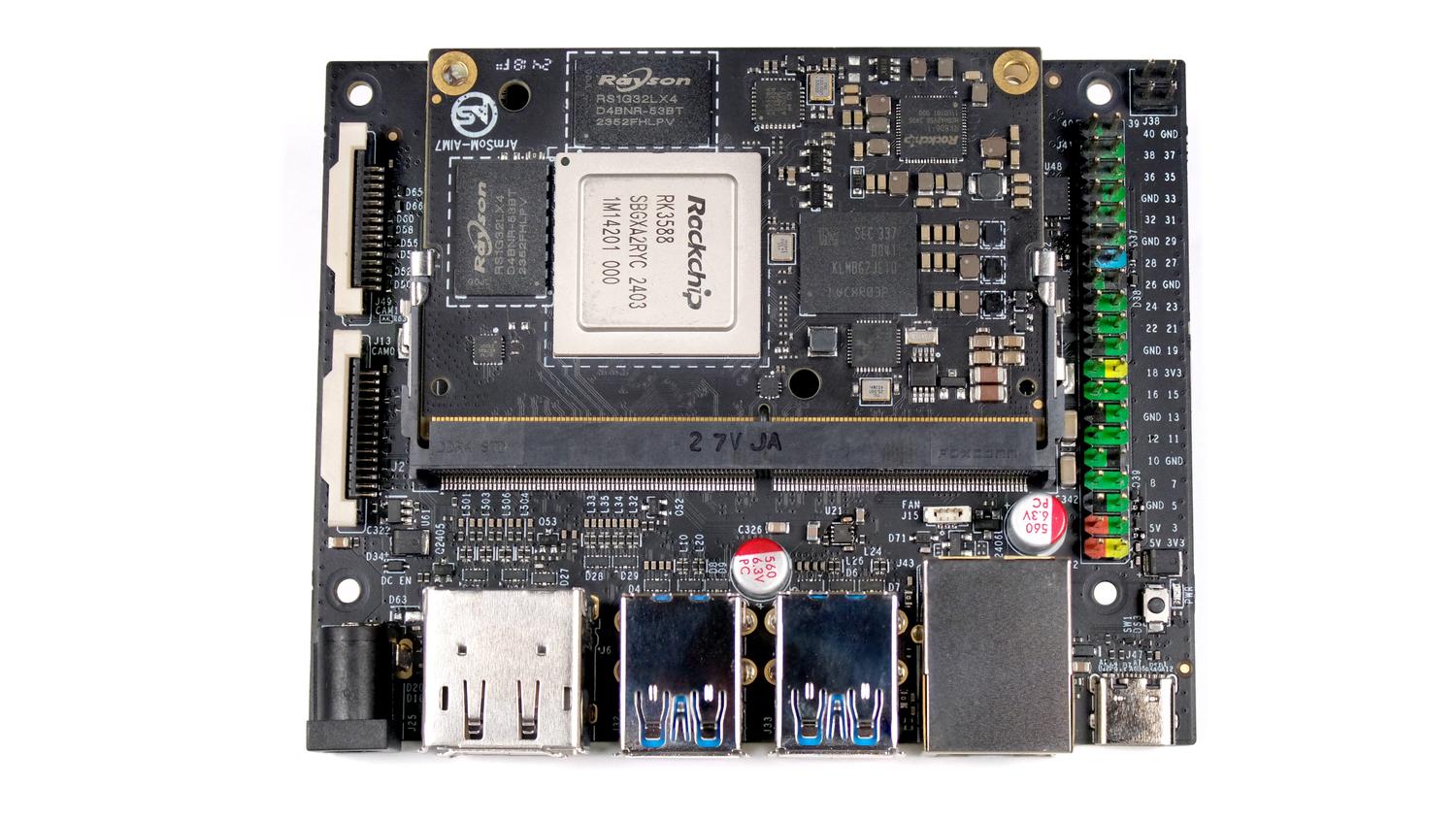
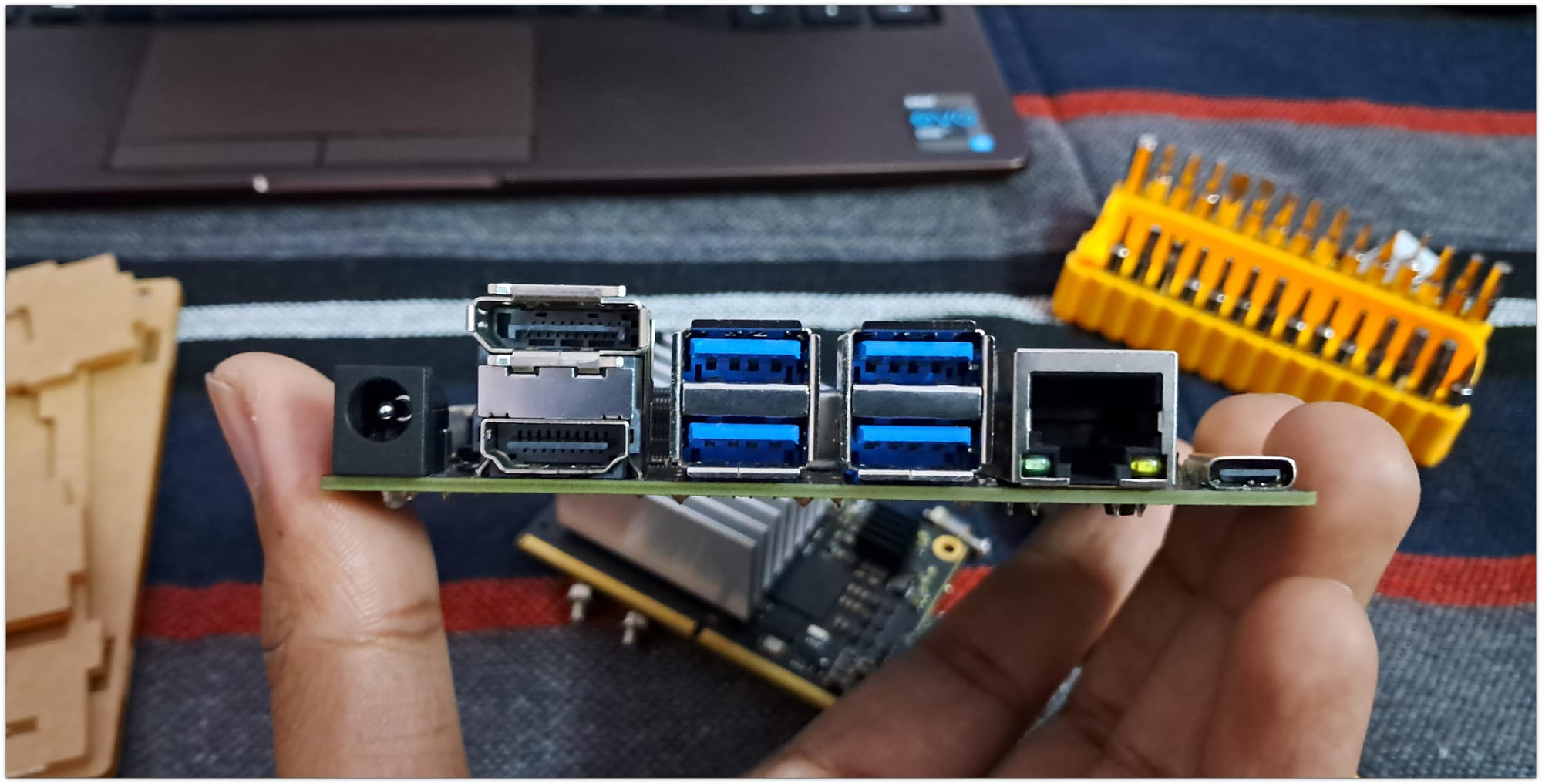
The build quality of both the module and the carrier board is solid. The AIM-IO board’s layout is clean, with clearly labeled ports and connectors.
ArmSoM AIM7: A Promising Upcoming Rockchip Device for AI Development

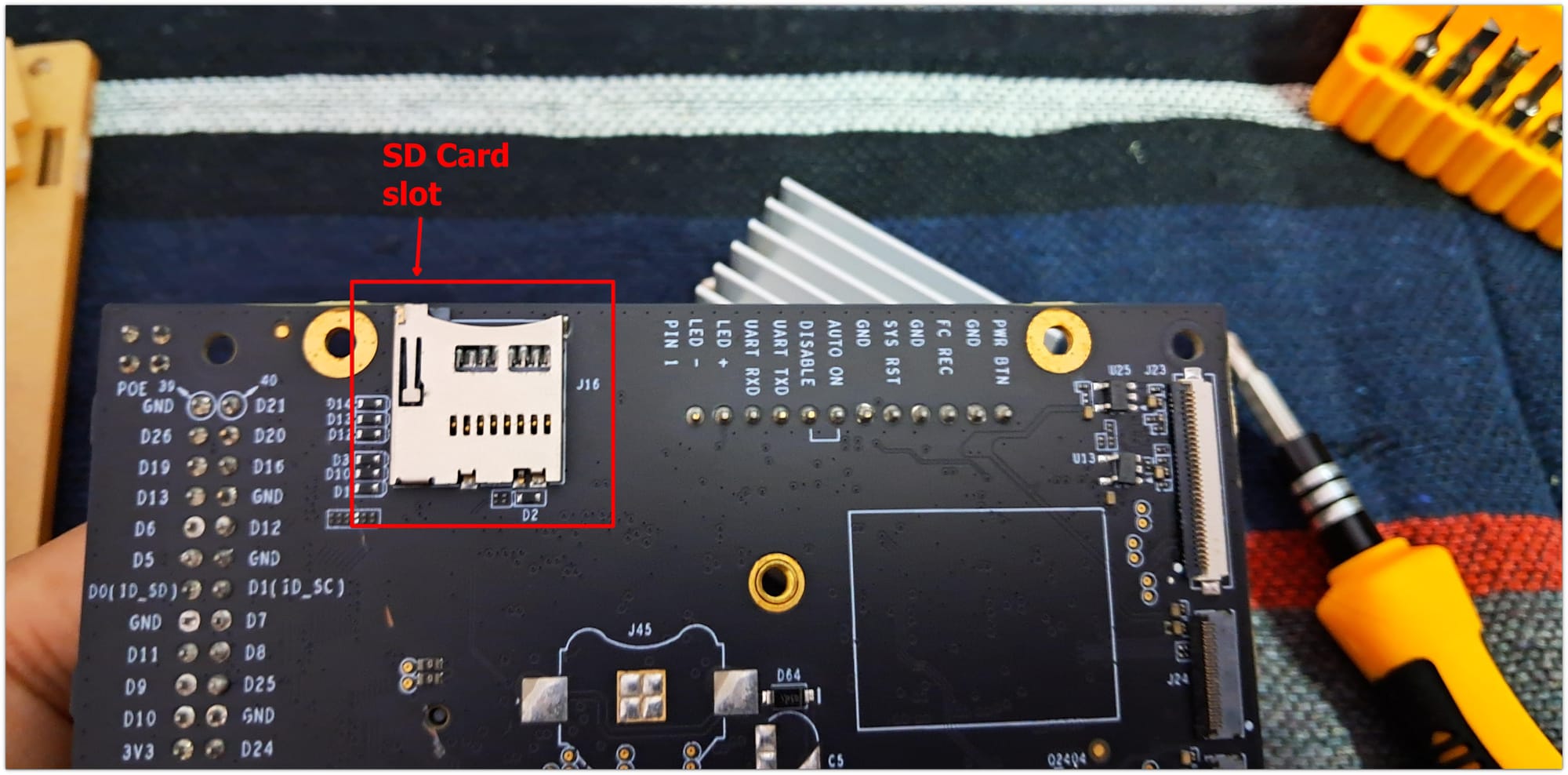
It features four USB 3.0 ports, HDMI and DisplayPort outputs, a 40-pin GPIO header and an M.2 slot for expansion, a welcome addition for developers looking to push the hardware’s limits.
ArmSoM AIM7: A Promising Upcoming Rockchip Device for AI Development

Setting it up

Installing the AIM7 onto the AIM-IO board was straightforward. The edge connector design, similar to the Jetson Nano’s, meant it slotted in effortlessly.

Powering it up required a standard 5V barrel jack.

I know these Rockchip SBCs get real hot, so I got a generic passive heatsink. Active cooling options were way too expensive.
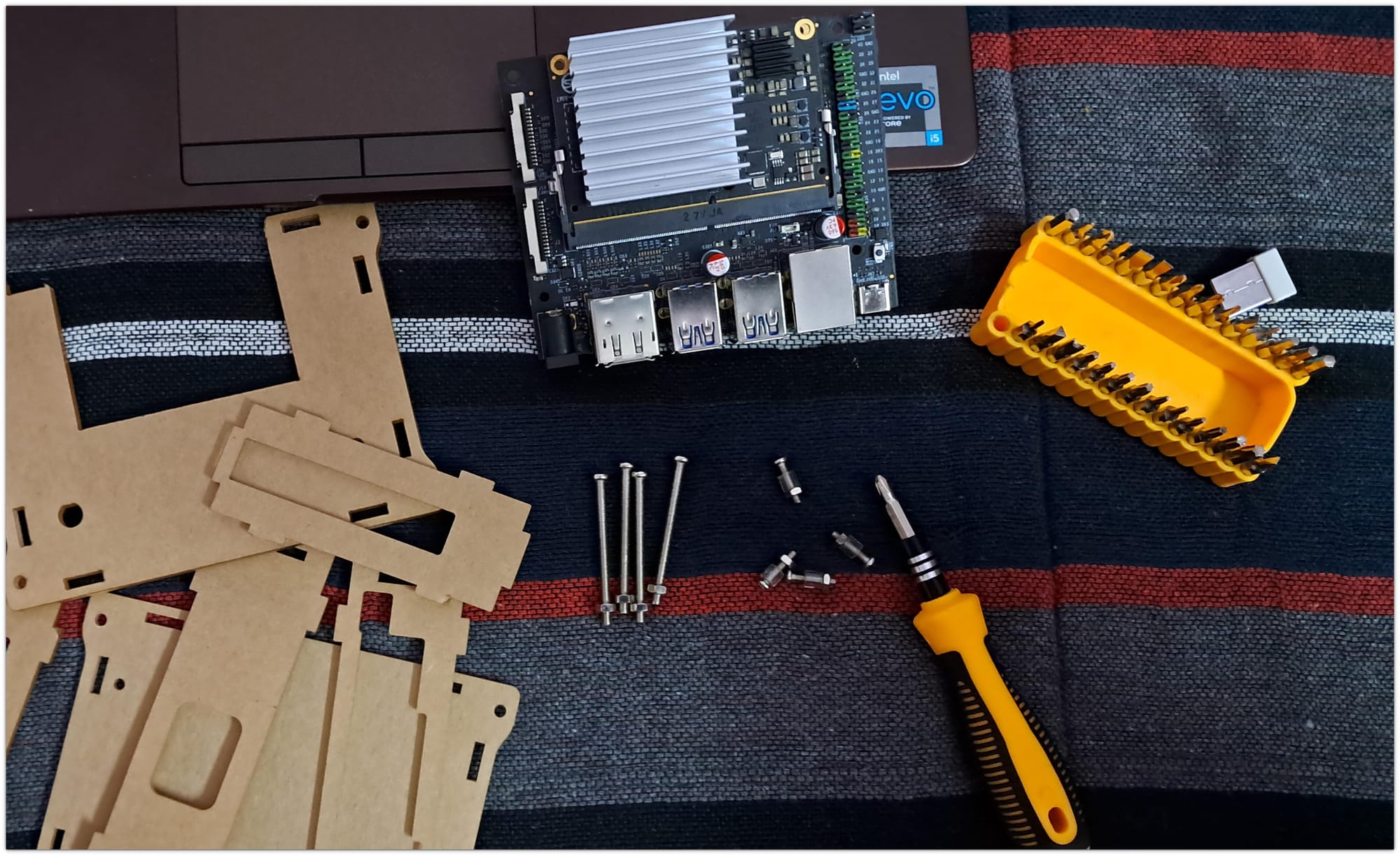
ArmSoM AIM7: A Promising Upcoming Rockchip Device for AI Development

Since I was hoping to use this device for home automation projects, I also got myself a DIY-built case.
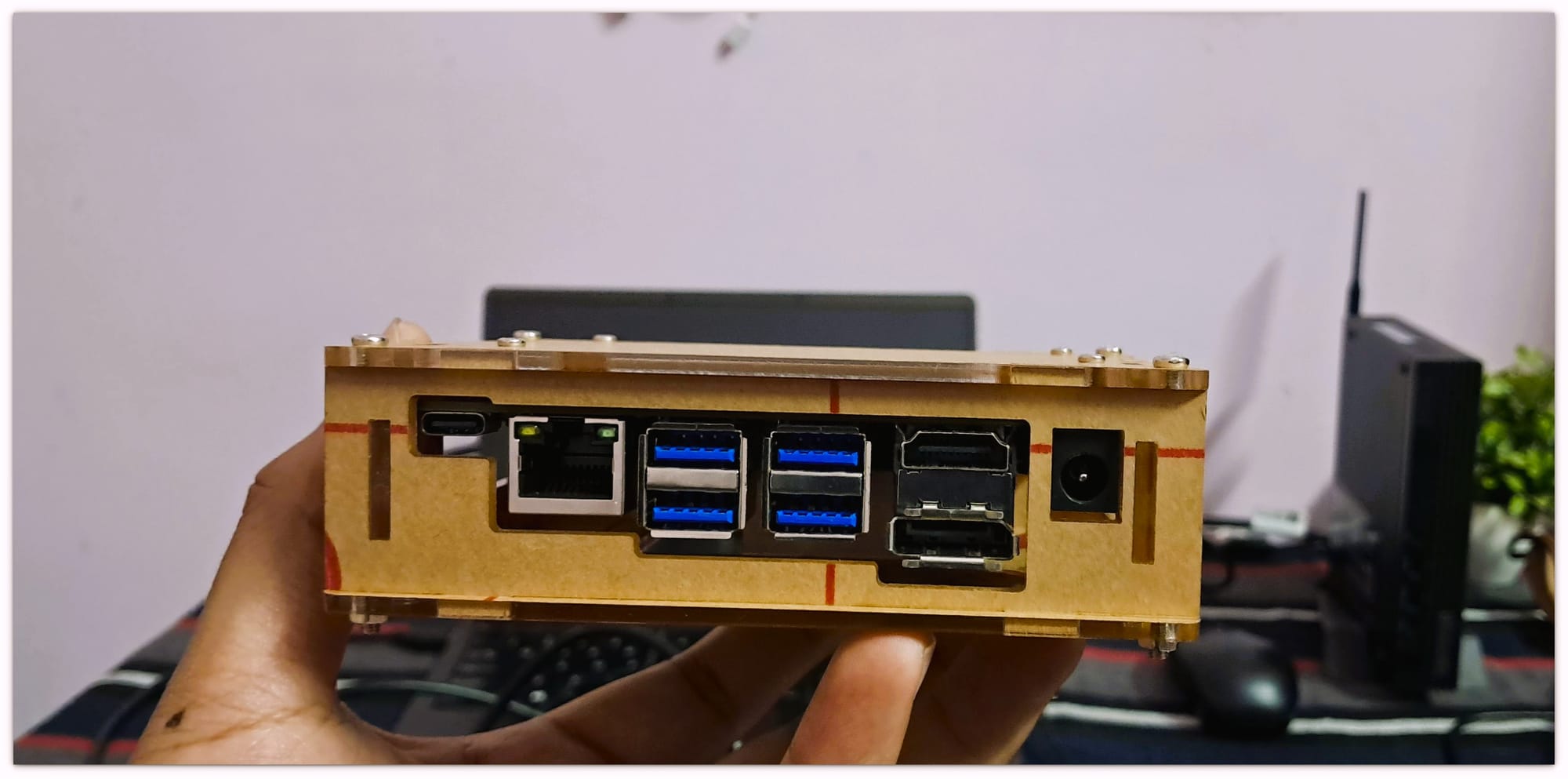
ArmSoM AIM7: A Promising Upcoming Rockchip Device for AI Development
Don’t judge me, I’m moving out, so I haven’t even peeled the protective plastic off of acrylic yet (to protect from scratches)!

OS installation

๐Ÿ“‹
ArmSoM devices come with a Debian installed on eMMC but in Chinese. I decided to install a distro of my choice by replacing the default OS.

Now, let’s talk about the OS installation. Spoiled by the ease of the Raspberry Pi Imager, I found myself on a steep learning curve while working with RKDevTool.
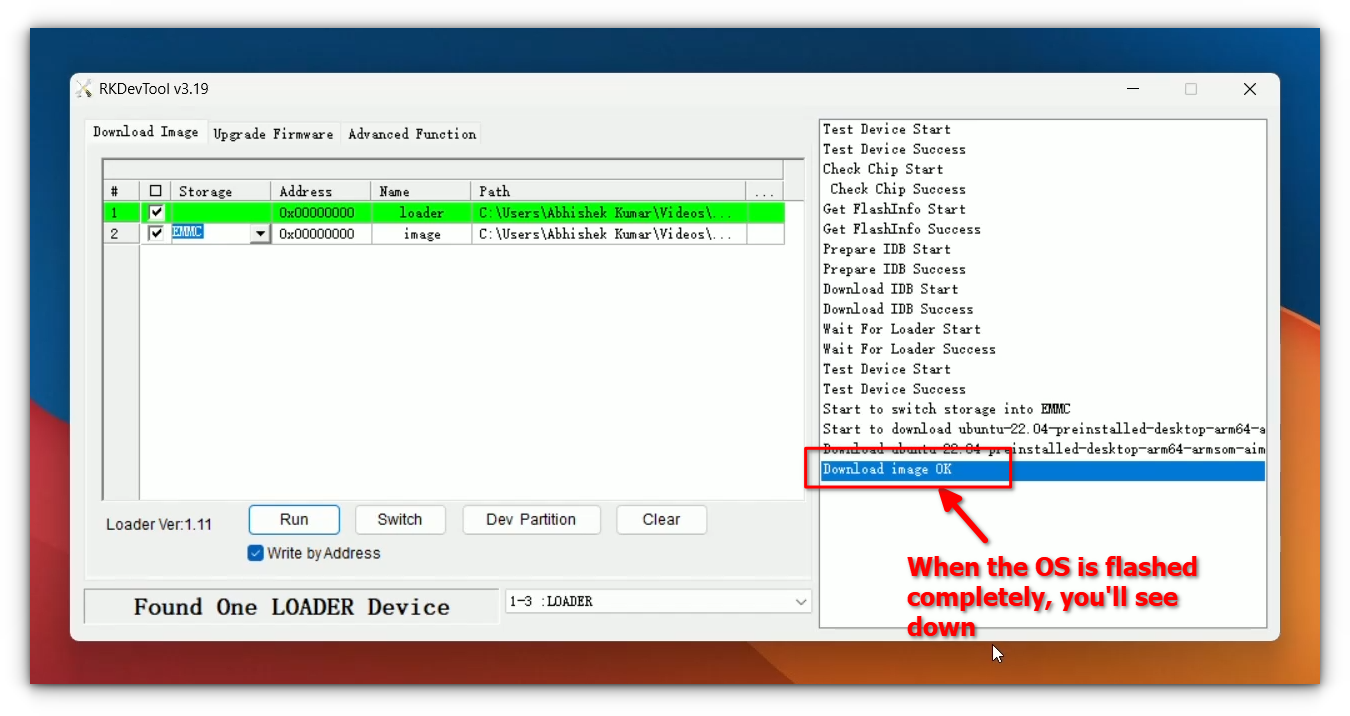
ArmSoM AIM7: A Promising Upcoming Rockchip Device for AI Development

Burning an image for the Rockchip device required me to watch several videos and read multiple pieces of documentation. After much trial and error, I managed to flash the provided Ubuntu image successfully.
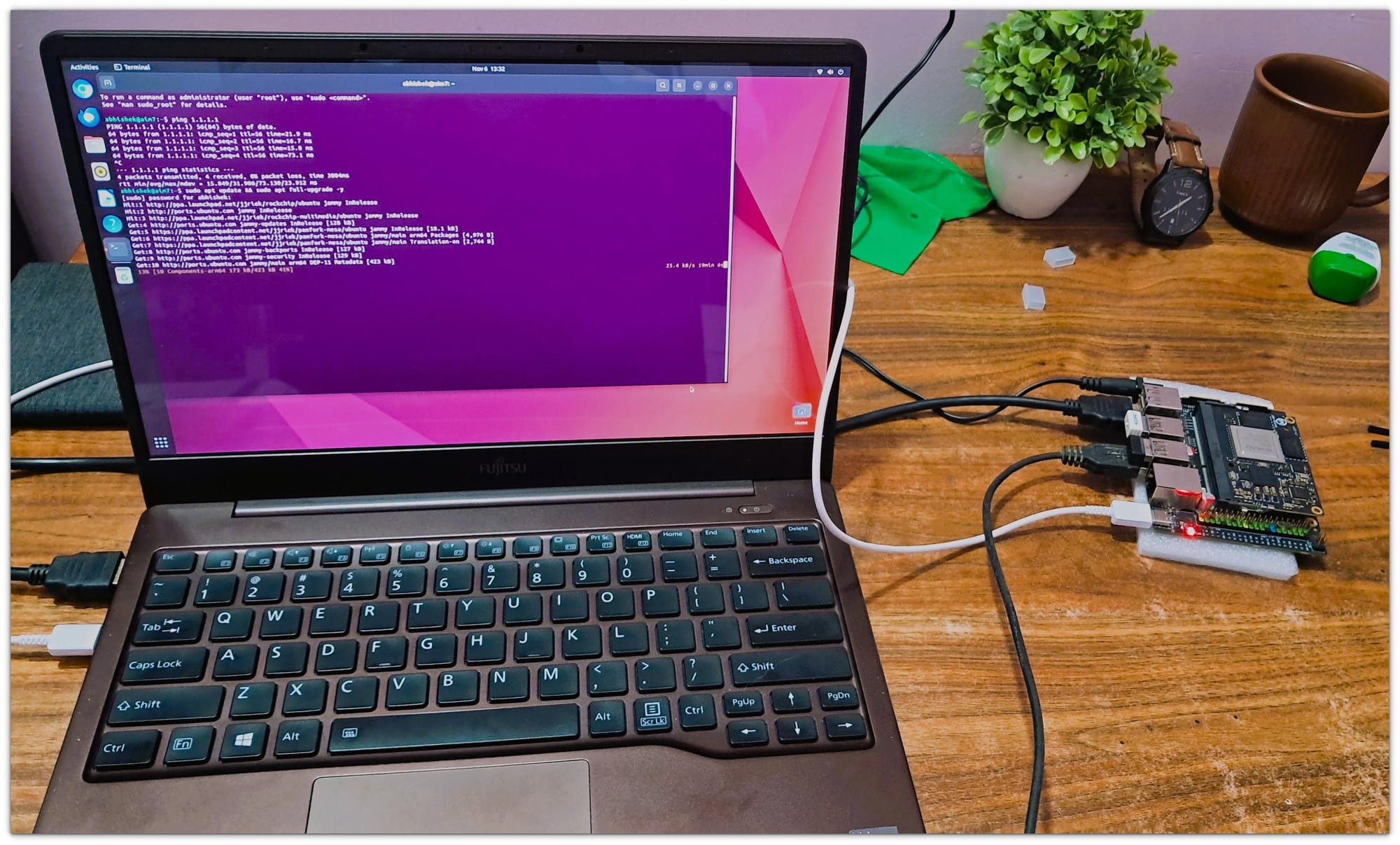
ArmSoM AIM7: A Promising Upcoming Rockchip Device for AI Development

I’ve written a dedicated guide to help you install an OS on Rockchip devices using RKDevTool.

One hiccup worth mentioning: I couldn’t test the SD card support as it didn’t work for me at all. This was disappointing, but the onboard eMMC storage provided a reliable fallback.

Performance testing

To gauge the AIM7’s capabilities, I ran a series of benchmarks and real-world tests. Here’s how it fared:

๐Ÿ“‹
For general testing, I opted for the Armbian image, which worked well, though I couldn’t test the AI capabilities of the NPU on it. To explore those, I later switched to the Ubuntu image.

Geekbench Scores

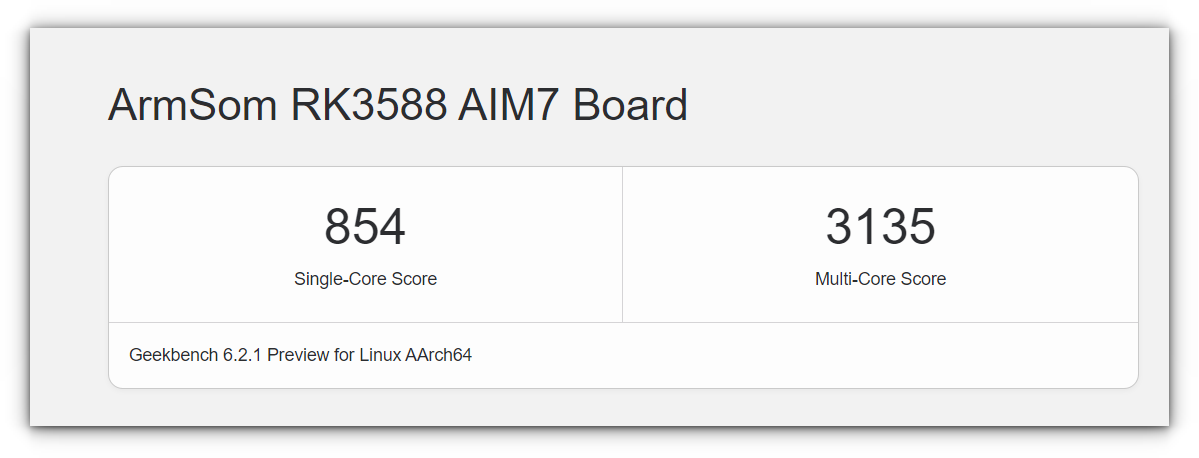
Here you can see the single-core and multi-core performance of RK3588, which is quite impressive. I mean, the results speaks for themselves. The Cortex-A76 cores are a significant upgrade.
ArmSoM AIM7: A Promising Upcoming Rockchip Device for AI Development

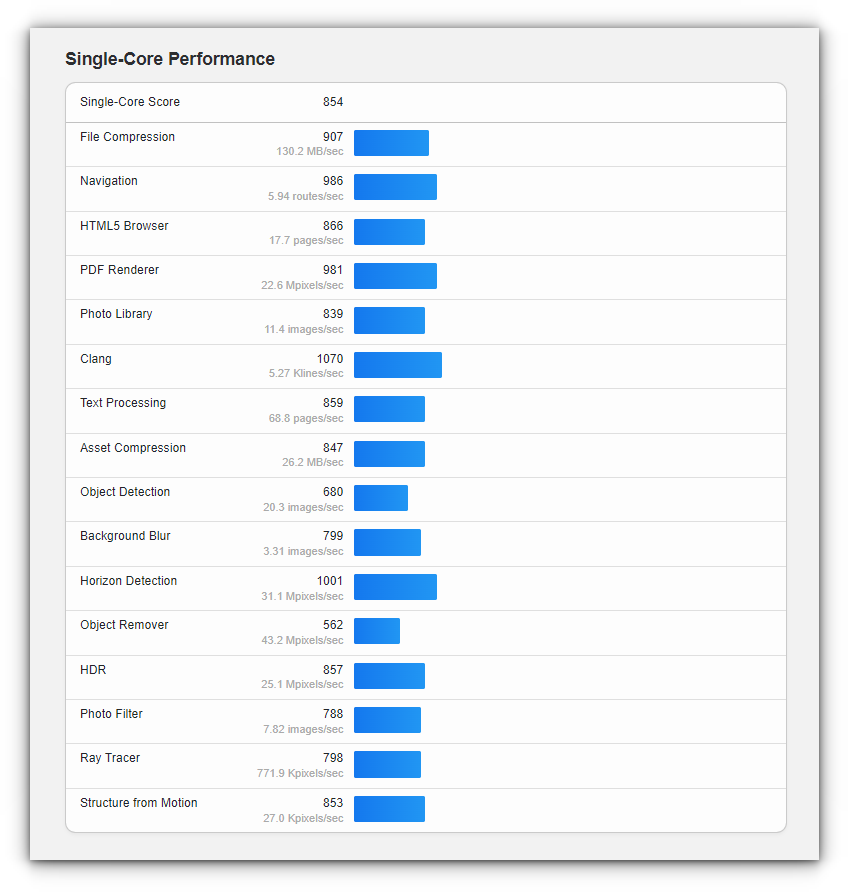
You can see the full single-core performance of RK3588:
ArmSoM AIM7: A Promising Upcoming Rockchip Device for AI Development

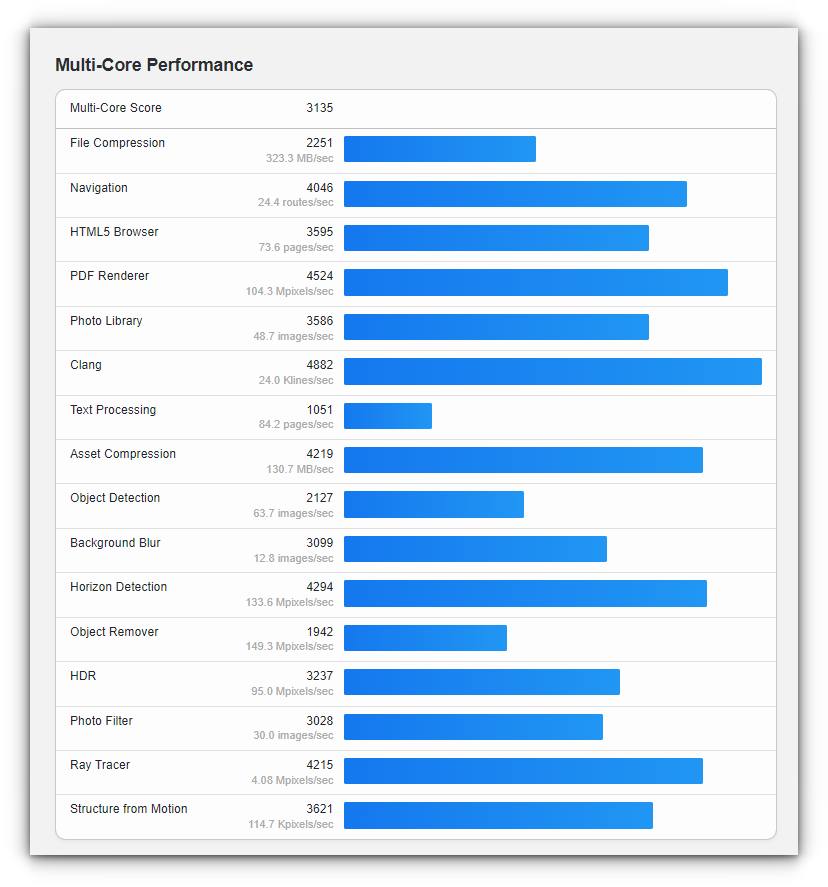
Multi-core performance:

ArmSoM AIM7: A Promising Upcoming Rockchip Device for AI Development

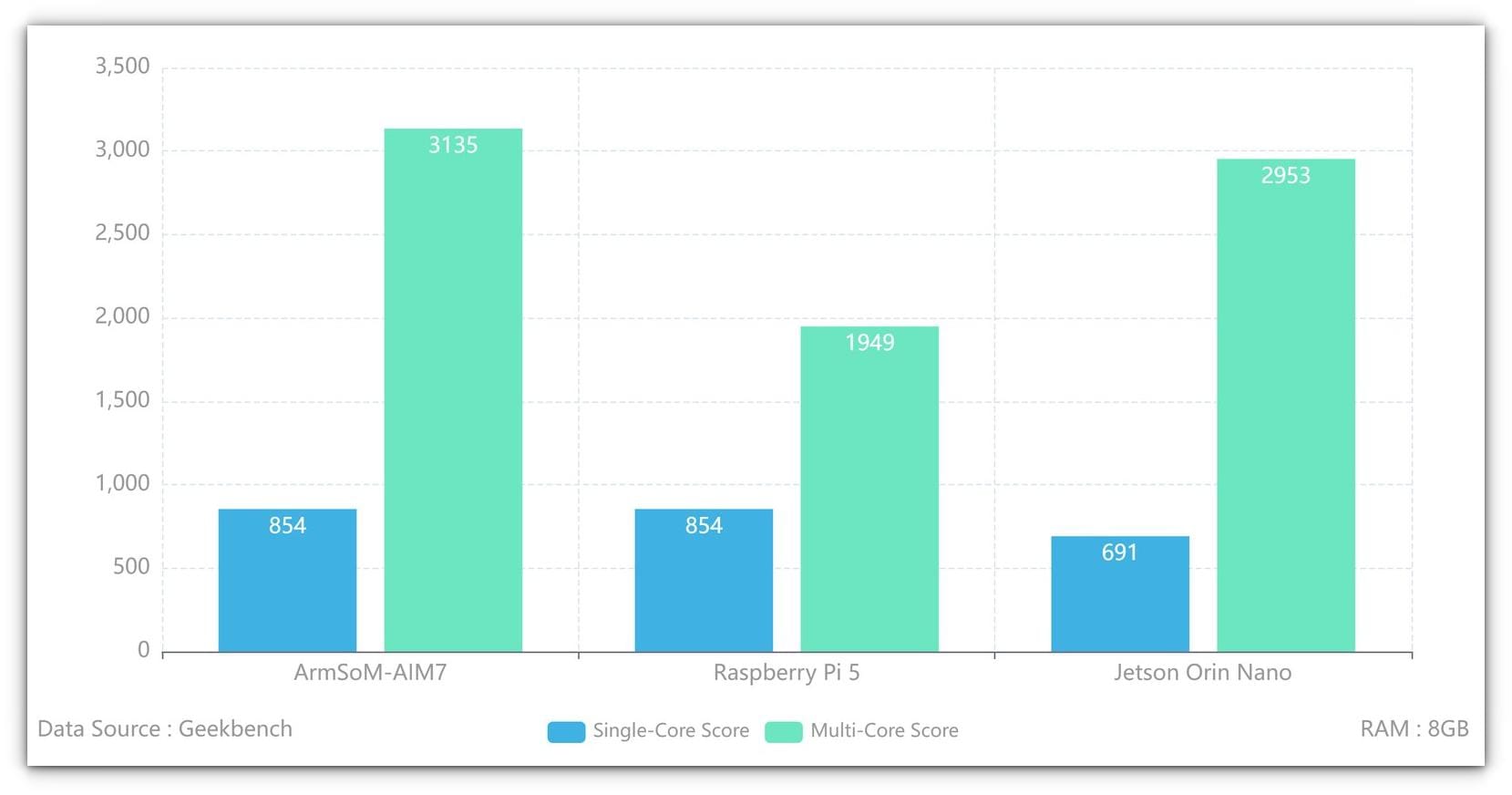
The RK3588’s multi-core performance blew the Raspberry Pi and even Jetson Nano out of the water, with scores nearly double in most tests.
ArmSoM AIM7: A Promising Upcoming Rockchip Device for AI Development
Source: ArmSoM

AI Workloads

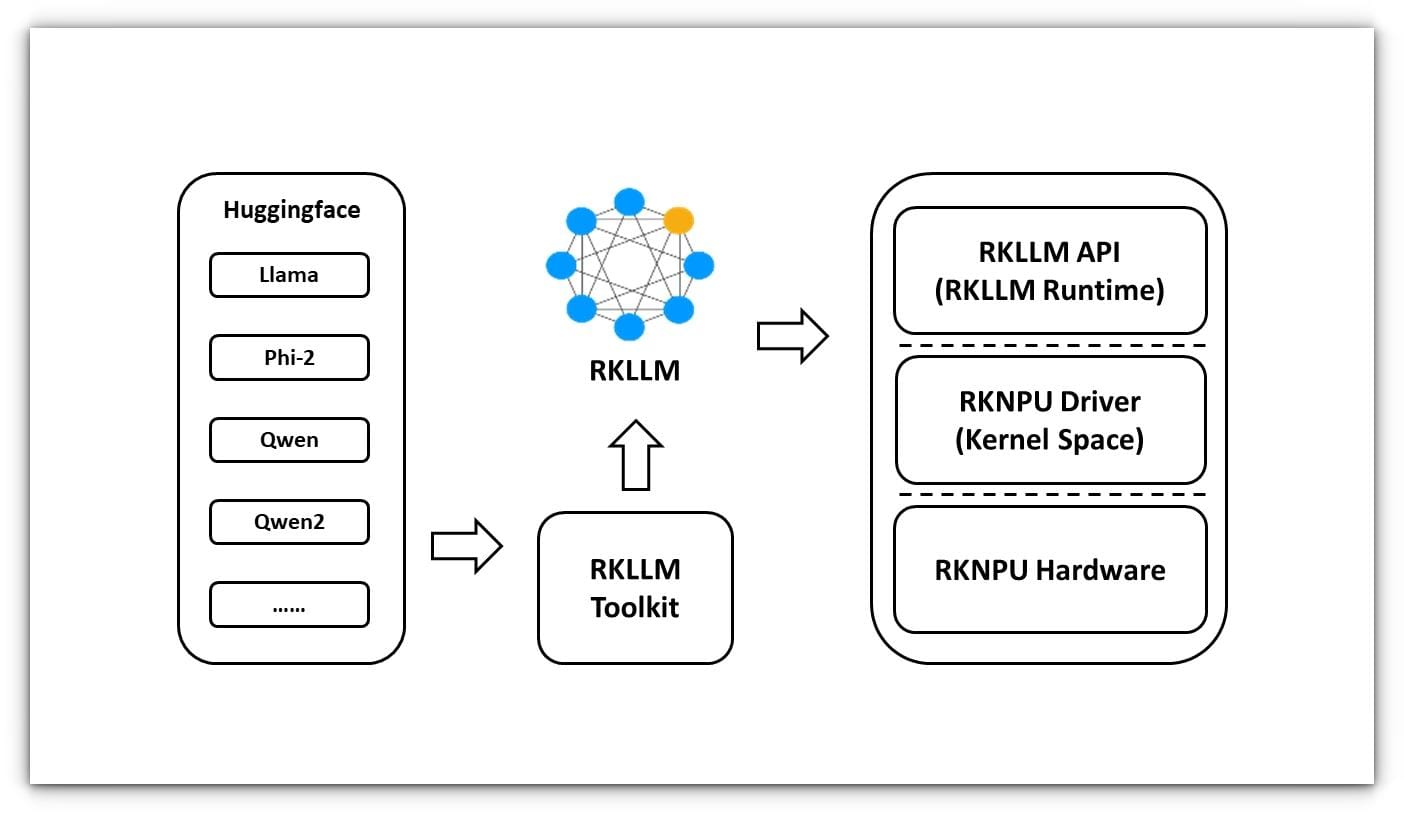
The AIM7’s 6 TOPS NPU is designed to handle AI inference efficiently. It supports RKNN-LLM, a toolkit that enables deploying lightweight language models on Rockchip hardware.
ArmSoM AIM7: A Promising Upcoming Rockchip Device for AI Development

I tested the TinyLLAMA model with 1.1 billion parameters, and the performance was amazing, achieving 16 tokens per second.

Output result:

root@armsom-aim7-io:/# ./llm_demo tinyLlama.rkllm 
rkllm init start
rkllm-runtime version: 1.0.1, rknpu driver version: 0.9.6, platform: RK3588
rkllm init success

**********************ๅฏ่พ“ๅ…ฅไปฅไธ‹้—ฎ้ข˜ๅฏนๅบ”ๅบๅท่Žทๅ–ๅ›ž็ญ”/ๆˆ–่‡ชๅฎšไน‰่พ“ๅ…ฅ********************

[0] what is a hypervisor?

*************************************************************************

user: 0
what is a hypervisor?
robot: A hypervisor is software, firmware, or hardware that creates and runs virtual machines (VMs).There are two types: Type 1 (bare-metal, runs directly on hardware) and Type 2 (hosted, runs on top of an OS). tokens 50 time 3.12
Token/s : 16.01
  • While I couldn’t test all the other supported models, here’s a list of models and their performance, courtesy of Radxa:TinyLLAMA 1.1B – 15.03 tokens/sQwen 1.8B – 14.18 tokens/sPhi3 3.8B – 6.46 tokens/sChatGLM3 – 3.67 tokens/s

The RKNN-LLM toolkit supports deploying lightweight language models on Rockchip hardware, and the NPU’s efficiency makes it a compelling option for AI workloads.

The performance varies depending on the model size and parameters, with larger models naturally running slower. The NPU also consumes less power than the GPU, freeing it up for other tasks.

Image & video processing

I couldn’t process live video and images as I didn’t have a compatible camera module. I own an RPi camera module but lacked the compatible ribbon cable to connect it to the AIM-IO board.
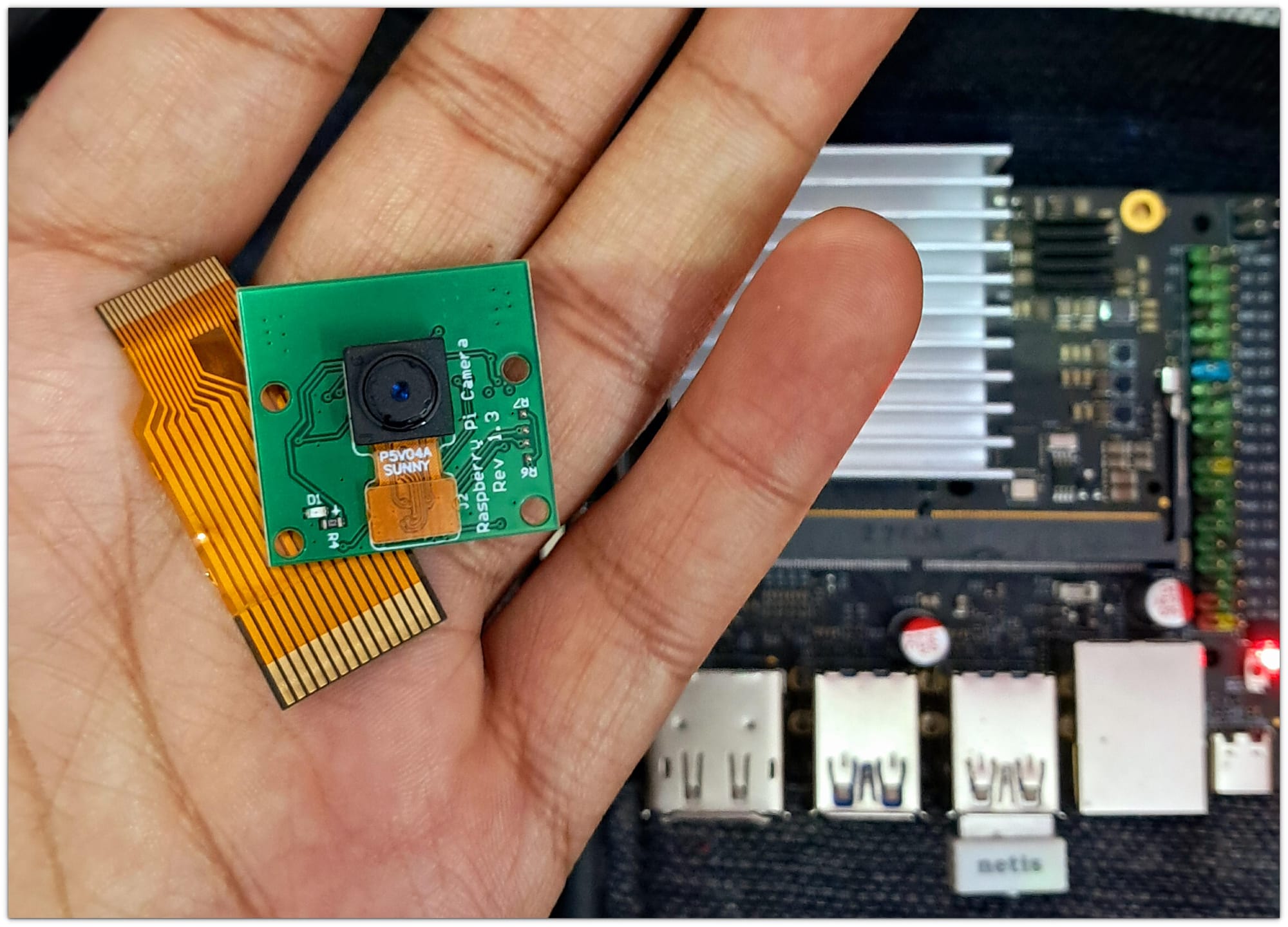
ArmSoM AIM7: A Promising Upcoming Rockchip Device for AI Development

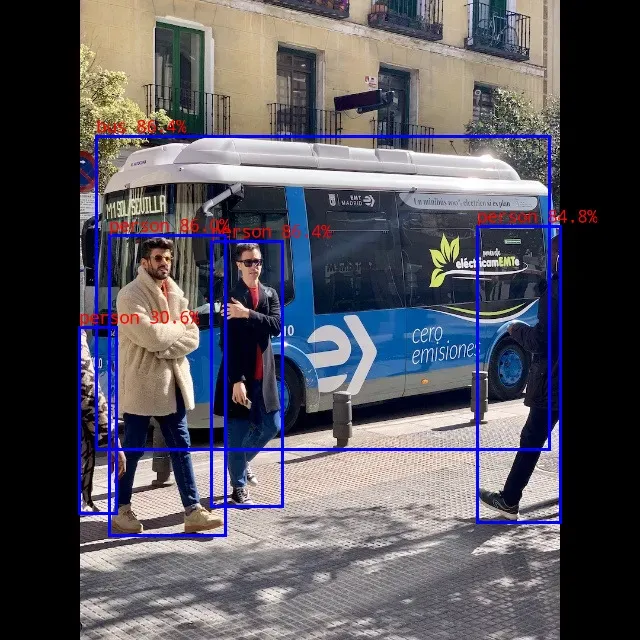
Despite this, I tested the image processing capabilities using the YOLOv8 model for Object detection on the demo images provided with it.

Took me a lot of time to understand how to use it (will cover that in separate article, hopefully) but thanks to Radxa's well-structured documentation, which provided a step-by-step guide.
ArmSoM AIM7: A Promising Upcoming Rockchip Device for AI Development

The results were impressive, showcasing the board’s ability to handle complex image recognition tasks efficiently.

What Could It Be Used For?

The AIM7 offers a wide range of potential applications, making it a versatile tool for developers and hobbyists alike. Here are some possible use cases:

  1. Home Automation: AIM7’s low power consumption and robust processing capabilities make it ideal for smart home setups. From controlling IoT devices to running edge AI for home security systems, the AIM7 can handle it all.
  2. AI-Powered Applications: With its 6 TOPS NPU, the AIM7 excels in tasks like object detection, natural language processing, and image recognition. It’s a great choice for deploying lightweight AI models at the edge.
  3. Media Centers: The ability to decode and encode 8K video makes it a powerful option for creating custom media centers or streaming setups.
  4. Robotics: AIM7’s compact size and versatile connectivity options make it suitable for robotics projects that require real-time processing and AI inference.
  5. Educational Projects: For students and educators, the AIM7 provides a hands-on platform to learn about embedded systems, AI, and computer vision.
  6. Industrial Automation: Its robust hardware and software support make it a reliable choice for industrial applications like predictive maintenance and process automation.
  7. DIY Projects: Whether you’re building a smart mirror, an AI-powered camera, or a custom NAS, the AIM7 offers the flexibility and power to bring your ideas to life.

If you are not interested in all of the above, you can always use it as your secondary desktop, at the end it is essentially a single board computer. ๐Ÿ˜‰

Final thoughts

After spending some time with the ArmSoM AIM7, I can confidently say that it’s an impressive piece of hardware. I installed Ubuntu on it, and the desktop experience was surprisingly smooth.

The onboard eMMC storage really made the experience smooth, it made app launches fast and responsive, offering a noticeable speed boost compared to traditional SD card setups.

Watching YouTube at 1080p was smooth, something that’s still a bit of a challenge for Raspberry Pi in the same resolution. The playback was consistent, without any stuttering, which is a big win for media-heavy applications.

The RKNN-LLM toolkit enabled me to deploy lightweight models, and the NPU’s power efficiency freed up the GPU for other tasks, which is perfect for edge AI applications.

My only gripe is the lack of extensive documentation from ArmSoM. While it’s available, it often doesn’t cover everything, and I found myself relying on Radxa and Mixtile forums to work around issues. ArmSoM told me that documentation will be improved after the crowdfunding launch.

You can follow the crowdfunding campaign and other developments on the dedicate page.

RK3588 AI Module7
A low-power AI module compatible with the Nvidia Jetson Nano ecosystem
ArmSoM AIM7: A Promising Upcoming Rockchip Device for AI Development

I’m looking forward to exploring more of its potential in my home automation projects, especially as I integrate AI for smarter, more efficient systems.


from It's FOSS https://ift.tt/Rmxvesr
via IFTTT

Kamis, 09 Januari 2025

Remembering Usenet - The OG Social Network that Existed Even Before the World Wide Web

Remembering Usenet - The OG Social Network that Existed Even Before the World Wide Web

Before Reddit, before GitHub, and even before the World Wide Web went online, there was Usenet.

This decentralized network of discussion groups was a main line of communication of the early internet - ideas were exchanged, debates raged, research conducted, and friendships formed.

Remembering Usenet - The OG Social Network that Existed Even Before the World Wide Web

For those of us who experienced it, Usenet was more than just a communication tool; it was a community, a center of innovation, and a proving ground for the ideas.

๐Ÿ“‹
It is also culturally and historically significant in that it popularized concepts and terms such as "LOL (first used in a newsgroup in 1990)," FAQ," "flame," "spam," and,"sockpuppet".

Oldest network that is still in use

Usenet is one of the oldest computer network communications systems still in widespread use. It went online in 1980, at the University of North Carolina at Chapel Hill and Duke University.

1980 is significant in that it was pre-World Wide Web by over a decade. In fact, the "Internet" was basically a network of privately owned ARPANet sites. Usenet was created to be the network for the general public - before the general public even had access to the Internet. I see Usenet as the first social network.

Over time, Usenet grew to include thousands of discussion groups (called newsgroups) and millions of users. Users read and write posts, called articles, using software called a newsreader.

In the 1990s, early Web browsers and email programs often had a built-in newsreader. Topics were many; if you could imagine a topic, there was probably a group made for it and, if a group didn't exist, one could be made.

The culture of Usenet: Learning the ropes

While I say that Usenet was the first social network, it was never really organized to be one. Each group owner could - and usually did - set their own rules.

Before participating in discussions, it was common advice to “lurk” for a while - read the group without posting - to learn the rules, norms, and tone of the community. Every Usenet group had its own etiquette, usually unwritten, and failing to follow it could lead to a “flaming.” These public scoldings, were often harsh, but they reinforced the importance of respecting the group’s culture.

For groups like comp.std.doc and comp.text, lurking was essential to understand the technical depth and specificity of the conversations. Jumping in without preparation wasn’t just risky - it was almost a rite of passage to survive the initial corrections from seasoned members. Yet, once you earned their respect, you became part of a tightly knit network of expertise and camaraderie - you belonged.

Remembering Usenet - The OG Social Network that Existed Even Before the World Wide Web

Usenet and the birth of Linux

One newsgroup, comp.os.minix, became legendary when Linus Torvalds posted about a new project he was working on. In August 1991, Linus announced the creation of Linux, a hobby project of a free operating system.

Usenet's structure - decentralized, threaded, and open - can be seen as the first demonstration of the values of open-source development. Anyone with a connection and a bit of technical know-how could hop on and join in a conversation. For developers, Usenet quickly became the main tool for keeping up with rapidly evolving programming languages, paradigms, and methodologies.

It's not a stretch to see how Usenet also became an essential platform for code collaborating, bug tracking, and intellectual exchange - it thrived in this ecosystem.

The discussions were sometimes messy - flame wars and off-topic posts were common - but they were also authentic. Problems were solved not in isolation but through collective effort. Without Usenet, the early growth of Linux may well have been much slower.

A personal memory: Helping across continents

My own experience with Usenet wasn’t just about reading discussions or solving technical problems. It became a bridge to collaboration and friendship. I remember one particular interaction well: a Finnish academic working on her doctoral dissertation on documentation standards posted a query to a group I frequented. By chance, I had the information she needed.

At the time, I spent a lot of my time in groups like comp.std.doc and comp.text, where discussions about documentation standards and text processing were common. She was working with SGML standards, while I was more focused on HTML. Despite our different areas of expertise, Usenet made it easy for the two of us to connect and share knowledge. She later wrote back to say my input had helped her complete her dissertation.

This took place in the mid-1990s and that brief collaboration turned into a friendship that lasts to this day. Although we may go long periods without writing, we’ve always kept in touch. It’s evidence to how Usenet didn’t just encourage innovation but also created a lasting friendship across continents.

The decline and legacy of Usenet

As the internet evolved, Usenet's use has been fading. The rise of web-based forums, social media, and version-control platforms like GitHub made Usenet feel clunky and outdated, and there are concerns that it is largely being used to send spam and conduct flame wars and binary (no text) exchanges.

On February 22, 2024, Google stopped Usenet support for these reasons. Users can no longer post or subscribe, or view new content. Historical content, before the cut-off date can be viewed, however.

This doesn't mean that Usenet is dead; far from it. GiganewsNewsdemon, and Usenet are still running, if you are interested in looking into this. Both require a subscription, but Eternal September provides free access.

If Usenet's use has been declining, then why look into it? Its archives. The archives hold detailed discussions, insights, questions and answers, and snippets of code - a good deal of which is still relevant to today’s software hurdles.

Conclusion

I would guess that, for those of us who were there, Usenet remains a nostalgic memory. It does for me. The quirks of its culture - from FAQs to "RTFM" responses - were part of its charm. It was chaotic, imperfect, and sometimes frustrating, but it was also a place where real work got done and real connections were made.

Looking back, my time on Usenet was one of the foundational chapters in my journey through technology. Helping a stranger across the globe complete a dissertation might seem like a small thing, but it’s emblematic of what Usenet stood for: collaboration without boundaries. It bears repeating: It was a place where knowledge was freely shared and where the seeds of ideas could grow into something great. And in this case, it helped create a friendship that continues to remind me of Usenet’s unique power to connect people.

As Linux fans, we owe a lot to Usenet. Without it, Linux might have remained a small hobby project instead of becoming the force of computing that it has become. So, the next time you’re diving into a Linux distro or collaborating on an open-source project, take a moment to appreciate the platform that helped make it all possible.


from It's FOSS https://ift.tt/KNPo4sj
via IFTTT
Rabu, 08 Januari 2025

FOSS Weekly #25.02: Absolute Linux, ShredOS, AI in Kdenlive, Fossify File Manager and More

FOSS Weekly #25.02: Absolute Linux, ShredOS, AI in Kdenlive, Fossify File Manager and More

The holidays are over and so do the Tuxmas Days. 12 days of 12 new features, changes and announcements.

As mentioned on Tuxmas Day 11, It's FOSS Lifetime membership now also gets you lifetime Reader-level membership of Linux Handbook, our other portal focused on sysadmin, DevOps and self-hosting.

If you are one of the 73 people (so far) who opted for the Lifetime plan, you'll get a separate email on Linux Handbook's membership. Meanwhile, please download the 'Linux for DevOps' book for free as part of your Plus membership.

Please note that this combined benefit of free lifetime Linux Handbook Reader level membership (usually costs $18 per year) is only available till 11th January. Thereafter, it will cost $99 and won't include Linux Handbook's membership. Get the additional advantage before the time runs out.

๐Ÿ’ฌ Let's see what else you get in this edition

  • SteamOS rolling out
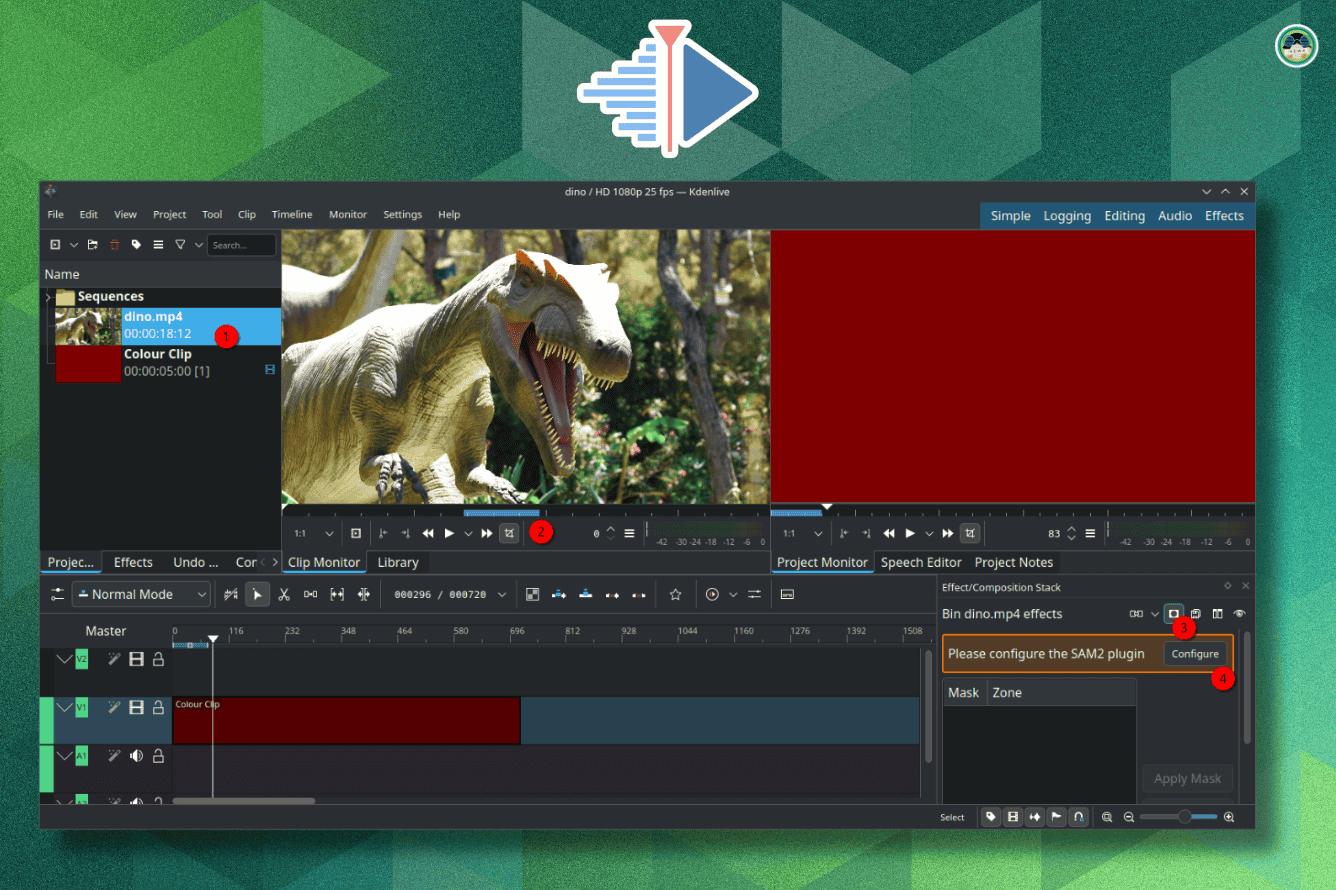
  • Kdenlive working on a new AI-powered feature.
  • Nobara being the first one to introduce a release in 2025.
  • And other Linux news, videos and, of course, memes!

๐Ÿ“ฐ Linux and Open Source News

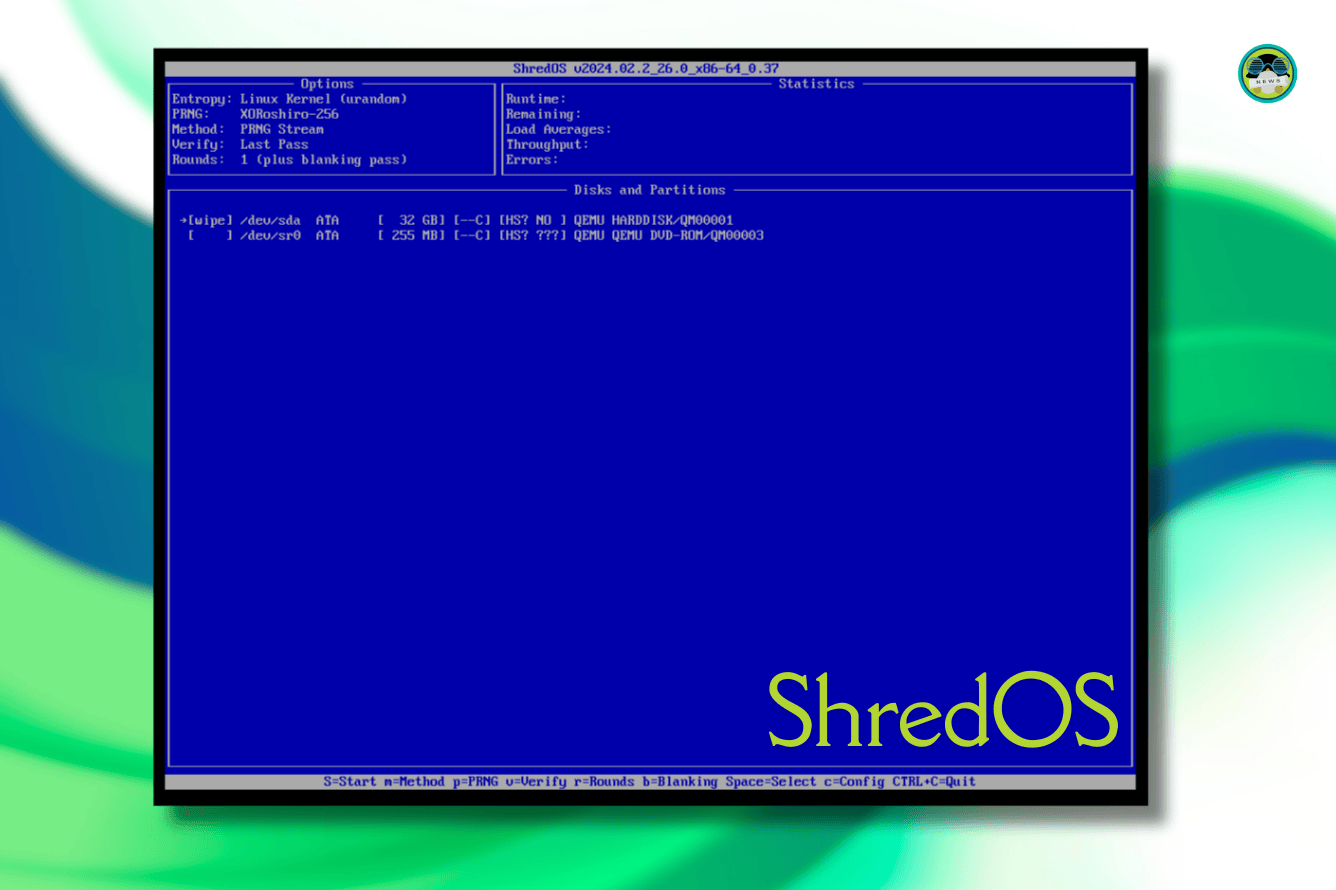
Did you know there is a dedicated Linux distribution for wiping disks?

ShredOS is a Linux Distro Built to Wipe Your Data
A Linux distro built to help you destroy data. Sounds pretty cool!
FOSS Weekly #25.02: Absolute Linux, ShredOS, AI in Kdenlive, Fossify File Manager and More

๐Ÿง  What We’re Thinking About

Sourav switched to Proton VPN after going through many other VPN services, here's what he thinks of it:

I Switched to Proton VPN and Here’s What I Honestly Think About It
Proton VPN is an impressive solution. Here’s my experience with it.
FOSS Weekly #25.02: Absolute Linux, ShredOS, AI in Kdenlive, Fossify File Manager and More

๐Ÿงฎ Linux Tips, Tutorials and More

And an analogy to explain why there are so many Linux distributions.

What is Linux? Why There are 100’s of Linux OS?
Cannot figure out what is Linux and why there are so many of Linux? This analogy explains things in a simpler manner.
FOSS Weekly #25.02: Absolute Linux, ShredOS, AI in Kdenlive, Fossify File Manager and More

๐Ÿ‘ท Maker's and AI Corner

Did you know you could run LLMs locally on a Raspberry Pi?

How to Run LLMs Locally on Raspberry Pi Using Ollama AI
Got a Raspberry Pi? How about using it ton run some LLMs using Ollama for your own private AI?
FOSS Weekly #25.02: Absolute Linux, ShredOS, AI in Kdenlive, Fossify File Manager and More

๐Ÿ“น Videos we are watching

Do you really need a media server software?


✨ Apps of the Week

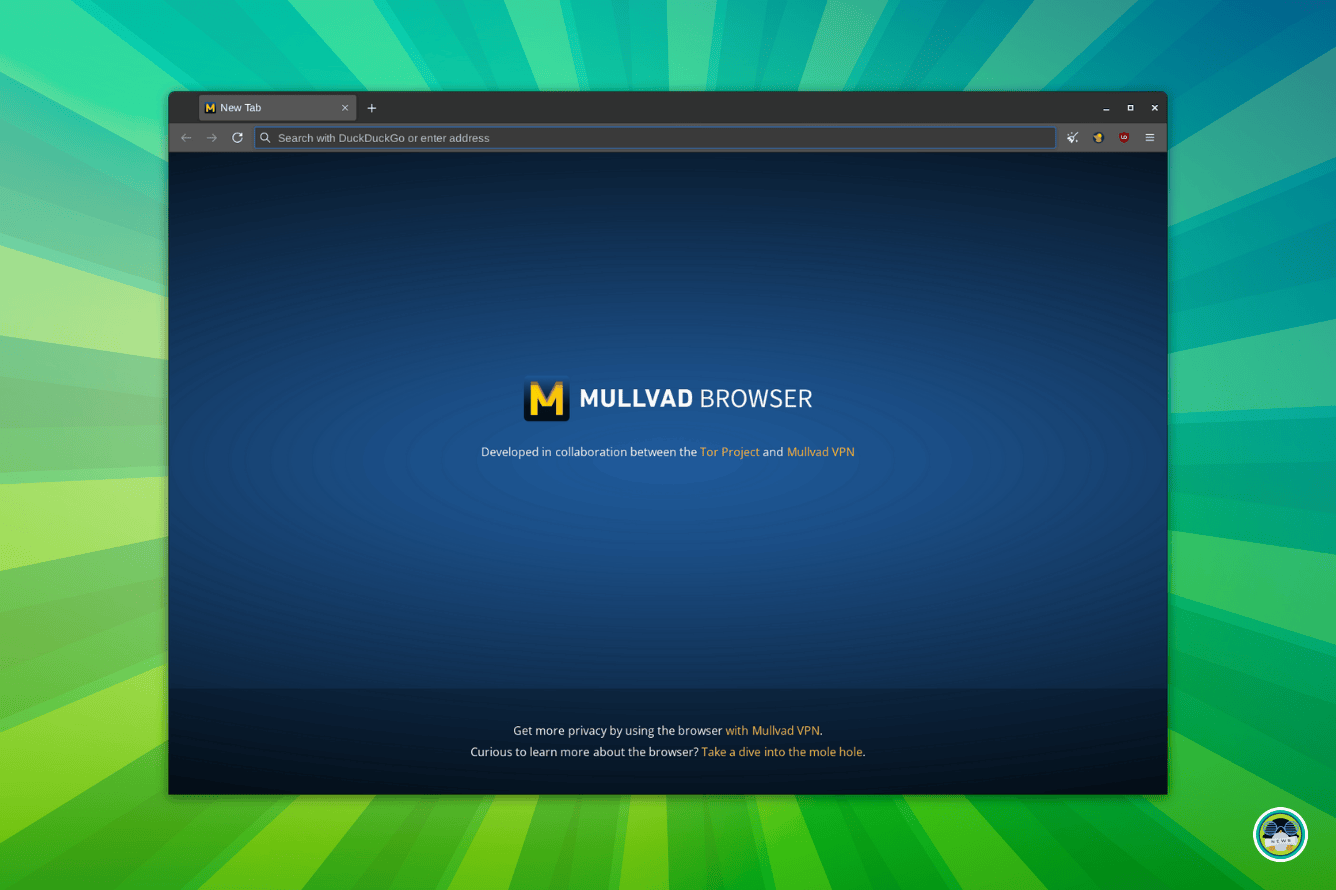
Mullvad Browser is a very solid privacy-focused alternative to the likes of Google Chrome.

Mullvad Browser: A Super Privacy-Focused Browser Based on Firefox
Mullvad is Firefox, but enhanced for privacy, pretty interesting take as a cross-platform private browser app.
FOSS Weekly #25.02: Absolute Linux, ShredOS, AI in Kdenlive, Fossify File Manager and More

If you are looking for a change in file management on Android, then you could go for Fossify File Manager.


๐Ÿงฉ Quiz Time

Have some fun finding the logos of distros and open source projects.

Spot All The Logos: Image Puzzle
Let’s see if you can spot the hidden items in the image!
FOSS Weekly #25.02: Absolute Linux, ShredOS, AI in Kdenlive, Fossify File Manager and More

๐Ÿ’ก Quick Handy Tip

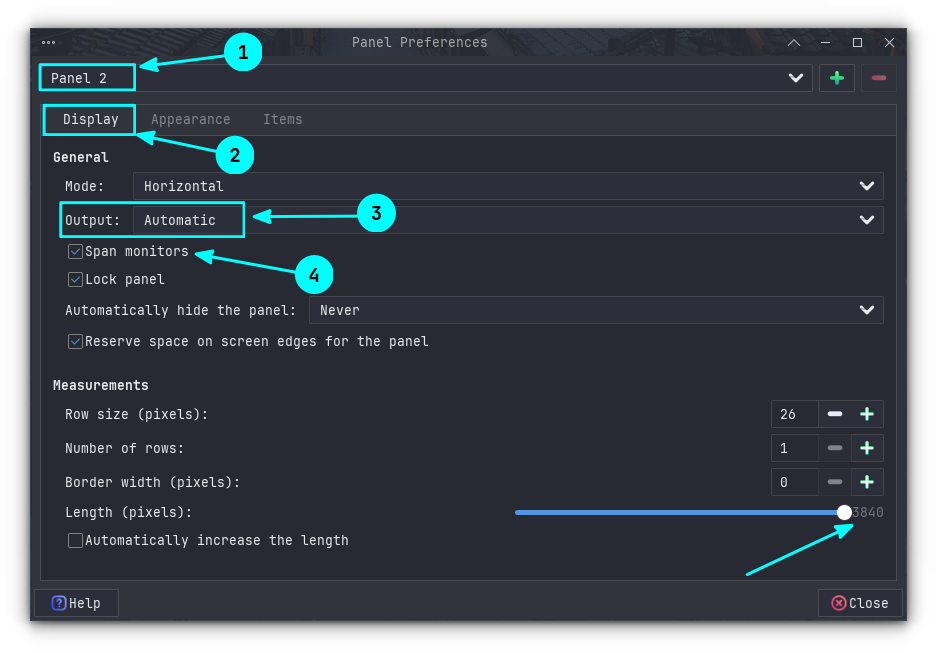
If you are a Xfce user with a multi-monitor setup, then you can span the Xfce panel across monitors. First, right-click on the panel you want to span and then go to Panel → Panel Preferences. Here, in the Display tab, set Output as Automatic and enable the “Span monitors” checkbox.

FOSS Weekly #25.02: Absolute Linux, ShredOS, AI in Kdenlive, Fossify File Manager and More

๐Ÿคฃ Meme of the Week

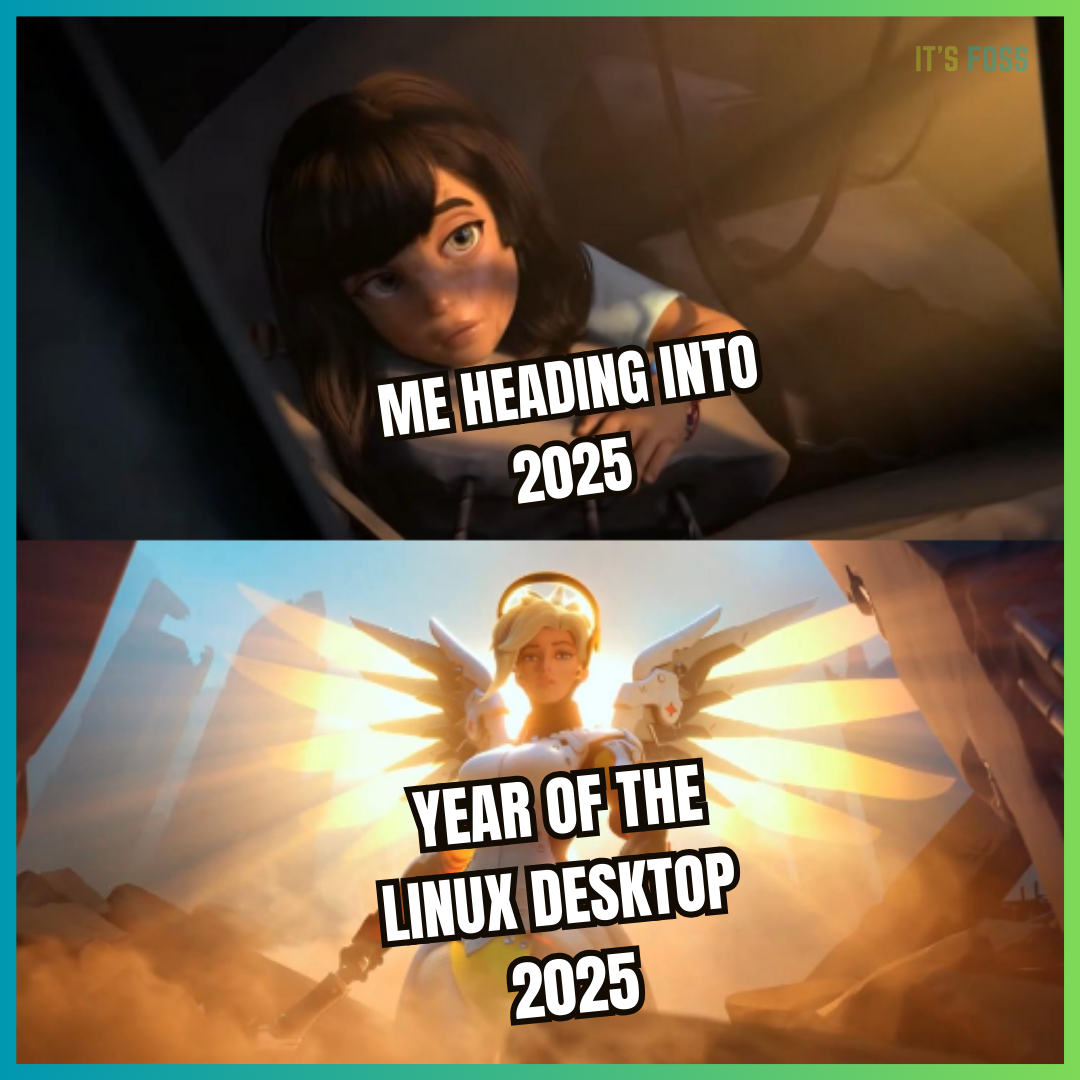
The pain is real. ๐Ÿ˜ฅ

FOSS Weekly #25.02: Absolute Linux, ShredOS, AI in Kdenlive, Fossify File Manager and More

๐Ÿ—“️ Tech Trivia

Hitachi announced the first 1 MB memory chip on January 6, 1984. At the time, this was a revolutionary leap in storage technology. Today, we carry more memory in our pockets than entire systems from that era!


๐Ÿง‘‍๐Ÿค‍๐Ÿง‘ FOSSverse Corner

Pro FOSSer Neville shares his experience with Chimera Linux on virt-manager. This is a detailed write-up, so be prepared for a lengthy read.

Chimera Linux in virt-manager with Plasma | Wayland | APK | Clang/LLVM | musl | dinit | BSD core tools
Chimera Linux in virt-manager with Plasma and Wayland Want to try something really different? Chimera Linux have just released new images as of 4/12/24. Chimera is a new distro build from scratch using Linux kernel 6.12 core tools from FreeBSD apk package system from Alpine Clang/LLVM toolchain Musl C library Gnome and Plasma desktops with Wayland &/or X11 multiple architectures - Intel/AMD, ARM AArch64, POWER, and RISC-V the dinit init system A real mix. One could debate whether it is L…
FOSS Weekly #25.02: Absolute Linux, ShredOS, AI in Kdenlive, Fossify File Manager and More

❤️ With love

Share it with your Linux-using friends and encourage them to subscribe (hint: it's here).

Share the articles in Linux Subreddits and community forums.

Follow us on Google News and stay updated in your News feed.

Opt for It's FOSS Plus membership and support us ๐Ÿ™

Keep on enjoying Linux in 2025 ๐Ÿง


from It's FOSS https://ift.tt/JfsQj8l
via IFTTT

Minggu, 05 Januari 2025

Autostart AppImage Applications in Linux

Autostart AppImage Applications in Linux

One of the main downside of using AppImages is the lack of desktop integration. This can be achived using AppImage Launcher tool.

Another problematic part is the lack of support for autostarting an AppImage application when the system restarts.

With some effort, you can achieve that, too.

The method involves twp steps:

  • Creating a desktop file for the application
  • Adding this desktop file to autostart application list

Let me show you the process in detail.

Step 1: Create a desktop file

Desktop files are text files that contain metadata about applications, such as their name, icon, and the command to run them.

These files are stored in specific locations, and the system menu uses them to allow users to launch applications from the menu.

For user-installed applications, the desktop file is typically stored in ~/.local/share/applications.

Before you explore autostarting an AppImage file, let’s first create a desktop file for your AppImage package.

Method 1: Using AppImage Launcher

AppImageLauncher is a handy tool that integrates AppImages with your Linux system. This way, you can find the AppImage apps in the system menu.

Although, AppImage Launcher hasn't see a new release in almost three years, it still works.

For Ubuntu and other Debian-based systems, you can use the deb package to install AppImage Launcher.

First, go to the releases page and download the deb file.

๐Ÿ“‹
You can either download the stable release file, released in 2020 or the continuous build file, released in 2022.

Then install the deb file to your system.

If you are an Arch Linux user, you can install AppImageLauncher from AUR using an AUR helper like Yay.

yay -S appimagelauncher

There are release files for Fedora on the official releases page.

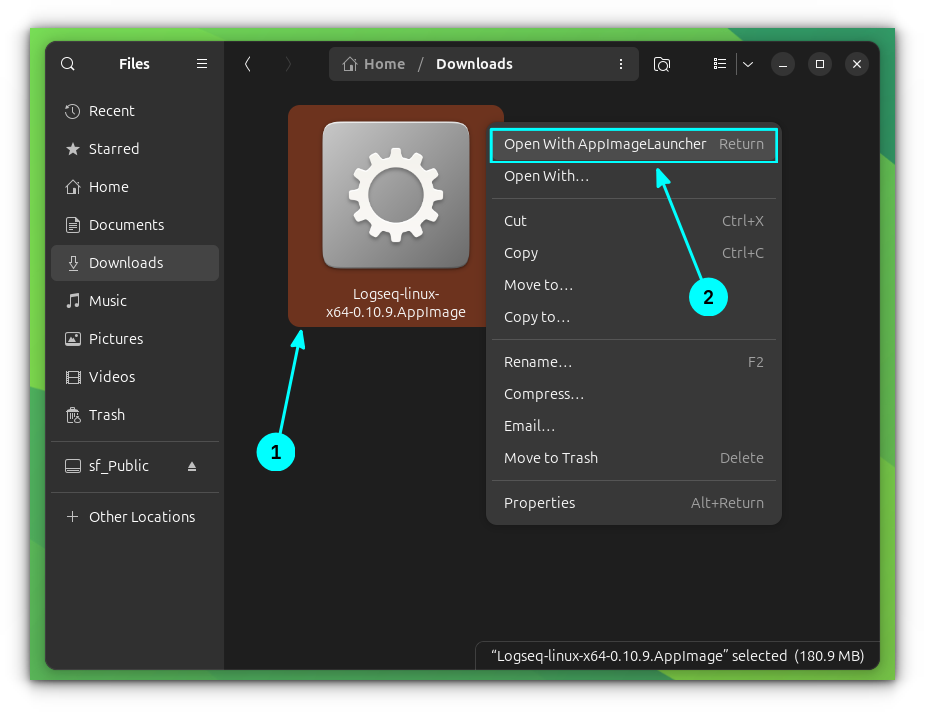
Once AppImageLauncher is installed, right-click on an AppImage app file and select "Open with AppImageLauncher".

Autostart AppImage Applications in Linux
Open AppImage with AppImageLauncher

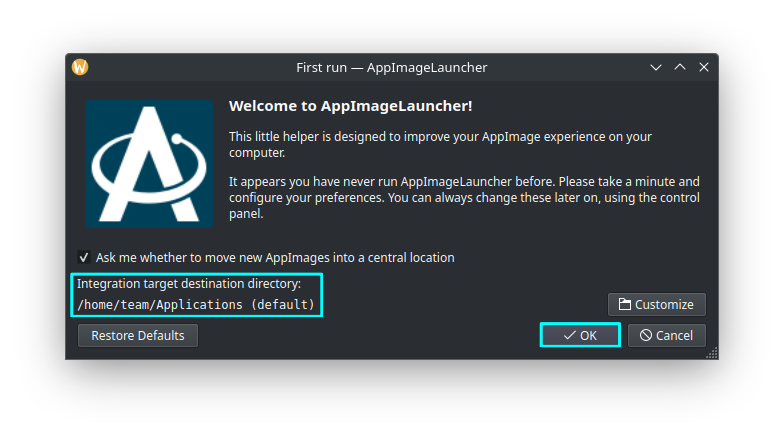
For the first time, it will ask you to select a centralized location. Go for the default (~/Applications). Click OK. Now, this is where all your AppImage files will be stored.

Autostart AppImage Applications in Linux
Default AppImage location

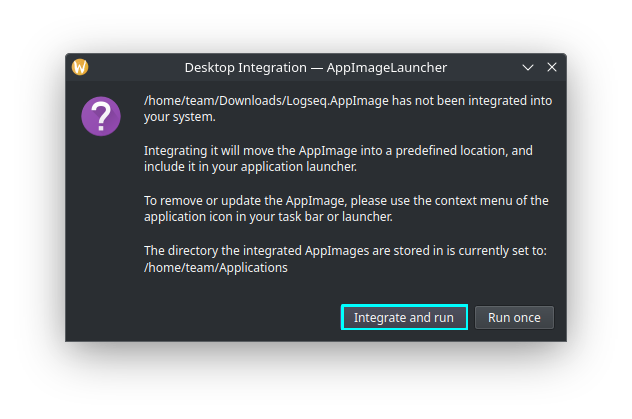
Now, in the next window, chose "Integrate and Run".

Autostart AppImage Applications in Linux
Integrate and Run the AppImage

That's it. Your AppImage is now integrated to your system. You can now find the app you just ran with AppImage launcher in the system menu.

And it creates the required desktop file which is located at ~/.local/share/application.

Method 2: Creating desktop file manually

๐Ÿ“‹
This part requires you to have basic knowledge of Linux commands.

If you do not want to use AppImage Launcher, you can also create a desktop file manually.

Create a file called <your-app-name>.desktop in ~/.local/share/applications. For example, if you are using ClickUp, name it ~/.local/share/applications/clickup.desktop

Inside this file, add the following lines in this manner:

[Desktop Entry]
Type=Application
Name=Logseq
Comment=A Note taking and Knowledge Management Application
Exec=/home/$USER/Applications/Logseq.AppImage
Icon=/home/$USER/Applications/Images/Logseq.png
Terminal=false
Categories=Office;

This is a very minimal desktop file for an application.

Here, the fields should be filled with data:

  • Replace the Name and Comment field with the name and description for your application.
  • The Exec field should point to the absolute path of the AppImage file.
  • The Icon field should point to the absolute path of the icon image file.
  • Terminal=false means that the application does not require a terminal to run. For most graphical applications like AppImages, this is the desired setting.
  • Categories is where your Application will appear in the system menu.

Once done, save the file. That's it. You have created a desktop file for the AppImage.

๐Ÿ’ก
I advise placing all the AppImage files in a dedicated directory for better organization and avoiding accidental removal of the AppImage files.

Step 2: Autostart the application

Once you have the AppImage desktop file ready, you can easily autostart the application by just copy and pasting it to the ~/.config/autostart directory.

Use the cp command to copy the file:

cp ~/.local/share/applications/Logseq.desktop ~/.config/autostart

There is a dedicated GUI tool to autostart programs in Ubuntu. You may use that, if you want.

Now, when you restart your system, the selected application will be auto-started.

Conclusion

Out of Snap, Flatpak and AppImages, I like AppImage for the protability feature. You download the AppImage file, make it executable and run it.

The ease of use comes with a few downsides. The desktop integration is the most obvious one. You cannot launch them from the system menu. However, this can be achived using the third-party AppImage Launcher tool.

Not able to auto start an AppImage app when the system starts is another pain point. With some effort, that can also be achieved.

I so wish that AppImage ecosystem provides these feature by default. I mean if a third party AppImage Launcher can allow desktop integration, it can surely be integrated by AppImage officialy. What do you think?


from It's FOSS https://ift.tt/OEfVjRs
via IFTTT
Rabu, 01 Januari 2025

FOSS Weekly #25.01: 2 New Free Books, Homelab Dashboards, Plan 9 and More

FOSS Weekly #25.01: 2 New Free Books, Homelab Dashboards, Plan 9 and More

Happy new year 2025 ๐Ÿฅณ

The Tuxmas Days continue in full swing. Main highlights are:

Tuxmas Day 3 introduced the new commenting system. You'll see it in action when you leave a comment on the website.

Tuxmas Day 4 introduced the lifetime membership option. Instead of a recurring fee, you get the Plus membership forever with a single payment of $76 till 7th January. After that it will be $99. If you wanted to support It's FOSS with Plus membership, this would be the best time and chance ๐Ÿ™

Tuxmas Day 5 has Linux Terminal and Bash series converted into downloadable PDF eBook.

Follow the entire Tuxmas series here. And your feedback is greatly appreciated.

๐Ÿ’ฌ Let's see what else you get in this edition

  • Serpent OS's alpha release.
  • An open source 3D printer.
  • Rediscovering an operating system.
  • And other Linux news, videos and, of course, memes!

๐Ÿ“ฐ Linux and Open Source News

And finally, open source tools are adding AI features. Better late than never.

Kdenlive is Adding an AI Background Removal Tool
You can easily remove backgrounds with this new tool.
FOSS Weekly #25.01: 2 New Free Books, Homelab Dashboards, Plan 9 and More

๐Ÿง  What We’re Thinking About

What's your new year resolution?

My Linux and Open Source Resolutions for 2025
Here’s what I have decided for 2025. What are your resolutions?
FOSS Weekly #25.01: 2 New Free Books, Homelab Dashboards, Plan 9 and More

Ankush's favorite distro of 2024 is one that you might not have expected.

My Favorite Linux Distro for 2024 is Not Ubuntu, Not Mint, It’s This
Revealing my favorite Linux distribution before 2024 ends.
FOSS Weekly #25.01: 2 New Free Books, Homelab Dashboards, Plan 9 and More

๐Ÿงฎ Linux Tips, Tutorials and More

And if you are still unfamiliar with the Linux command line, use the new year motivation and get acquainted with the essentials in this series.

Linux Command Line Introduction [Free Course]
Want to know the basics of the Linux command line? Here’s a tutorial series with a hands-on approach.
FOSS Weekly #25.01: 2 New Free Books, Homelab Dashboards, Plan 9 and More

๐Ÿ‘ท Maker's and AI Corner

Your homelab will thank you for using a dashboard tool to manage it effectively.

Imagine that the genius minds like Ken Thompson, Brian Kernighan and Bjarne Stroustrup collaborated on a new operating system and yet it flopped.

Rediscovering Plan9 from Bell Labs
An OS that was developed by the likes of Rob Pike, Ken Thompson, Brian Kernighan, Bjarne Stroustrup and yet it did not achieve the success.
FOSS Weekly #25.01: 2 New Free Books, Homelab Dashboards, Plan 9 and More

๐Ÿ“น Videos we are watching


✨ Discover handy tools

A dope looking GUI-based system monitor for Linux.

NeoHtop - Modern System Monitor
A beautiful, efficient system monitor built with Rust and Svelte. Monitor processes, CPU, and memory usage in real-time.
FOSS Weekly #25.01: 2 New Free Books, Homelab Dashboards, Plan 9 and More

๐Ÿงฉ Quiz Time

Call yourself a terminal junkie? Find the wrong paths with this puzzle.

Find The Wrong Path
Spot what’s wrong, and solve the quizzes!
FOSS Weekly #25.01: 2 New Free Books, Homelab Dashboards, Plan 9 and More

If that's too tricky, then you can try your hand at the Essential Ubuntu Shortcuts puzzle.


๐Ÿ’ก Quick Handy Tip

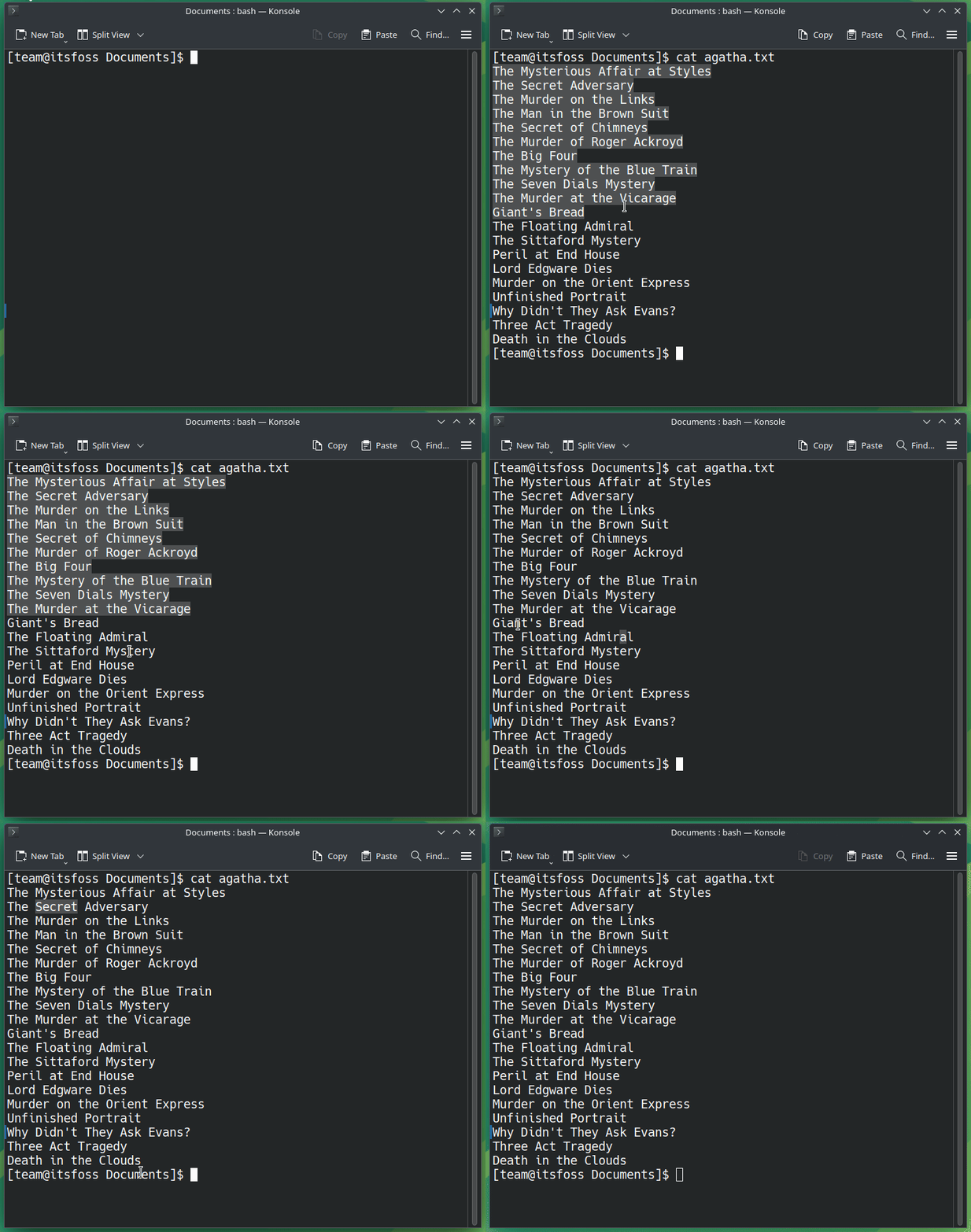
In a terminal, you might already know that you can select a word by double-clicking on it.

However, if you hold the Shift key and left-click on another word after that, all the text between the first and last selected text will also be highlighted. No need to manually drag the cursor to select those.

It may not work in all the terminal emulators (i.e. terminal applications).

FOSS Weekly #25.01: 2 New Free Books, Homelab Dashboards, Plan 9 and More

๐Ÿคฃ Meme of the Week

Oh, that would be something. ๐ŸคŒ ✨

FOSS Weekly #25.01: 2 New Free Books, Homelab Dashboards, Plan 9 and More

๐Ÿ—“️ Tech Trivia

On December 31, 1889, American Bell reorganized and transferred its assets to AT&T to bypass Massachusetts laws. By becoming the parent company, AT&T took control of the Bell System. This move eventually led to AT&T becoming a legalized monopoly in the U.S.


๐Ÿง‘‍๐Ÿค‍๐Ÿง‘ FOSSverse Corner

What was your favorite distro in 2024? Join other FOSSers and share yours!

What’s your favourite Linux distro? Why do you use that one?
You have to move with the times. When you retire you may have the luxury of doing it your way. Snaps are like static binaries, but with some extra crud to fit them into the package system. I dont see why they should startup slowly… there must be some clunky scripts involved. A static binary is large, but not so large that it would affect load time. I have one app (keenwrite) that comes as a static binary… it loads quite fast and my machine is rather like your Dell with early corei7 and…
FOSS Weekly #25.01: 2 New Free Books, Homelab Dashboards, Plan 9 and More

❤️ With love

Share it with your Linux-using friends and encourage them to subscribe (hint: it's here).

Share the articles in Linux Subreddits and community forums.

Follow us on Google News and stay updated in your News feed.

Opt for It's FOSS Plus membership and support us ๐Ÿ™

Enjoy using Linux in 2025 ๐Ÿง


from It's FOSS https://ift.tt/3AoPsX8
via IFTTT