For the longest time, I assumed running LLMs locally needed a decent GPU. That’s what most guides implied, and honestly, that’s how the ecosystem felt not too long ago. But after digging into recent tools and actually trying things out on CPU-only setups, that assumption doesn’t really hold anymore.
Newer model formats like GGUF and aggressive quantization (think 4-bit variants) have made these models much smaller and lighter. At the same time, runtimes such as Llama.cpp have become efficient enough that CPUs (yes, even older ones) can run them without completely falling apart.
That said, I quickly realized something more important: just because a model runs doesn’t mean it’s usable.
While testing, I found that the real metric that matters isn’t model size or even RAM usage, it’s actually tokens per second. A model providing a response at 3–5 tokens per second technically works, but it feels painfully slow in practice. On the other hand, once you get into the 15–30 tok/s range, things start to feel responsive enough for everyday use.
So instead of just listing models that can run on CPU, I focused on ones that are actually usable on low-end machines. This list is based on my own experimentation.
If you're working with an older laptop, Raspberry Pi, or basic desktop, this guide would be helpful for running your local AI model successfully and speedily.
What “Runs well on CPU” actually means
CPU performance varies wildly depending on model size and quantization. Formats used by tools like llama.cpp let you run models in reduced precision. Q8 offers better quality but is slower than Q4_K, which is much faster but comes with slightly reduced quality.
I found models ranging from ~40+ tokens/sec for tiny models all the way down to ~4 tokens/sec for larger 4B models. It completely changes how usable a model feels.
I would say, 1B-2B models consistently offer the best balance. They're small enough to fit comfortably within 8 GB RAM (with quantization) and maintain decent token speeds. Additionally, they are capable of handling basic reasoning and producing useful responses.
From my experience, Q4_K_M quantization usually hits the best balance. It provides fast response times, consumes low RAM, and produces acceptable output quality for most tasks. It significantly improves tokens per second, sometimes enough to move a model from painfully slow to actually usable.
My hardware on which I'm performing these tests
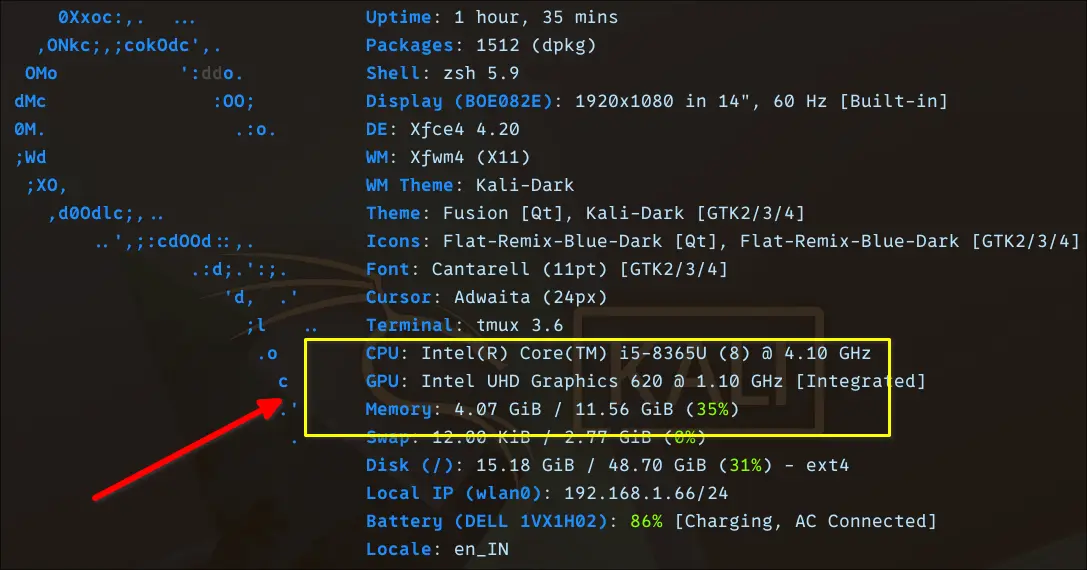
I'm performing these tests on an Intel i5-generation CPU laptop with around 12 GB of RAM. I’m not running these tests on a workstation or anything close to “AI-ready” hardware. This is a fairly typical older laptop. It's the kind many Linux users already have lying around.
Though the device comes with an Integrated Intel UHD Graphics 620 GPU, it is irrelevant for LLMs here. While some tools experiment with iGPU acceleration, in practice, all meaningful inference in my tests is CPU-bound.
I deliberately stuck to this machine because it reflects a realistic baseline. If something runs well here, it will likely run on older laptops and low-end desktops without any upgrades.
With around 12 GB RAM, 3B–4B models fit comfortably (especially with Q4 quantization). Anything beyond that requires compromises, including swap, resulting in slower performance.
While testing, I kept asking: Would I actually use this daily on this machine? If a model felt sluggish, I treated it as impractical. Whereas if it responded smoothly, even at smaller sizes, it made the cut.
Quick reality table
| Model | Eval Rate | Disk Size |
|---|---|---|
| Qwen 3 0.6B | ~34–36 tok/s | ~500 MB |
| TinyLlama 1.1B | ~25–28 tok/s | ~638 MB |
| Gemma 3 1B | ~18.6 tok/s | ~815 MB |
| Gemma 4 E2B | ~9.9 tok/s | ~7 GB |
| Granite 4 3B | ~8.5–9 tok/s | ~2 GB |
| Phi 4 Mini 3.8B | ~6.90 tok/s | ~2.5 GB |
| OpenHermes 7B | ~4.1–4.3 tok/s | ~4.1 GB |
| Ministral 3 8B | ~3.16 tok/s | ~6 GB |
8 LLMs that actually make sense on CPU
Let's dive into the LLMs. I used Ollama in this setup.
Qwen 0.6B
I started with Qwen 3 0.6B, mainly to establish a baseline for how fast a tiny model can run on a CPU. Qwen models are known for being efficient, and this 0.6B variant is about as lightweight as it gets while still being usable.
To run it locally, I used ollama command:
ollama run qwen3:0.6b --verboseThe --verbose flag exposes detailed metrics like token evaluation rate, total duration, and prompt processing speed. I only used it for this initial run to get a clearer picture of performance.
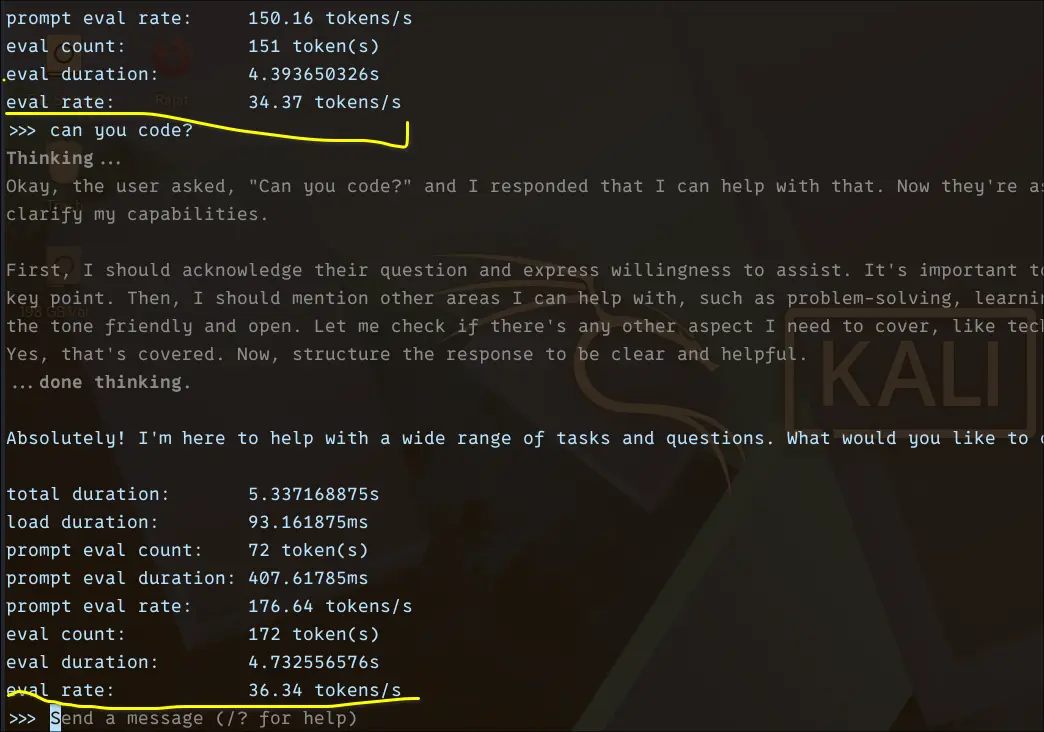
The results were honestly impressive. I consistently saw ~34–36 tokens/sec eval rate. In practical terms, this feels instant. Responses stream smoothly without noticeable delay.
Of course, this comes with tradeoffs. The model is fast, but limited in depth and reasoning. Still, as a baseline, it clearly shows what’s possible on CPU when the model size is kept small.
TinyLlama 1.1B
After establishing a baseline with Qwen 0.6B, I moved to TinyLlama 1.1B to see how much capability you can gain without sacrificing too much speed.
TinyLlama is a 1.1B parameter model trained on the Llama 2 architecture, but heavily optimised for efficiency. It was trained on ~3 trillion tokens, which is unusually high for a model of this size. That large training corpus is what gives it a noticeable edge over most sub-2B models.
Architecturally, it sticks to a decoder-only transformer design, similar to Llama. TinyLlama is not just small but is also efficiently designed to run well on limited hardware.
I run it locally using:
ollama run tinyllama:1.1b --verbose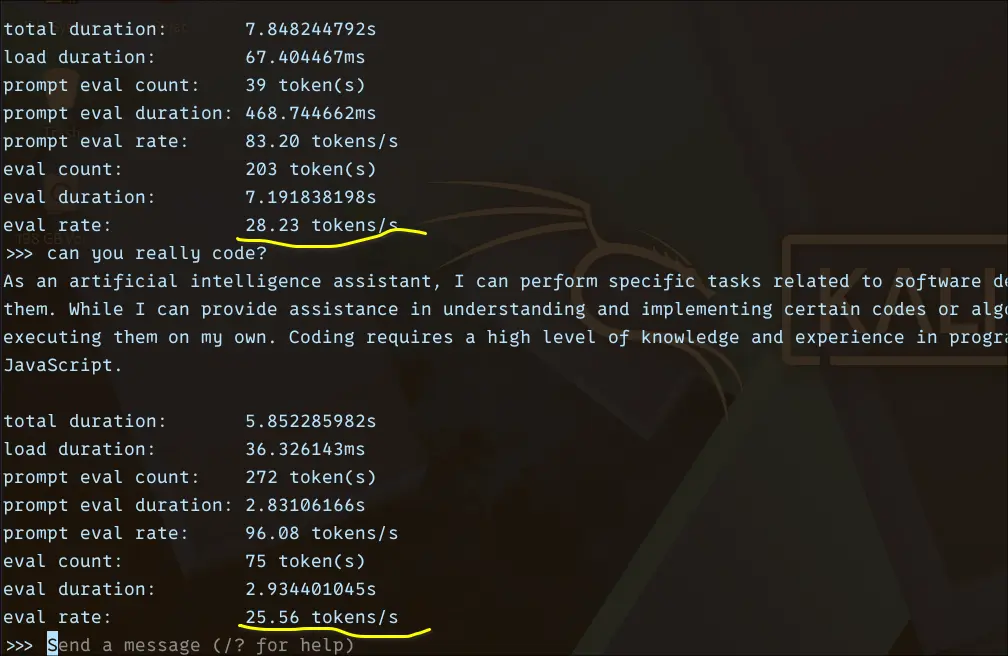
From the benchmark, it feels slightly slower, but still very responsive as compared to Qwen 0.6B.
Eval rate: ~25–28 tokens/sec
Total duration: ~5–7 seconds (short responses)
Prompt eval rate: ~80–96 tokens/sec
What surprised me here is how well TinyLlama holds up despite being just 1.1B. It’s much more coherent than ultra-small models. It also handles basic coding prompts better than expected.
Gemma 3 1B
Next, I tested Gemma 3 1B, which sits in a slightly higher class than sub-1B models like Qwen 0.6B. The expectation here was simple: a bit slower, but noticeably better output quality.
I ran it using:
ollama run gemma3:1b --verbose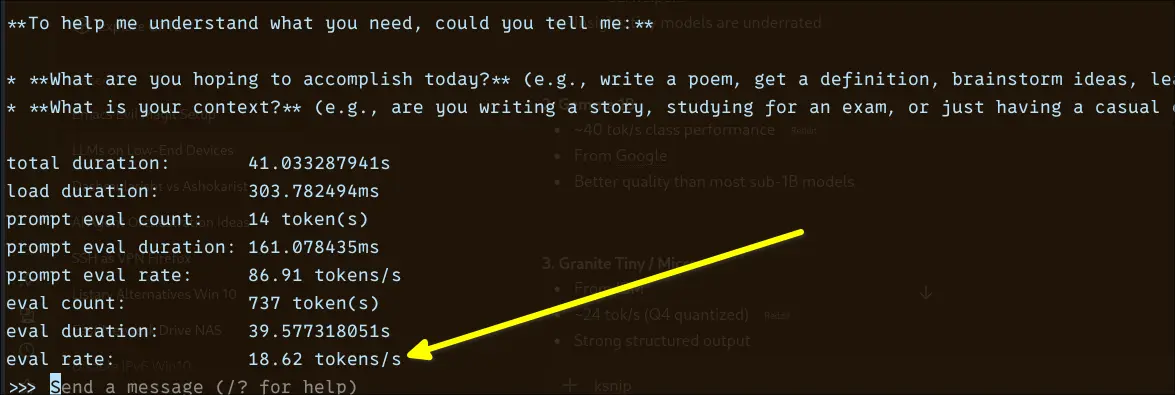
The performance landed at around ~18.6 tokens/sec, which puts it firmly in the “usable” tier. It’s not instant like the smaller Qwen model, but it’s still responsive enough for real interaction. You can feel a slight delay when generating longer responses, but it never becomes frustrating.
What stood out to me was the tradeoff. Compared to 0.6B models, Gemma 1B produces more structured and context-aware responses. It handles prompts more thoughtfully, especially when you ask for explanations or multi-step answers.
So while you give up some speed, you gain a noticeable bump in quality, making this a solid middle ground for CPU-only setups.
Gemma 4 E2B
After testing smaller models, I wanted to see how far I could push things on this CPU-only setup. That’s where Gemma 4 E2B comes in, a significantly larger and more capable model compared to the earlier ones.
I ran it with:
ollama run gemma4:e2b --verbose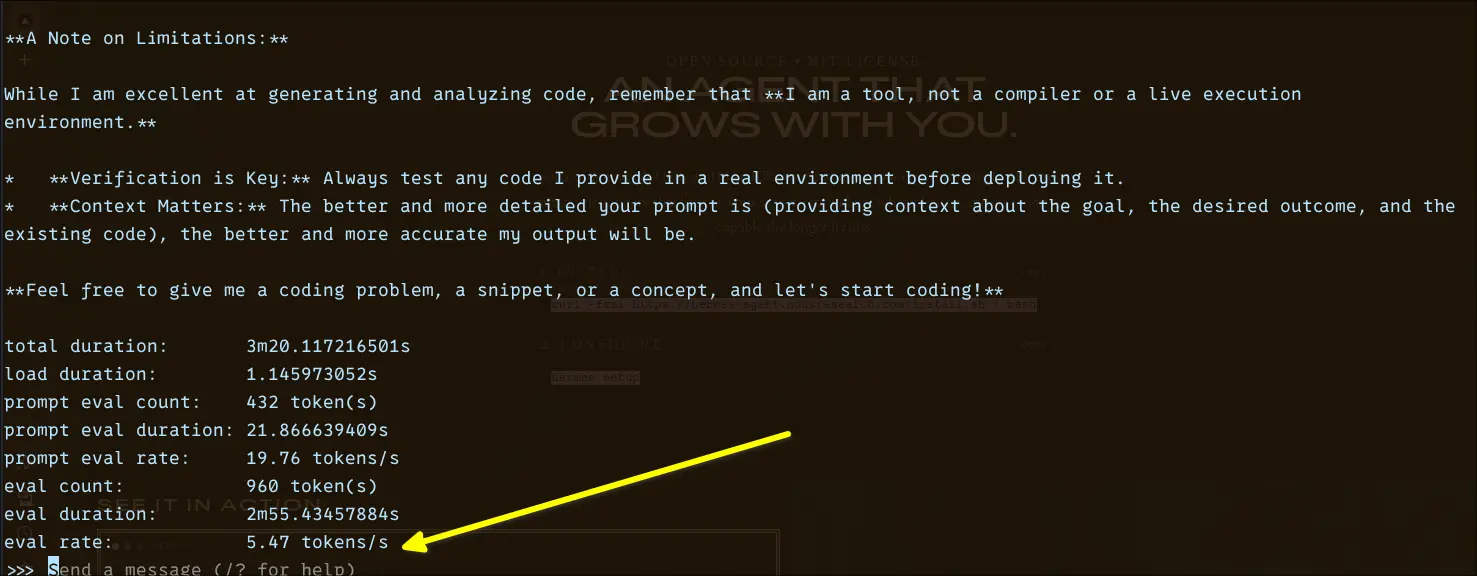
The performance drop was immediately noticeable. I was getting around ~9.9 tokens/sec, which places it right on the edge of what I’d call “slow but workable.”
That said, the quality jump is real. Responses are more detailed, better structured, and noticeably stronger for complex prompts, especially coding and multi-step explanations. It feels closer to what you’d expect from a “serious” assistant.
The tradeoff becomes very clear here: you’re exchanging speed for capability. On a low-end CPU, this is about as far as you can reasonably go before the experience starts to feel sluggish for everyday use.
Granite4 3B
Next, I tried Granite 3B, expecting it to land comfortably in the “sweet spot” range like most 3B models. On paper, this size usually delivers a good balance between speed and quality on the CPU.
I ran it using:
ollama run granite4:3b --verbose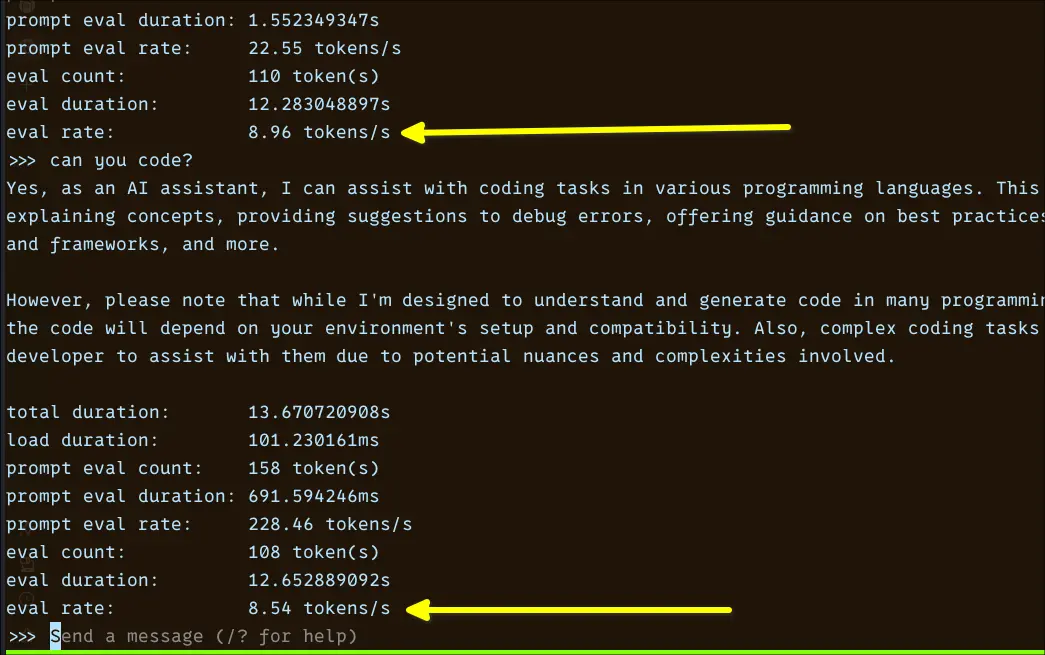
In practice, the performance came in at around ~8.5–9 tokens/sec, which was a bit surprising. That puts it closer to the “slow but workable” tier rather than the typical 3B expectation of ~15–20 tok/s.
Responses aren’t painfully slow, but there’s a noticeable delay, especially compared to lighter models like Qwen 0.6B or even Gemma 1B. It feels usable, but not snappy.
Phi4 3.8B
After poking around with various small models, I was curious about Microsoft's entry into the sub-4B space. Phi 4 Mini carries a reputation that punches above its parameter count, particularly for reasoning and structured tasks. Let's see what it actually feels like on a CPU-only setup.
I run this with:
ollama run phi4:3.8b --verbose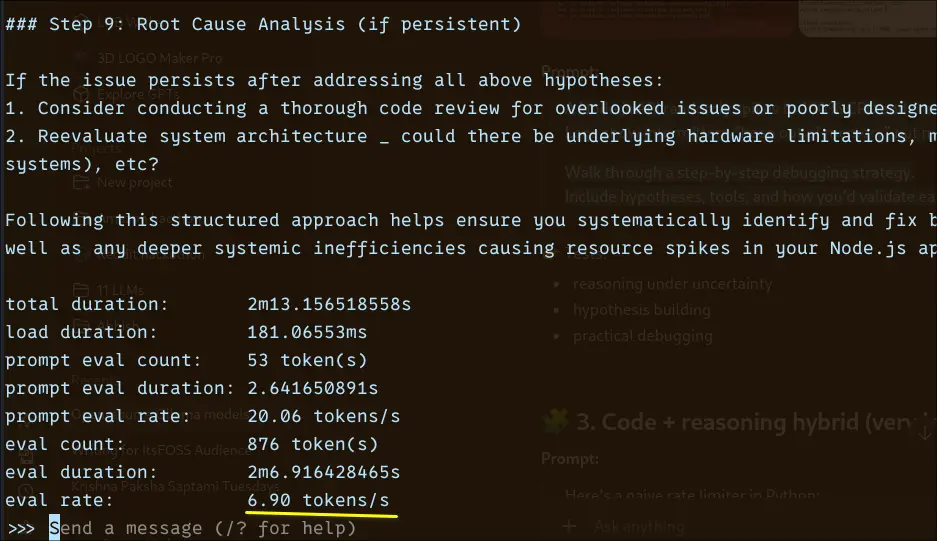
The prompt eval rate at 20.06 tokens/sec is respectable. The model processes your input quickly. The CPU showing its limits is during generation: 6.90 tokens/sec for 876 tokens means you're waiting just over two minutes for a long, detailed response. That's consistent with what you'd expect from a 3.8B model doing real work on CPU.
Phi 4 Mini comes in at around 2.5 GB on disk, compact enough to sit comfortably on systems with 8 GB RAM. The default pull uses Q4_K_M quantisation, which is the sweet spot most models land on for balancing quality against memory footprint.
If reasoning quality matters more than raw speed for your use case, Phi 4 Mini makes a strong argument for itself in this size class.
Openhermes 7B
OpenHermes is a fine-tuned variant built on top of the Mistral 7B architecture, designed to improve conversational quality and instruction adherence. Instead of focusing purely on raw model capability, it’s trained to produce cleaner, more aligned, and more usable outputs right out of the box. In practice, this means better formatting when you ask for explanations, summaries, or step-by-step answers.
Under the hood, it inherits Mistral’s efficient transformer design, which is already known for performing well relative to its size. The difference here comes from the instruction tuning layer, which makes it feel more like a polished assistant rather than a raw base model.
I run it locally using:
ollama run openhermes:7b-mistral-v2-q4_K_M --verbose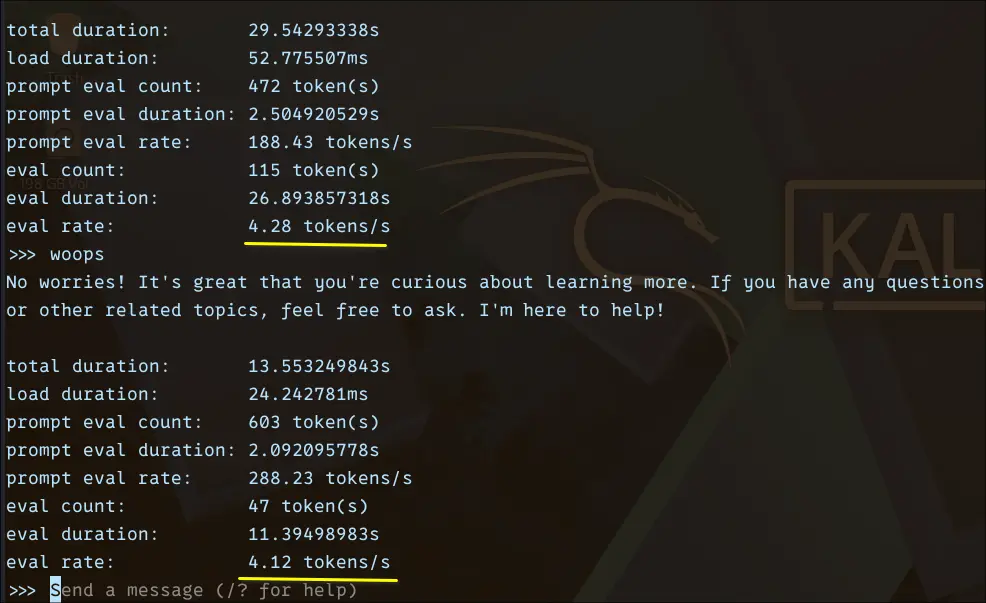
From the benchmark, the eval rate consistently stayed around ~4.1–4.3 tokens/sec, with total response times ranging between ~13 and 29 seconds depending on output length. Prompt processing itself was relatively fast, often exceeding ~180–280 tokens/sec, but generation is where the slowdown becomes noticeable.
What makes OpenHermes interesting is its output quality. It provides more structured, better formatted, and easier-to-follow responses.
Ministral 3 8B
After testing smaller models, I wanted to see how far a CPU-only setup can realistically go. That’s where Mistral 3 8B comes in.
Ministral models are well known for delivering strong performance relative to their size, and the 8B variant sits in an interesting spot. It’s significantly more capable than 3B models, but still just about runnable on a 10GB RAM system with quantisation. It feels close to a full-scale general-purpose LLM designed for conversational tasks, coding assistance, and structured reasoning.
I run it locally using:
ollama run ministral-3:8b --verbose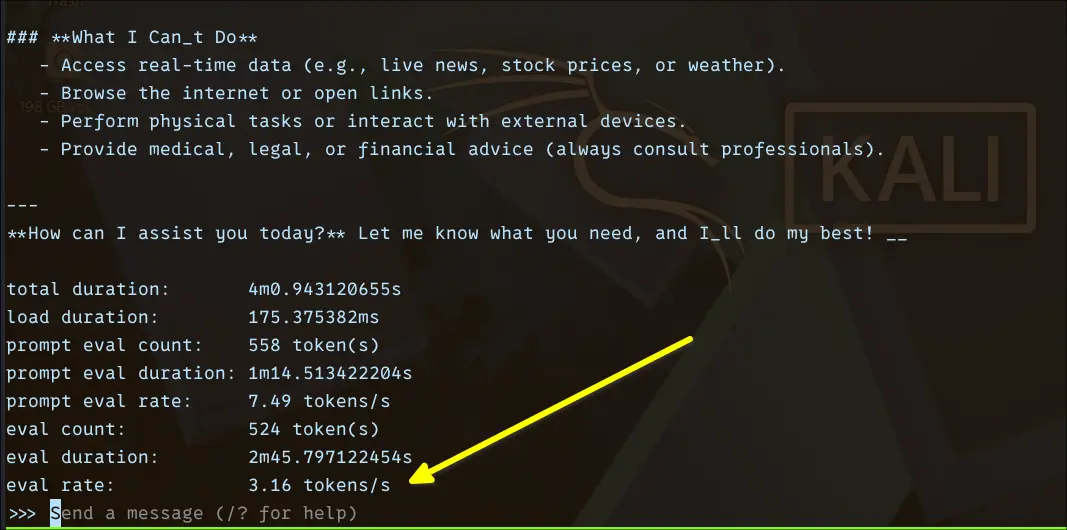
From the benchmark:
Eval rate: ~3.16 tokens/sec
Eval duration: ~2m 45s for ~524 tokens
Prompt eval rate: ~7.49 tokens/sec
This is a big drop compared to smaller models, and that’s expected. In practical use, you’ll notice a delay before responses start, token generation is steady but slow, and longer answers require patience. It’s not unusable, but it’s definitely not “interactive” in the same way as 1B models.
One interesting thing I quickly noticed, with 8.9 billion parameters, ministral-3 comes within a size of around 6 GB disk space, while Gemma 4, with 2B billion parameters, takes around 7 GB.
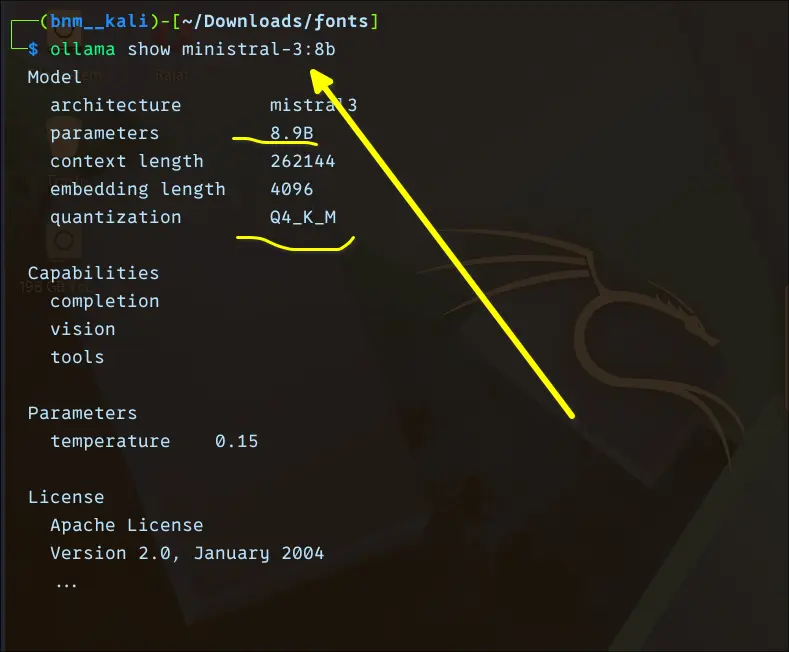
Upon close inspection, it turned out Ministral 3 is using Q4_K_M quantization.
Conclusion
| Model | Params | Eval Rate | Disk Size | Quantization | Speed Tier | Best For |
|---|---|---|---|---|---|---|
| Qwen 3 0.6B | 0.6B | ~34–36 tok/s | ~500 MB | Q4_K_M | ⚡ Fastest | Quick lookups, basic tasks |
| TinyLlama 1.1B | 1.1B | ~25–28 tok/s | ~638 MB | Q4_K_M | Very fast | Coding help, coherent chat |
| Gemma 3 1B | 1B | ~18.6 tok/s | ~815 MB | Q4_K_M | Fast | Structured explanations |
| Gemma 4 E2B | 2B | ~9.9 tok/s | ~7 GB | Q4_K_M | Moderate | Complex prompts, coding |
| Granite 4 3B | 3B | ~8.5–9 tok/s | ~2 GB | Q4_K_M | Moderate | General-purpose use |
| Phi 4 Mini 3.8B | 3.8B | ~6.90 tok/s | ~2.5 GB | Q4_K_M | Slow | Reasoning, structured tasks |
| OpenHermes 7B | 7B | ~4.1–4.3 tok/s | ~4.1 GB | Q4_K_M | Slow | Aligned, formatted output |
| Ministral 3 8B | 8.9B | ~3.16 tok/s | ~6 GB | Q4_K_M | Slowest | Long-form, async tasks |
After running all eight models through their paces on the same CPU-only hardware, a few things became clear.
First, the assumption that local LLMs need a GPU is outdated. Tools like Ollama, combined with GGUF quantization, have genuinely changed what's possible on modest hardware.
Second, smaller doesn't mean useless. Qwen 0.6B and TinyLlama 1.1B surprised me consistently. For quick lookups, basic coding help, or conversational tasks, they hold up well and feel genuinely responsive. If raw speed matters most, these are hard to beat.
Third, the 3B–4B range is where things get interesting. Gemma 4 E2B, Granite 3B, and Phi 4 Mini all sit in a space where you're making a conscious trade: slower responses in exchange for noticeably better reasoning and output quality. Whether that trade is worth it depends entirely on your use case.
Beyond 7B, local AI models like OpenHermes and Ministral 3 8B both produce impressive output, but at 3–4 tokens/sec. They're better suited for tasks where you ask a question, step away, and come back, not for back-and-forth conversation.
If I had to pick one model for daily CPU-only use, I'd land on something in the 1B–2B range for speed, or Phi 4 Mini if I needed structured reasoning and could tolerate the wait.
The honest takeaway: local AI on CPU is real, practical, and improving fast. You don't need to wait for a GPU upgrade to start experimenting.

from It's FOSS https://ift.tt/1gust5k
via IFTTT

Tidak ada komentar:
Posting Komentar