Sabtu, 04 April 2026

Git Isn’t Just for Developers. It Might Be the Best Writing Tool Ever

In 2019, I watched a fellow writer almost lose her life’s work.

We were working in an advertising agency. Like most writers who end up in advertising, we were both secretly working on our novels. One afternoon, after lunch, I noticed her pacing around the office, rifling through her bag, checking every desk. Her irritation quickly turned into panic.

Her pen drive was missing.

Hours later, on the verge of tears, she told us why this particular pen drive mattered: it held the only copy of her manuscript.

My first reaction was disbelief. Only copy?

No emailed draft to herself, no Google Drive or Dropbox, no backup anywhere? The answer was simple: she hadn’t thought about it. Relative tech illiteracy had put an entire novel at the mercy of a misplaced USB stick.

My reaction was part heartbreak, part annoyance, and part dread. That night I sat down to audit my own practice—how I recorded, recalled, and stored my work.

At the time, the source of truth for my fiction was a single folder on Dropbox, with dozens of subdirectories by project. All the manuscripts were ‎.doc or ‎.docx. I took regular backups of that folder, zipped them, and emailed them to myself with dates and times in the subject line. If something went wrong, I could theoretically roll back to a recent version.

On paper, that sounded reasonable. In my body, it felt wrong. I couldn’t articulate why, but I knew “not losing everything” was not the same as “leaving behind a studio that someone else could actually use.”

A few weeks later, on a whim, I decided to relearn programming after almost twenty years. Maybe, I thought, programming in 2019 would be kinder than it had been in 2001.

The first lesson on The Odin Project was on Git.

I went through it expecting boilerplate developer lore and came out with something else: a way to resolve the unease I had been carrying about my writing. Git didn’t just promise safety from catastrophic loss; it offered a way to keep a living, navigable history of my writing. It suggested that my studio didn’t have to be a pile of files.

It could be a time machine instead.

I remember feeling irritated that night: why was Git not being taught to writers?

The Timelessness of Plain Text

Sociologist Kieran Healy wrote a guide for “plain people” on using plain text to produce serious work. Neither he nor I are the first non‑programmers to come to this realization, and hopefully not the last: plain text is the least glamorous, most important infrastructure upon which I build my work. I use the word infrastructure intentionally: plain text forms the substrate that underlies, connects, and outlives higher-level applications. For people like you and me---whether we are writers or not---choosing to work with plain text is a political choice about memory and power, not a mere nerdy preference about file types.

It has been over six years since I moved all my writing to plain text and Git. Before that, my life’s work sat in one folder, spread over a handful of ‎.doc and ‎.docx files. Now, plain text is the lifeblood of everything I write—a choice to live closer to the infrastructure layer where I retain power over time, interoperability, and preservation. The alternative is renting them from whoever owns the fancy app.
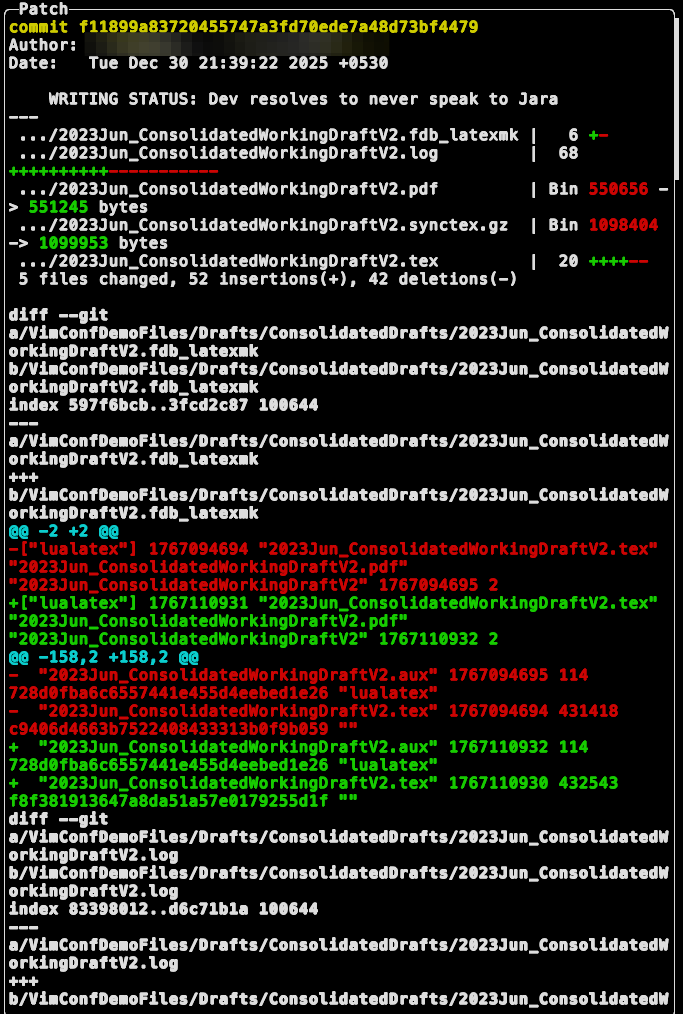
An extract of the writer's git commit history © Theena Kumaragurunathan

Why does this matter?

In my last two columns, I spoke about how Emacs interfaces with my work: and using it for writing my next novel ; put simply, why I choose to work on Emacs in the age of AI tools. None of my Emacs-fu would be possible without plain text and Git sitting underneath.

Most of us are told that platforms will take care of our work. “Save to cloud” is the default. Drafts live in Google Docs, outlines in Notion, images in someone else’s “Photos,” notes in an app that syncs through servers we don’t control. It feels safe because it is convenient. It feels like progress: softer interfaces, smarter features, less friction.

The cost is deliberately obfuscated.

You pay it when the app changes its business model and the export button slips behind a subscription.

You pay it when comments you believed were part of the record are actually trapped inside an interface that will be sunsetted in ten years.

You pay it when a future collaborator has to sign up for a dead service—if that’s even possible—just to open a reference document.

You pay it when your own older drafts become psychologically “far away,” not because you are ashamed of them, but because the path to them runs through expired logins and abandoned software.

A repository of written work hosted entirely on proprietary, cloud‑bound software is a studio that dies when the companies behind it do—or when they decide that their future no longer includes you.

If you want your studio to outlive you, you cannot outsource its memory to platforms that see your work as a data source, a training set, or a metric. You need materials and tools that privilege longevity over lock‑in.

The Studio as a Text Forest
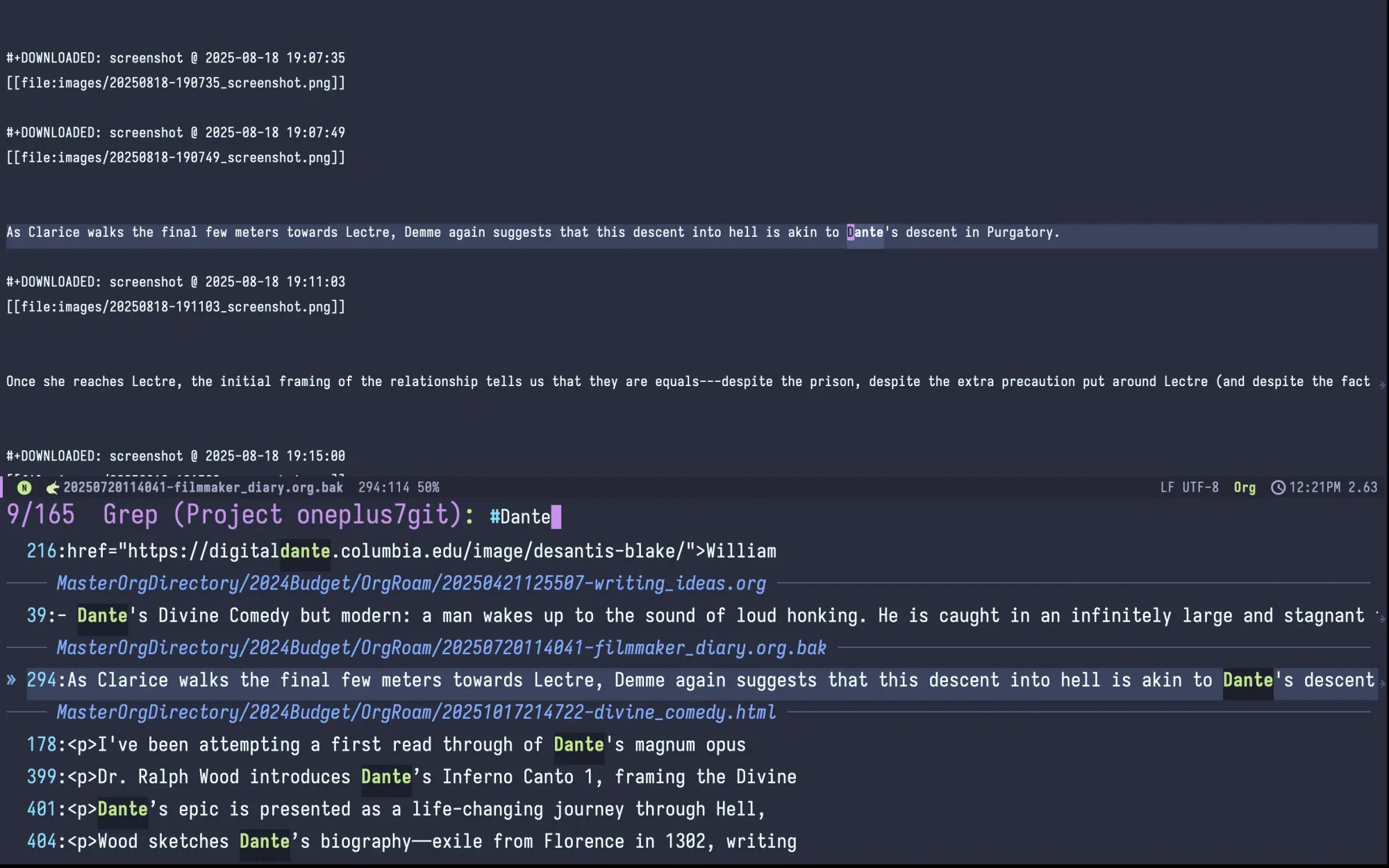
Showing my writing studip built on git

Plain text works because it is not sexy. It is not “disruptive.” Good. That is precisely why it is so important.

A text file is one of the most durable digital objects we have. It has remained readable, without elaborate translation, across decades of hardware, operating systems, and software ecosystems. It is trivial to convert into other formats: PDF, EPUB, HTML, printed book, subtitles. It compresses well. It plays well with search. It fails gracefully.

When I began moving my practice into plain text, I was not thinking about posterity. I was thinking about control. I wanted to pick up my work on any machine and carry on. I wanted to stop worrying that an update to a writing app would quietly rearrange my files. I wanted my drafts to be mine, not licensed to me through someone else’s interface.

The result is a studio structured less like a warehouse of finished products and more like a forest of living documents.

Each project—work‑in‑progress novels, screenplays, this very series of essays, research trails—lives in its own directory inside a single mono‑repo for all my writing. Inside each directory are text files that do one thing each: a chapter, a scene, a note, a log of cuts and revisions. The structure is legible at a glance. You don’t need me to draw a diagram or sell you a course. Anyone who knows how to open a folder can navigate it.

This is not nostalgia for a simpler computing era. It is about lowering the barrier for future humans—future me, future collaborators, future scholars, future strangers—to enter the work without first having to resurrect my software stack.

Plain text gives us a chance to build archives with the same openness as a box of annotated manuscripts, without the paper slowly turning to dust.

But text alone is not enough. A studio that outlives the writer needs a memory of how the work changed.

Version Control as Time Machine and Conversation

Linus Torvalds probably never intended Git for use by writers. And perhaps that is why I view it as almost possessing magical powers. You see, with Git I can talk to my future self, and my future self can talk to my past self.

In software, version control lets teams collaborate on code without stepping on each other’s toes. In a solo writing practice, it becomes something else: a time machine, a ledger of decisions, a slow, ongoing conversation between different iterations of the writer.

Every time I hit a significant point in a project—adding a chapter, making a painful cut, restructuring a section—I make a commit. I write a short message explaining what I did and why. Over months and years, these messages accumulate into a meta-narrative: not the story itself, but a veritable documentary of how my stories came to be.

When I open the log of a book or a long essay, I can scroll through those messages and see the ghost of my own thinking. I see the point where I abandoned a subplot, the week I rewrote an ending three times, the day I split a single swelling document into a modular structure that finally made sense. It is humbling and reassuring in equal measure: it shows me that good writing isn't a result of strokes of inspiration but sitting down consistently to wrangle my writing brain.

At some point, selected manuscripts from this mono‑repo will be made publicly available under a Creative Commons license.

When that happens, I will not just be publishing a final text. I will be publishing its making. A reader in another part of the world, years from now, will be able to trace how a scene evolved. A young writer will see that the book they admire was once a mess. A collaborator will be able to fork the repo, experiment with adaptations, translations, or critical editions, and perhaps send those changes back.

Version control turns my writing studio into something that can be forked, studied, and extended, not just consumed.

This stands in stark contrast to the way most digital platforms treat creative work today: as a stream of “content” to be scraped, remixed anonymously into generic output, and resurfaced as something merely “like” you. When your drafts live inside a proprietary system, you are not only dependent on that system to access them; you are also feeding an apparatus whose incentives diverge sharply from your own.

A Git repository of plain‑text work, mirrored in places you control, is not magically immune to scraping. Mine has been private from the moment I created it, and it will remain so until I am ready to open parts of it on an instance whose values align with my own. Even then, determined actors can copy anything that is accessible. The point is not perfect protection. The point is to design for humans first: to make the work legible and usable to future people on terms that you have thought about, instead of leaving everything at the mercy of opaque platforms.

Designing for the Long Afterlife

What does it mean, practically, to design a studio that outlives you?

It does not mean embalming your work in an imaginary final state. The texts we now call “classical” did not survive because someone froze them. They survived because people kept copying, translating, annotating, arguing with them. They survived because they were malleable, not because they were pristine.

If I want my work to have any chance at a similar afterlife—not in scale, but in spirit—I need to make it easy for future people to touch it.

For me, that means:

  • The core materials of my work live in plain text, organized in a directory structure that makes sense without me.
  • The history of that work is kept in Git, with commit messages written for humans, not machines.
  • The repositories I want to be accessible are published under licenses that explicitly permit study, remixing, and adaptation.
  • The studio is mirrored in more than one place, including at least one I self‑host, so its existence is not tied to a single company’s fortunes.

Notice what this does not require. It does not forbid me from using GUI tools, publishing platforms, or even proprietary software where necessary. I am not pretending to live in a bunker with only a terminal and a text editor. I am saying that the source of truth for my work is kept somewhere that does not depend on the goodwill of companies for whom my creative life is just another asset.

This is not an overnight migration. It took me years to get from a single Dropbox folder of ‎.docx files to my current setup. The important part was the direction of travel. Every project I started in plain text, every journal I kept as a folder of files instead of a locked‑down app, every book I moved into a Git repo rather than an opaque project bundle, was a step toward a studio that a future human could actually enter.

A Quiet Resistance to Big Tech's Power

We are entering an era where large AI systems are trained on whatever they can scrape. The default fate of most creative work is to be swallowed, blurred, and regurgitated as undifferentiated “content.” It becomes harder to tell where a particular voice begins and the training data ends. As more of the public web fills with machine‑generated sludge, it becomes harder for human readers to find specific, intentional work without passing through the filters of a few large intermediaries.

A self‑hosted, plain‑text, version‑controlled studio will not stop any of this by itself. But it is a form of quiet resistance. And at this point in our collective history, where the same infrastructures that mediate our creative lives are entangled with surveillance, automated propaganda, and the machinery of war, even small acts of refusal matter.

Moving a novel into plain text will not topple a platform. Hosting your own Git server will not end a conflict. But these choices shape who ultimately has their hands on the levers of our personal and collective memories.


from It's FOSS https://ift.tt/8I1jalH
via IFTTT

Jumat, 03 April 2026

Proton Launches Workspace and Meet, Takes Aim at Google and Microsoft

If you are a regular reader of ours, then you know that Proton is one of the privacy-focused services we usually vouch for. I have been using their various services personally for quite a while now, and I can confidently say that they know what they are doing.

Of course, I am just a random person on the internet yapping about how good it is. If you haven't ever tried their offerings, then you can decide for yourself, as they have launched two new services that could make your move away from Big Tech easier.

Two Big Launches

a purple-colored banner that shows the various proton services included in proton workspace

Proton Workspace is a comprehensive suite that pulls all of Proton's services together under one roof, aimed at businesses and teams that want a privacy-first alternative to Google Workspace and Microsoft 365.

It brings together Mail, Calendar, Drive, Docs, Sheets, VPN, Pass, Lumo, and the newly launched Proton Meet (more on it later). Businesses (both small and big) that want Proton's full suite without having to manage a separate subscription for every service and team member can go for this.

As an added bonus, being on a Swiss platform means the US government can't compel Proton to hand over your data the way it can with Google or Microsoft under the CLOUD Act.

📋
The URLs for some Proton services above are partner links.
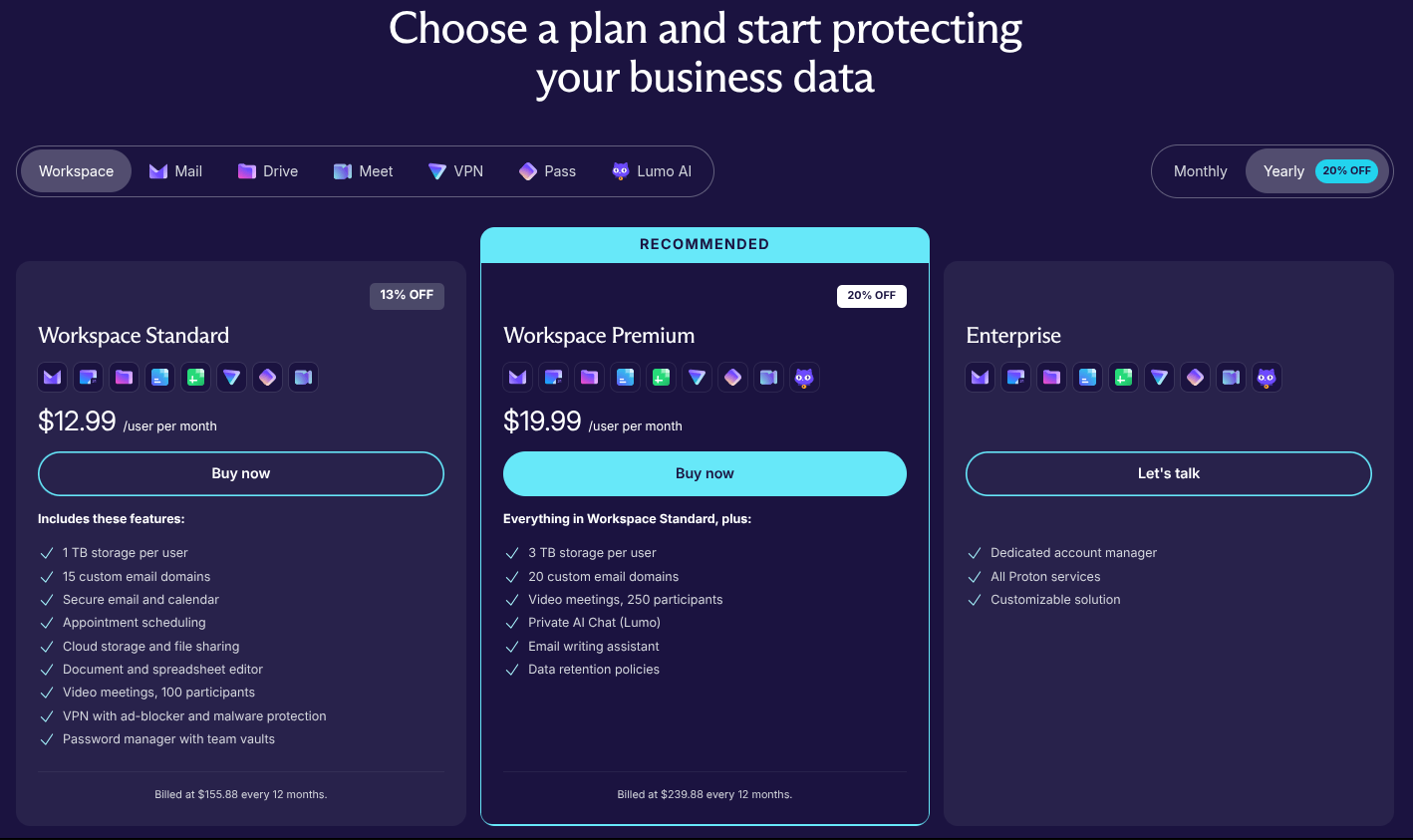
the three pricing tiers for proton workspace is shown here, with workspace standard ($12.99 per user per month annually), workspace premium ($19.99 per user per month annually), and enterprise (contact sales team) listed

If Proton Workspace interests you, then you can opt for one of the two paid plans.

Workspace Standard, at $12.99/month per user on an annual plan or $14.99/month per user if you pay monthly, gets you Mail, Calendar, Drive, Docs, Sheets, Meet, VPN, and Pass. It also includes 1 TB of storage per user and support for up to 15 custom email domains.

Workspace Premium bumps that up to 3 TB of storage per user, 20 custom email domains, higher Meet capacity (250 participants vs. 100 on Standard), access to Lumo, and email data retention policies at $19.99/month per user annually or $24.99/month per user on a monthly plan.

Large organizations can also reach out to Proton directly for a specially tailored Enterprise plan, and if you are already a Proton Business Suite member, then you get a free upgrade to Workspace Standard.

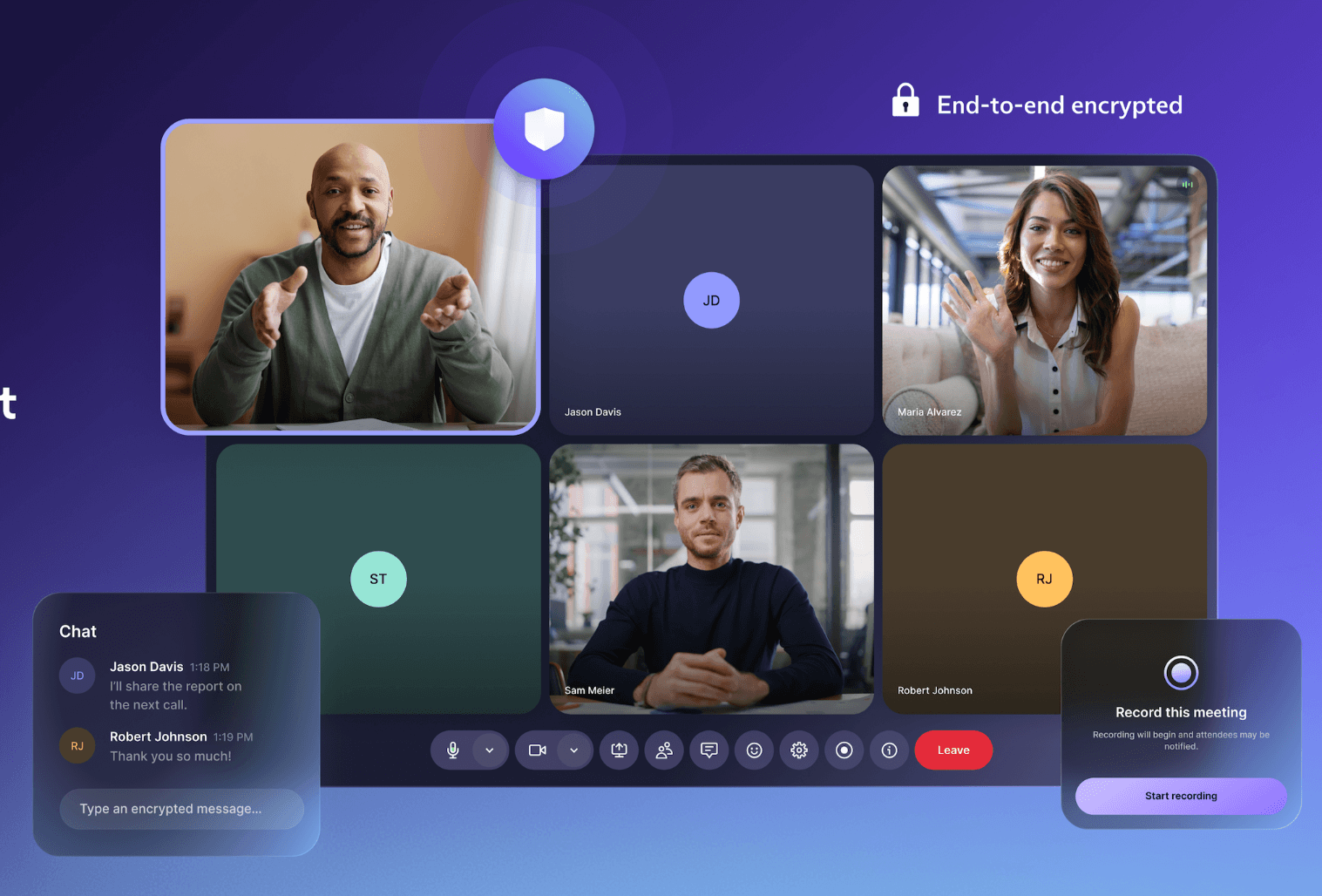
a purple-colored banner that shows a demo of proton meet with many participants in a video call

On the other hand, Proton Meet is their new end-to-end encrypted video conferencing tool, and it goes up directly against the likes of Zoom and Google Meet.

Every call, including audio, video, screen shares, and chat, is encrypted using the open source Messaging Layer Security (MLS) protocol. Thanks to that, not even Proton can see what goes on in your meetings, and there are no logs either.

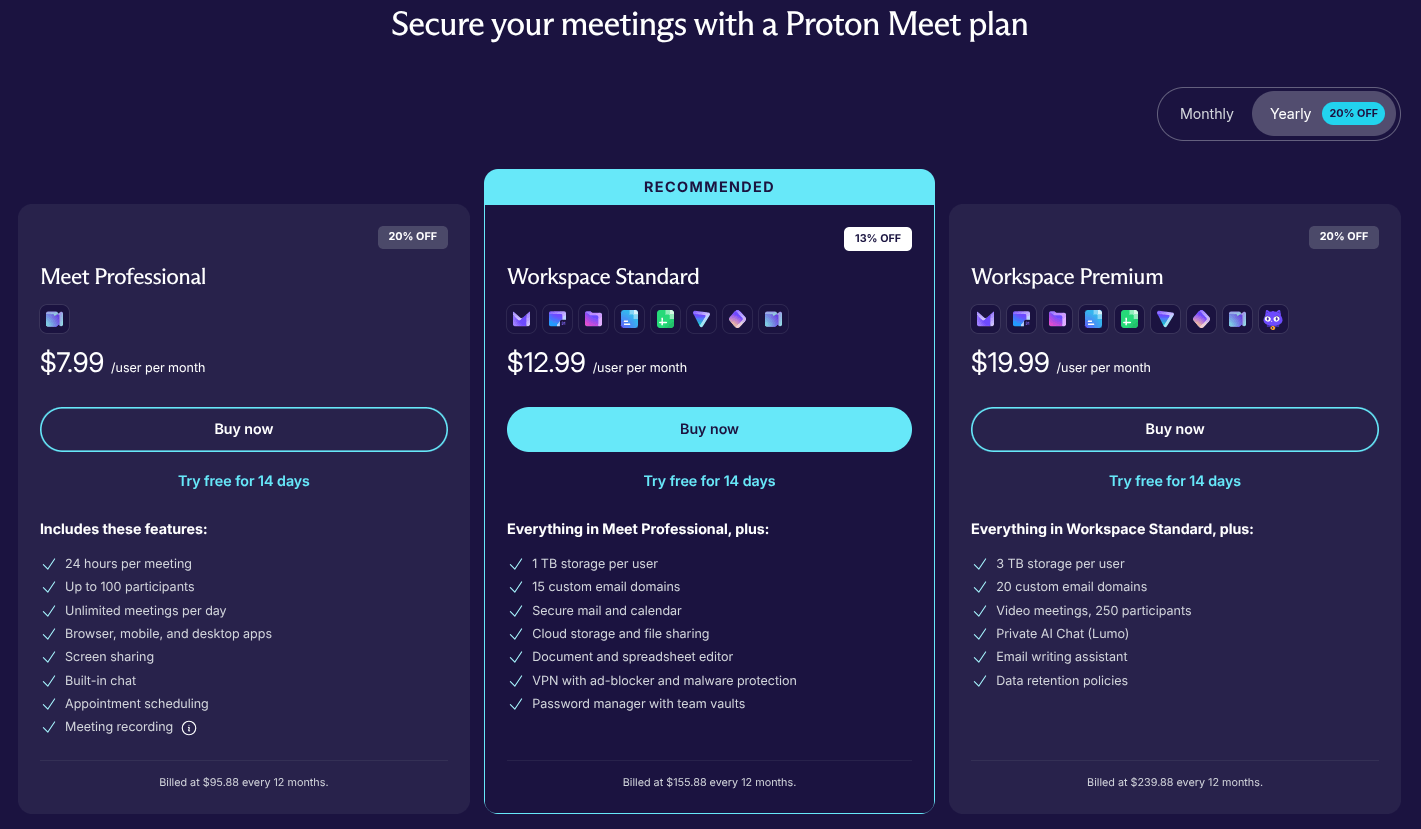
the three pricing tiers for proton meet is shown here, with meet professional ($7.99 per user per month annually), workspace standard ($12.99 per user per month annually), and workspace premium ($19.99 per user per month annually) listed

As for the pricing, the Free tier lets anyone host calls with up to 50 participants for up to an hour without requiring a Proton account. For more headroom, the Meet Professional plan costs $7.99/user/month and raises the participant cap to 100, with meeting durations of up to 24 hours.

Teams that want Meet bundled with the rest of Proton's suite can opt for Workspace Standard or Premium instead, which is the better deal if you are already switching over from Google or Microsoft.

You have many options to use Meet. It is available on the Web, but also ships with native apps for Linux (yeah, you read that right), Android, Windows, macOS, and iOS.


from It's FOSS https://ift.tt/2mZ3hOI
via IFTTT

Kamis, 02 April 2026

FOSS Weekly #26.14: Open Source Office Drama, Ubuntu MATE Troubles, Conky With Ease, Session Management in Wayland and More Linux Stuff

The open source office space has turned unusually dramatic this week, with multiple conflicts unfolding at the same time.

First, there is a new entrant called Euro-Office. While it is being presented as a European alternative, it is essentially a fork of ONLYOFFICE. That has not gone down well. ONLYOFFICE has accused Nextcloud of violating its license, turning what could have been a routine fork into a full-blown controversy.

And then there is the situation around LibreOffice. The Document Foundation, the organization behind LibreOffice, has removed all Collabora developers and partners from its membership. This is a significant move, considering Collabora builds the online version of LibreOffice and has long been one of its biggest contributors.

Both stories point to a larger pattern. Even in open source, where collaboration is the default expectation, disagreements over governance, licensing, and control can quickly escalate. It is shaping up to be an interesting and important moment for the future of open source office suites.

Here are other highlights of this edition of FOSS Weekly:

  • GNOME dropping Google Drive support.
  • A major Wayland bug finally being addressed.
  • Systemd's sysext feature for immutable distros
  • Ubuntu 26.10 potentially having a controversial change.
  • And other Linux news, tips, and, of course, memes!
  • This edition of FOSS Weekly is supported by GroupOffice.

Tired of paying Microsoft tax? Group Office is a powerful open-source alternative to Microsoft 365. You get email, calendar, CRM, and project management in one self-hosted suite. Own your data. Explore Group Office here.

Learn more

📰 Linux and Open Source News

GNOME 50 ships without Google Drive integration, and it turns out it's been effectively dead for a while. The library powering it, libgdata, went without a maintainer for four years, got archived after no one answered a 2022 call for help, and was the last thing keeping a CVE-ridden deprecated library in the stack.

Ubuntu 26.04 is bringing deb packages back into the App Center properly. You can test out the beta release for it right now if you can't wait for the stable release.

Nextcloud and IONOS have forked ONLYOFFICE into a project called Euro-Office, citing concerns about its Russian development team, opaque contribution process, and the trust issues that come with the current geopolitical situation.

A Canonical engineer has proposed stripping down GRUB significantly for Ubuntu 26.10's Secure Boot signed builds. The cuts would remove filesystem support for Btrfs, XFS, ZFS, and HFS+, along with LVM, most RAID modes, LUKS encryption, and image format support.

Archinstall 4.0 swaps out its curses-based interface for Textual, making the whole installation flow noticeably cleaner and more responsive.

Ubuntu MATE founder Martin Wimpress has announced he's looking for someone to take over the project. Says he no longer has the time or passion for the project and is looking to hand it over to contributors who do.

Wayland has finally gotten session management. The xdg-session-management protocol was merged into wayland-protocols after sitting as an open pull request for six years.

🧠 What We’re Thinking About

Ubuntu 26.04 LTS has raised its minimum RAM requirement for the desktop install to 6 GB, up from 4 GB in 24.04. Windows 11 minimum RAM requirement suggest only 4GB. But the truth is not in the number on the paper.

The Document Foundation has published an open letter to European citizens arguing that the current shift toward digital sovereignty is only meaningful if Europe actually understands what sovereignty requires.

YOUR support keeps us going, keeps us resisting the established media and big tech, keeps us independent. And it costs less than a McDonald's Happy Meal a month.

Support us via Plus membership and additionally, you:

✅ Get 5 FREE eBooks on Linux, Docker and Bash
✅ Enjoy an ad-free reading experience
✅ Flaunt badges in the comment section and forum
✅ Help creation of educational Linux materials for everyone

Join It's FOSS Plus

🧮 Linux Tips, Tutorials, and Learnings

If you've ever hit a "Read-only file system" error while trying to install a troubleshooting tool on Fedora Silverblue or another immutable distro, systemd-sysext is worth knowing about.

We now have a detailed comparison of LibreOffice and ONLYOFFICE covering the full suite: word processors, spreadsheets, presentations, PDF editing, format support, and online availability.

If Markdown feels a bit limited for serious documentation work but LaTeX feels like overkill, AsciiDoc sits nicely in between. Our guide covers what it is, and why you might prefer it over other text formats.

You can use conky to get system details as well as make your desktop look beautiful.

📚 Linux eBook bundle (don't miss)

No Starch Press needs no introduction. They have published some of the best books on Linux. And they are running an ebook bundle deal on Humble Bundle.

I highly recommend checking it out and getting the bundle.

Plus, part of your purchase supports Electronic Frontier Foundation (EFF).

👷 AI, Homelab and Hardware Corner

PINE64 has revealed the PineTime Pro, the long-awaited follow-up to its open source smartwatch.

✨ Apps and Projects Highlights

Nocturne is a new Adwaita-styled music player for GNOME that works as a Navidrome/Subsonic client. The interesting part is that it doesn't just connect to an existing Navidrome instance; it can also install and manage its own.

📽️ Videos for You

Archinstall 4.0 is here. Want to see what's changed in video format? Checkout the latest video on YouTube.

💡 Quick Handy Tip

GNOME comes with a dark panel by default. To switch it to a light panel, you can use the command:

gsettings set org.gnome.desktop.interface color-scheme 'prefer-light'

This will make the panel bright, too bright. If you don't like it, you can revert to the dark panel with:

gsettings set org.gnome.desktop.interface color-scheme 'prefer-dark'

gnome

🎋 Fun in the FOSSverse

Think you know your chmod from your chown? This quick quiz tests your knowledge of Linux file permissions.

Meme of the Week: Is this what they call divine intervention? 😶‍🌫️

arch linux divine intervention meme

🗓️ Tech Trivia: On March 31, 1939, Harvard and IBM signed an agreement to build the Mark I, one of the first machines that could automatically run complex calculations without human intervention.

🧑‍🤝‍🧑 From the Community: A long-time FOSSer has posted their experience switching from Hyprland to COSMIC.


from It's FOSS https://ift.tt/8uMtUHe
via IFTTT

Proposal to Centralize Per-User Environment Variables Under Systemd in Fedora Rejected

A contributor named Faeiz Mahrus put forward a change proposal for Fedora 45 that would change how per-user environment variables are managed on the system. Right now, Fedora handles this through shell-specific RC files: ~/.bashrc for Bash users, ~/.zshrc for Zsh users.

These files are responsible for things like adding ~/.local/bin and ~/bin to your $PATH, which is the list of directories your system searches when you run a command.

The problem Faeiz pointed to was that Fedora ships a number of alternative shells (Fish, Nushell, Xonsh, and Dash among them), but none of those have packaged RC files that do the same job.

So if you switch your default shell to Fish, any scripts or programs you've installed in ~/.local/bin suddenly stop being found by the system. They're still there, but your shell doesn't know where to look for them.

The proposed fix was to move this responsibility to systemd's environment-generator functionality, using drop-in configuration files placed in the /etc/skel/.config/environment.d/ directory.

Since systemd manages user sessions on Fedora, the idea was that it could apply these environment variables to all user processes regardless of which shell you're running. One config file would cover all shells, with no per-shell fixing required.

The vote

The proposal went to the FESCo for a vote, and it came back with six votes against and three abstentions. The key objection was that the proposal didn't adequately account for environments where systemd isn't running.

Committee member Neal Gompa (ngompa) voted against it, pointing out that containers don't guarantee systemd is present, which would make the change quietly disruptive for anyone running Fedora-based container images. Kevin Fenzi (kevin), another member, said that the proposal wasn't convincing enough yet.

If you didn't know, FESCo, or the Fedora Engineering and Steering Committee, is the governing body that reviews and approves all significant proposed changes to Fedora Linux before they land in a release.

Contributors submit change proposals, FESCo members deliberate, and the committee votes on whether a proposal is ready to ship, needs revision, or should be turned away. It is essentially the gatekeeper for what makes it into a Fedora release.

While the FESCo has marked the ticket as rejected, they haven't fully shut the door on the idea. Committee member Michel Lind (salimma) noted in the closing comment that the proposal owner is welcome to resubmit once the gaps around systemd-less environments are addressed and more concrete configuration examples are provided.

Via: Phoronix


Suggested Read 📖: Fedora project leader suggests using Apple's age verification API


from It's FOSS https://ift.tt/crNIa9C
via IFTTT

Rabu, 01 April 2026

Arch Installer Goes 4.0 With a New Face and Fewer 'Curses'

Arch Linux needs no introduction around here. It is the distro people flock to for its no-nonsense, rolling release approach and, of course, the right to say "I use Arch, btw" at every given opportunity.

Setting it up used to mean having the wiki open in one window and a terminal in another, hoping you didn't miss a step. Arch Installer (archinstall) changed that.

It is Arch's official guided installer that is bundled with the live ISO. It takes you through the whole process, from disk partitioning to desktop environment selection, without requiring you to memorize yet another command. I have used it while installing an Arch-based distro in the past (Omarchy), and it was quite reliable.

The developers have now introduced Arch Installer 4.0, and it is a major overhaul.

What to expect?

Video courtesy of Sreenath.

We begin with the most obvious change, where Arch Installer has ditched curses, the old C library powering most terminal interfaces you've come across, in favor of Textual, a Python TUI framework by Textualize.io.

This brings a cleaner look, and menus are now async too, with the installer running as a single persistent Textual app throughout rather than spinning up a new instance for each selection. This means the user interface won't freeze or stall between selections while the installer is doing work in the background.

Moving on, you can now set up a firewall during installation, with firewalld available right from the menu. GRUB also picks up Unified Kernel Image (UKI) menu entry support. A Btrfs bug that had the installer choking on partitions with no mountpoints assigned has been fixed too.

On the translation front, Galician and Nepali are in as new languages, and a good chunk of the existing ones, Italian, Japanese, Turkish, Hungarian, Ukrainian, Czech, Finnish, Spanish, and Hindi included, have been refreshed.

Worth noting too is that Arch Installer 4.1 has already arrived shortly after, and it drops the NVIDIA proprietary driver option since nvidia-dkms is no longer in the Arch repos.

Closing words

You can grab the latest Arch Linux ISO to try the new installer or update an existing live ISO by running pacman -Syu. For the full changelog, head to the releases page on GitHub.


Suggested Read 📖: Wayland’s most annoying bug is getting fixed


from It's FOSS https://ift.tt/uvzRedi
via IFTTT

GNOME 50 Drops Google Drive Integration (For Valid Reasons)

Almost two weeks ago, someone on GNOME's Discourse forum asked whether the missing Google Drive support in GNOME 50 was a bug or a deliberate decision.

GNOME developer Emmanuele Bassi replied, confirming that Drive was no longer supported.

He went on saying that libgdata, the library that coordinates communication between GNOME apps and Google's APIs, has gone without a maintainer for nearly four years. Furthermore, GVFS dropped its libgdata dependency about ten months ago, and GNOME Online Accounts now checks for that before offering the Files toggle under its Google provider settings at all.

Emmanuele suggested that anyone wanting to restore the feature should reach out to the GVFS maintainer. Chiming in on this, Michael Catanzaro, another GNOME developer, said that libgdata has since been archived on GitLab (linked above), leaving nothing to even contribute to at this point.

Further explaining that:

GNOME had already disabled this functionality years ago, but distros sometimes move slowly. If Fedora had disabled it sooner, then perhaps users would have noticed the problem before the project was archived rather than after. Oh well.

Back in December 2022, Catanzaro had already put out a public call for someone to take over libgdata, warning that the integrations depending on it would eventually stop working if nobody did. That was over three years ago, and nobody ever stepped up.

The issue was not just libgdata itself. It was the only remaining reason libsoup2 was still present in the GNOME stack, at a time when libsoup2 was already being phased out ahead of the GNOME 44 release.

Currently, Debian's security tracker lists many open CVEs against it, covering everything from HTTP request smuggling to authentication flaws. Keeping libgdata around meant keeping all of those spicy vulnerabilities around too.

A long shot, but…

I like to be delulu every so often, and I think that maybe Google could officially step in? Assigning a developer or two to bring back Drive support could get things rolling; I am aware that they don't have any shortage of talent after all.

Plus, they are already known to be supporters of open source. Seeing their recent f*ckups, this could be a good win for both their PR team and GNOME users who rely on such support.


Suggested Read 📖: GNOME 50 is here, but ditches X11


from It's FOSS https://ift.tt/0HmL3DX
via IFTTT